Resume builders are compared on templates. That is the least useful axis available, because the template is the thing you can change in thirty seconds and the billing terms are the thing you are stuck with.
Three published mechanics decide what one of these tools actually costs you: what the free tier lets you export, how often the meter runs, and what happens when you stop paying. All three are on the vendors’ own pages, and they vary far more than the prices do — one tool here bills by the week, another is explicitly not a subscription at all, and a third publishes no price anywhere on its pricing page.
Six tools below. Every figure is linked to the vendor page that publishes it. Where a vendor publishes nothing, this guide says so instead of quoting a number from somewhere else.
Mechanic one: what the free tier exports
Building a resume costs nothing almost everywhere. The gate is the export, and the difference between these free tiers is the difference between a finished document and a demo.
Three of the six let you export freely. Kickresume states of its free plan that “you can download your resume as many times as you want. We don’t limit the number of downloads”, with payment unlocking customisation rather than export. VisualCV’s free account lists “Download Unlimited PDFs” alongside a first resume and an ATS-friendly template. Teal’s Free Forever plan gives unlimited resumes and unlimited job tracking, metering AI rather than documents.
Two meter it. Rezi’s free plan is “1 Resume” and “3 PDF Downloads”, with Word (.DOCX) export also listed on the free tier. Novorésumé’s Basic plan is a “Single version”, “Max 1-Page Resume”, “Predefined Layouts”, “No Cover Letter”, 3 fonts and 30 colour themes — and its Premium feature list includes “No Watermark/Branding”, which tells you what the free output carries.
Separate building from optimization. Jobscan offers a free resume builder with PDF downloads. Its paid AI and matching features are a separate purchase; the free scanner allowance is not the limit on how many resumes you can build.
The test worth running before you commit to anything: build one document on the free tier and click download. That single action tells you more than any feature list.
Mechanic two: how often the meter runs
This is where the category is genuinely unusual, and it is all published.
Teal bills by the week. Its pricing page lists Teal+ at “$13 per week”, alongside “$29 every 30 days” and “$79 every 90 days”. Teal publishes its own per-day equivalents for the longer two — $0.96 a day and $0.87 a day — and none for the weekly option, which is the one to look at hardest. A weekly cadence suits a search that ends in a fortnight and punishes one that drifts.
Check the current Jobscan offer separately from the free builder. Its pricing link now leads to an interactive plan screen. We have not independently confirmed a current Premium checkout price in this update, so do not treat an older monthly or quarterly figure as an offer. Confirm the charge, renewal interval and trial eligibility before entering payment details.
Kickresume prices by term, with an introductory catch worth reading. Premium is $19.20 a month monthly, $14.40 a month quarterly, or $6.40 a month yearly, against regular rates of $24, $18 and $8. The page states those as “Pay $19.20 for first month”, “Pay $43.20 for first 3 months” and “Pay $76.80 for first 12 months” — a first-term discount, not a permanent rate.
Rezi sells a one-time exit from the meter. Pro is $29 a month; Lifetime is “$149” as a one-time payment. For a search running longer than five months, the arithmetic on its own published figures favours the one-off.
Novorésumé does not run a meter at all. Its pricing page states plainly: “No, our pricing model is not subscription based. Therefore, you will not be charged automatically without your consent.” You buy a period — $21.99 for a month, $39.99 for a quarter, $149.99 for a year — and it expires. That is the opposite of every other model here.
VisualCV publishes one paid option. Pro Quarterly is “$16 USD per month” billed quarterly, marked as a 36% saving. No separate monthly or annual tier appears on the page.
The one that publishes no price
Resume.io is one of the best-known names in this category, and it belongs in any honest comparison for a specific reason: its pricing page carries no prices.
What that page does publish is the mechanism. “If you upgrade to a premium trial you’ll have access to the premium plan for 7 days”, after which the account is enrolled in the premium monthly membership unless cancelled first, backed by a “7-day money back guarantee. If you purchase a plan and decide within 7 days that you didn’t get your money’s worth, we’ll give you a refund.”
That is the whole of what Resume.io states publicly, and it is what this guide reports. The renewal figure is not published, so this guide does not print one, does not infer a billing interval, and does not calculate an annual cost from a price nobody has published. Resume.io’s own page publishes no trial or renewal figures, so none are quoted here, and none have been borrowed from resellers.
The practical advice follows from the mechanism rather than the number: if you start that trial, find the renewal price inside the account before day seven, and diary the cancellation date.
Mechanic three: how you get out
Every tool here is bought during a stressful few weeks and kept for longer than intended. The exit terms are published and they differ by a factor of four.
Rezi and VisualCV give thirty days. Rezi states a “100% money-back guarantee on all paid plans (Pro and Lifetime). If you are unsatisfied, you can request a full refund within 30 days of your purchase.” VisualCV: “If you’re not satisfied with VisualCV for any reason within your first 30 days, simply email us and we’ll refund your money.”
Kickresume gives fourteen, listing a “14-day money back guarantee” on every Premium term.
Resume.io gives seven, as quoted above.
Jobscan’s cover-letter page describes a seven-day trial. Confirm the selected plan’s eligibility, renewal date and cancellation conditions at checkout; a trial on one offer does not prove every offer includes it.
One clause deserves reading before you buy anything at Jobscan. Its cancellation policy states: “When your subscription expires, you will lose access to paid features and all data associated with those features.” Export anything you want to keep before a subscription lapses. That is the clearest documented buying trap in this comparison, and it is on the vendor’s own page.
What applicant tracking systems actually break
The common advice is that PDFs confuse parsers and DOCX is safer. Greenhouse, one of the larger applicant tracking systems, publishes its own answer, and it is not that.
Its supported-formats page lists “.doc, .docx, .pdf, .rtf, .txt” as accepted formats, with no statement that any one of them parses better than another. Format is not the variable. Layout is.
Greenhouse’s guidance on unsuccessful parsing names what actually fails: resumes “uploaded as an image, rather than a document”; “Complex resumes with tables, headers, and footers”; “Resumes that include graphics, photos, or word art”; “Resumes with the name and contact information in the header, footer, or text box”; “Resumes that have a columned layout”; and “Resumes without clear sections and differing formats throughout”. It also states that it “can’t parse resumes larger than 2.5MB”.
The consequence is not automated rejection. Greenhouse says that when parsing fails, “you’ll need to manually input the candidate’s details into the fields” — a person retypes it, or does not.
Three things follow, and they apply whichever builder you pick. Put your name and contact details in the body of the document, not in a header. Use a single-column layout with conventional section headings. Keep the file small and text-based rather than an exported image. Novorésumé’s PDF-only export is not a problem on this evidence; a two-column template with your phone number in the footer is, in any format.
On AI-written content: applicant tracking systems match candidates against requirements rather than detect authorship. The practical risk is genericness, which a human reader notices without any tool. Our guide to AI cover letter generators covers the disclosure side.
Testing the layout claim: one resume, four layouts, two text extractors (25 September 2026)
We did not create accounts with the builders below, so this test does not cover their exports. It tests the claim in the section above instead: that layout, not file format, decides what a parser can read.
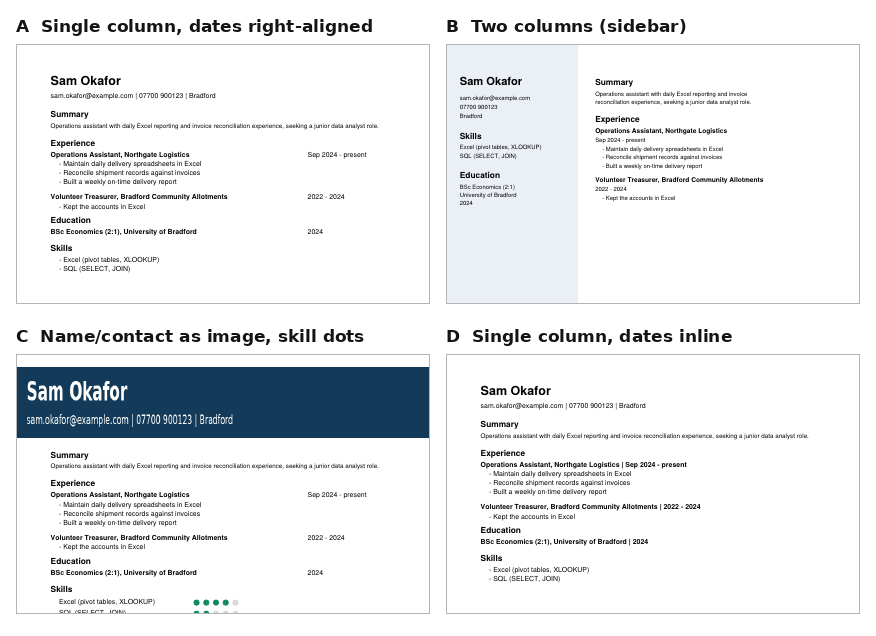
We built one fictional resume in four PDF layouts. The words are identical; only the arrangement changes. A is a plain single column with dates right-aligned beside each job title. B is a two-column design with a shaded sidebar for contact details, skills and education. C is a single column whose name and contact banner is an image, with skill levels shown as dots. D is a single column with each date written straight after its job title. We then pulled the text out of each file with two widely used open-source extractors, pdftotext (Poppler) and pdfminer.six, and checked three things: whether the name, email and phone number came through; whether each date stayed next to the job or degree it belongs to; and whether the summary stayed under its heading.
| Layout | Name, email, phone recovered | Dates kept with their entry (of 3) | Summary kept under its heading |
|---|---|---|---|
| A: single column, dates right-aligned | 3 / 3 in both | 0 (pdftotext), 1 (pdfminer) | Yes in both |
| B: two columns | 3 / 3 in both | 2 in both | No in pdftotext: the email and phone number were spliced into the summary |
| C: image banner, skill dots | 0 / 3 in both | 0 (pdftotext), 1 (pdfminer) | Yes in both |
| D: single column, dates inline | 3 / 3 in both | 3 in both | Yes in both |
Layout C is the clearest failure. The name, email and phone number were in the image, so both extractors returned a resume with no candidate attached. The skill dots disappeared too, which matters less here only because the skill names were also written as text.
Layout A was the surprise. It is the safe-looking single column most advice recommends, yet pdftotext moved every date to the end of its job’s bullet points, and the graduation year ended up after the Skills section. Nothing was lost, but a parser reading top to bottom would have to guess which date belongs to which role. Writing the date on the same line as the title (layout D) fixed this in both extractors.
What this does not show: pdftotext and pdfminer are not applicant tracking systems, and commercial parsers may handle columns and positioning better or worse. The test shows what a straightforward text extraction produces, and shows one way the layout problems on Greenhouse’s list can arise. The extracted text, scoring rules and script are in our test record. Before choosing a template in any of the builders below, export a sample and copy its text into a plain editor: if your name or your dates are not where you expect, a parser may have the same trouble.
The six tools
1. Kickresume
Kickresume pairs a large template library with AI writing for resumes and cover letters, and it is the most generous of this group at the download step: unlimited free downloads within the free customisation set, with payment unlocking the rest.
Premium lists 40-plus resume and cover letter templates, all colours and typefaces, an AI Writer, an ATS Resume Checker, Career Map, LinkedIn and PDF import, mobile apps and seven personal website templates, at $19.20 monthly, $14.40 a month quarterly or $6.40 a month yearly on the current first-term rates.
Students should not pay at all. Kickresume states: “Kickresume is free for all students who can prove their student status with ISIC, ITIC or UNiDAYS.” That is a full free plan on verification, not a discount.
Suits: most people, and any student with an ISIC, ITIC or UNiDAYS card.
2. Rezi
Rezi is built around ATS keyword matching against a specific job description rather than visual design, with scoring and targeted suggestions.
Its free plan gives one resume and three PDF downloads, with DOCX export listed on the same tier and unlimited cover letters. Pro is $29 a month, Lifetime is $149 once, and Enterprise is $99 a month per 200 users. The 30-day money-back guarantee covers both Pro and Lifetime, which makes the one-time licence unusually low-risk to try.
Suits: applicants targeting large employers where keyword matching matters, and anyone whose search will run past five months.
3. Teal
Teal is a job-search workspace rather than a document tool: it tracks applications, stores job descriptions, and tailors resume content against them. For anyone applying at volume, that organisation matters more than template choice.
Its free tier is generous on documents and tight on AI: unlimited resumes, unlimited job tracking, 10 templates, top five job-description keyword matches, and a fixed allowance of AI credits — 10 for resume bullets, two for a professional summary, two for a cover letter. Teal+ removes those caps at $13 a week, $29 every 30 days or $79 every 90 days, with no credit card required to start.
Suits: organised searches across many applications — on the 90-day option if the search is likely to last, since Teal’s own per-day figures make it the cheapest of the three cadences.
4. Novorésumé
Novorésumé is the design-led option, with clean layouts and support for European-style CVs.
Its billing model is the genuine outlier: not a subscription, no automatic charge, and a period that simply expires — $21.99 a month, $39.99 a quarter or $149.99 a year. If the thing you dislike about this category is the renewal you forget to cancel, this removes it structurally rather than promising to remind you.
Two limitations are published on the same page. The free plan is a single one-page version on predefined layouts with no cover letter, and Premium’s feature list includes “No Watermark/Branding”. And everything exports as PDF: “All the documents are saved as PDFs.” On Greenhouse’s published guidance that is not a parsing problem, but it does mean no Word file if an application specifically asks for one.
Suits: people who want polished design and refuse to hold a subscription.
5. VisualCV
VisualCV occupies a slot nothing else here fills: it hosts an online resume with shareable links and reports resume performance analytics, alongside a personal professional website. For creative and client-facing roles where you send a link rather than a file, that is genuinely useful.
Its free account is stronger than the category norm — unlimited PDF downloads, your first resume, an ATS-friendly template, cover letter builder, shareable links and performance analytics. Pro Quarterly at $16 a month billed quarterly adds 30-plus templates, unlimited resumes and full Career Journal access, with a 30-day refund window.
Suits: creative professionals sharing a resume as a link, and anyone who wants free unlimited PDF export.
6. Jobscan
Jobscan combines resume building with job-description matching. Its basic builder is free, while premium AI features add assistance with summaries, bullet points and optimization. Choose it for a free document first; evaluate the paid matching tools separately. A vendor match score is not a guarantee of passing an employer’s system or receiving an interview.
Free gives five resume scans a month and five ATS and recruiter findings, plus a job tracker, resume builder and manager, and a Chrome extension. Paid removes the scan limit at $49.95 a month, or $89.95 every three months, which the page presents as $29.98 a month. The 7-day trial applies to the quarterly plan only.
Read the cancellation clause before subscribing: paid-feature data does not survive expiry.
Suits: applicants who already have a resume and want it checked against specific postings — five a month, free, is enough for many searches.
Comparison
Every figure comes from the vendor’s own pricing page, linked above. Where a vendor publishes nothing, the table says so rather than estimating.
| Tool | Free tier export | Billing cadence | Published paid price | Refund or trial window |
|---|---|---|---|---|
| Kickresume | Unlimited downloads | Monthly / quarterly / yearly | $19.20 / $14.40 / $6.40 per month, first term | 14-day money back |
| Rezi | 1 resume, 3 PDF downloads; DOCX listed | Monthly or one-time | $29/mo; Lifetime $149 | 30-day money back |
| Teal | Unlimited resumes; AI credits capped | Weekly / 30-day / 90-day | $13/week; $29/30 days; $79/90 days | No card required to start |
| Novorésumé | 1 page, predefined layouts, PDF | Not a subscription | $21.99 / $39.99 / $149.99 per period | No automatic charge |
| VisualCV | Unlimited PDFs | Quarterly | Pro $16/mo billed quarterly | 30-day refund |
| Jobscan | Free builder and PDF download; scanning has separate limits | Optional monthly or quarterly Premium | Premium price: verify current plan selector | Trial eligibility depends on selected plan |
| Resume.io | — | Premium monthly membership | Not published | 7-day trial; 7-day money back |
There is no resume-quality column. No vendor publishes a reproducible measure of resume effectiveness, and outcomes depend on your experience and the role rather than the template.
How to choose
You want a formatted resume at no cost: Kickresume or VisualCV, both of which publish unlimited free downloads. Neither requires a card to produce a usable file.
You are a student: check ISIC, ITIC or UNiDAYS first. Kickresume is free outright on verification, which beats every paid option here.
Your search will run for months: Rezi’s $149 one-time licence or Novorésumé’s non-subscription year remove the renewal question entirely.
Your search will be short and intense: Teal’s weekly cadence exists precisely for that, and it is the only tool here that offers one.
You are applying to large employers: use the employer’s requested format and describe your relevant experience accurately. Jobscan can build a free resume and compare it with a job description; Rezi offers another writing workflow. Treat either tool’s keyword suggestions as prompts to review, not instructions to invent experience.
You send a link rather than a file: VisualCV is the only option here that hosts and tracks one.
Whatever you pick: single column, headings a parser recognises, contact details in the body rather than the header, and under 2.5MB.
A practical check before buying a resume plan
Suppose you need one base resume and three versions for different vacancies. List the four downloads you need, whether each must be PDF or DOCX, and whether you need AI drafting at all. A free builder that produces the required file can meet this task without a scanning subscription.
For each version, copy text out of the exported PDF into a plain-text editor. Check the reading order, dates, headings and contact details. This is a useful local check, not a simulation of every employer’s ATS. Compare every suggested accomplishment against your real experience and delete invented metrics. Save the final file outside the service before canceling a plan.
Related guides
- Best AI Cover Letter Generators in 2026
- Best AI Writing Tools in 2026
- Grammarly Review 2026
- ChatGPT Review 2026
- Best AI Tools for Students in 2026
- Best AI Lead Generation Tools in 2026
Frequently asked questions
Can I download a resume for free?
From several of these. Kickresume states it does not limit the number of free downloads, and VisualCV’s free account lists “Download Unlimited PDFs”. Rezi’s free plan gives one resume and three PDF downloads. Novorésumé’s free plan is a single one-page version, and its Premium tier lists “No Watermark/Branding” among what it adds.
Is there a resume builder without a subscription?
Two options. Novorésumé states “our pricing model is not subscription based… you will not be charged automatically without your consent”, selling a month, quarter or year that simply expires. Rezi sells a one-time Lifetime licence at $149.
Why does Teal charge by the week?
It publishes three cadences — $13 per week, $29 every 30 days and $79 every 90 days — which suits a job search that has a defined end. Teal gives per-day equivalents of $0.96 and $0.87 for the 30-day and 90-day options and none for the weekly one, so work that comparison out before choosing it.
What does Resume.io cost?
Resume.io does not publish a price on its pricing page. What it publishes is a 7-day premium trial that enrols you in a premium monthly membership unless you cancel first, plus a 7-day money-back guarantee. Find the renewal figure inside the account before the trial ends, because it is not available beforehand.
Does file format matter for ATS?
Less than layout does. Greenhouse accepts “.doc, .docx, .pdf, .rtf, .txt” and does not say one parses better than another. What it lists as causing failures is columned layouts, tables, headers and footers, graphics and photos, contact details placed in a header or text box, unclear sections, and files over 2.5MB.
What happens to my data if I stop paying?
Check the specific vendor, because it is not uniform. Jobscan states that when a subscription expires “you will lose access to paid features and all data associated with those features”. Export anything you need to keep before a plan lapses.
Is there a student discount?
Kickresume publishes the strongest offer here: free for students who verify with ISIC, ITIC or UNiDAYS. Our guide to AI tools for students covers eligibility across other categories.
Conclusion
Judge these tools at the download step, at the renewal date and at the exit, not on template galleries. A builder that lets you export freely is worth more than one with nicer designs behind a paywall, a weekly meter and a one-time licence are different products rather than different prices, and a refund window that runs 7 days rather than 30 changes how carefully you have to diarise a trial.
Two things are worth carrying away from the published terms specifically. A tool that will not show you its renewal price before you enter card details has told you something. And a tool that deletes your data when the subscription expires has told you something too — both are on their own pages, and both are easy to miss while comparing templates.