
Grammarly is one of the most widely used writing tools in the world, and in 2026 it is a noticeably different product from the grammar checker most people remember. The plan structure changed, the AI allowance became the main thing separating tiers, and the company behind it renamed itself. This review sets out what Grammarly actually offers now, what the free plan covers, and where it is the wrong tool for the job.
Everything below is drawn from Grammarly’s own plans page, support documentation and product pages. This is mainly a research-based review; the one hands-on element is the small, dated test of the free checker reported near the end. Plan, prompt-limit and multilingual documentation was checked on 20 September 2026; details not verified are identified as such.
What Grammarly is in 2026
Grammarly is a writing assistant that works inside the applications you already write in, rather than a destination you visit to write. It checks grammar, spelling and punctuation in real time, reports the tone your writing conveys, and on paid plans rewrites sentences, adjusts tone, checks for plagiarism and flags text that looks AI-generated.
One structural change is worth knowing before you compare old reviews. Grammarly folded its former Premium and Business plans into a single tier called Pro. Grammarly’s own plans page confirms that Pro includes the advanced writing features that were in Premium, such as tone suggestions and full-sentence rewrites, plus team features that were previously only in Business. If you are an existing Premium subscriber, Grammarly states that switching to Pro cancels the Premium subscription and issues a refund prorated to the remainder of it.
The company also renamed itself. The parent company is now Superhuman, and Grammarly’s own site carries a Superhuman Platform copyright notice and links Enterprise availability through Superhuman Go. The writing product is still called Grammarly. If you see the two names used together, that is why.
Free vs Pro: what you actually get
Grammarly’s free plan is genuinely useful rather than a crippled demo, but the boundary between it and Pro is sharper than most people expect. According to Grammarly’s plans page, the free tier covers writing without spelling and grammar mistakes, seeing your writing tone, and generating text with 100 AI prompts per month.
The Pro comparison highlights additional writing features. That includes adjusting your tone, rewriting full sentences, writing fluently in English, using inclusive language, keeping citations consistent, detecting AI-generated text, catching accidental plagiarism, and unlimited personalized suggestions.
| Feature | Free | Pro | Enterprise |
|---|---|---|---|
| Grammar, spelling and mistake correction | Yes | Yes | Yes |
| See your writing tone | Yes | Yes | Yes |
| Adjust your writing tone | No | Yes | Yes |
| Rewrite full sentences | No | Yes | Yes |
| Plagiarism detection | No | Yes | Yes |
| AI text detection | No | Yes | Yes |
| Citation consistency | No | Yes | Yes |
| AI prompts | 100 / month | 2,000 / member / month | Unlimited / member / month |
| Style guides / brand tones | None | 1 each | Unlimited |
| SAML single sign-on, SCIM, DLP, BYOK | No | No | Yes |
The row that decides most upgrades is the prompt allowance. If your use of Grammarly is corrections and tone awareness, the free plan covers it indefinitely. If you want the tool to rewrite for you, 100 prompts a month runs out quickly.
Pricing and AI prompt limits
Grammarly’s plans page lists three tiers: Free, Pro and Enterprise, with Enterprise at contact-sales pricing. The figure attached to each plan is regional. Loaded from the United States the page shows Free at “$0 USD / month” and Pro at “$12 USD”; loaded from the euro area the same page shows “€0 EUR / month” and “€12 EUR”. Check the figure your own session displays before comparing it with anything quoted elsewhere. On the trial, the Pro card reads “Start 7-day Free Trial” with “€0 payment today” and “Email reminder 2 days before trial ends.”
One caution on the Pro figure. Grammarly prints “/ month” after the Free plan’s zero but shows the Pro number on its own, with no billing cadence beside it, and the plans page carries no annual-versus-monthly breakdown anywhere else on it. So the published figure does not tell you whether 12 is what you are charged each month or the monthly equivalent of a longer commitment. Confirm the cadence at checkout rather than assuming the headline number is a monthly charge.
The plan comparison lists 100 monthly prompts on Free, 2,000 per member on Pro and unlimited prompts on Enterprise. Grammarly’s out-of-prompts guidance explains the monthly refill. We did not verify a top-up offer. Check the relevant feature and account notice rather than treating an Enterprise purchase as the only alternative; individual agents can have separate limits.
On teams: Pro carries light team functionality including two user groups, one style guide, one brand tone, snippets, knowledge share and a team analytics dashboard. The organisation-grade controls sit on Enterprise.
Where Grammarly works
Grammarly’s reach across applications is its strongest practical advantage, and it is the reason people keep it alongside other AI tools. Grammarly publishes dedicated versions for:
- Desktop: Windows and Mac clients
- Browsers: Chrome, Safari, Firefox and Edge extensions
- Documents: Microsoft Office and Google Docs integrations
- Mobile: iPhone, iPad and Android
- Grammarly docs: its own AI writing surface
Some features are surface-specific rather than universal. Grammarly’s support documentation notes, for example, that AI detection is reached through the browser extension inside Google Docs, through the desktop clients within Microsoft Word, or as an agent inside docs, depending on your plan. The feature you are paying for may not appear everywhere you write.
Generative AI features
Grammarly’s generative side now extends well past rewriting. Its published tool set includes a paraphrasing tool, an AI humanizer, AI chat, a translator, a citation generator and a set of AI agents including a citation finder, an AI grader, reader reactions and a resume builder.
These are the features that consume prompts. The practical framing is that Grammarly’s generative AI is built around improving text that already exists, or producing short pieces in place, rather than drafting long documents from a brief. It is an editor with generation attached, not a drafting engine.
Plagiarism and AI detection
Both are Pro features, and the AI detector is where Grammarly’s own documentation is unusually candid.
Grammarly’s AI Detector user guide explains that the feature returns a percentage of text that appears AI-generated, based on an in-house model trained on human and AI-generated text. It divides a document into sections and checks each for patterns typical of AI writing.
Grammarly states plainly that the feature is not 100% accurate, that the score should be viewed as an average estimate rather than a definitive assessment, and that it should not be treated as an objective source of truth. It also notes that the model is optimised to minimise false positives, on the reasoning that wrongly flagging human writing is more damaging than missing AI text.
Two details deserve more attention than they usually get:
- The score may differ from your institution’s. Grammarly states its detector uses a proprietary model and that scores may differ from Turnitin, GPTZero, Copyleaks and others. A clean score in Grammarly is not a guarantee of a clean score elsewhere.
- Grammarly’s own rewrites raise your AI score. Grammarly documents that rewrites from its Grammarly, Paraphraser and Humanizer agents come from its own LLM, and can affect the detector score. Its own guidance is that users concerned about being flagged should refrain from using those agents to rewrite content, and instead use agents for feedback they incorporate manually. Standard red and blue underline corrections should not typically affect the score.
Grammarly also states there is currently no dedicated feature for reducing a document’s AI score. Where generative AI has been used, the detector offers to generate a citation acknowledging it.
Privacy and data considerations
Grammarly works by processing the text you write, which makes its data handling a reasonable thing to check rather than assume. What follows is what Grammarly publishes, not a security assessment.
Grammarly states that its SOC 2 (Type 2) report attests to its system and organization controls covering security, privacy, availability and confidentiality, and it publishes a Trust Center, a security page and a privacy policy.
The more actionable detail sits in the plan comparison. Several controls that organisations often assume are included are Enterprise-only: SAML single sign-on, SCIM provisioning, managed mode, application and domain controls, confidential mode, data loss prevention, an audit logs API, enterprise key management (BYOK), session timeout and group-level security controls. Pro includes account roles and permissions and what Grammarly labels enterprise-grade privacy and security, but not the items above.
The practical implication is to map your organization’s actual requirements to the plan controls. Confidential material alone does not establish which subscription is appropriate. If you are unsure whether your organisation permits a writing assistant to process a given document, check before installing rather than after.
Grammarly vs ChatGPT: when each makes more sense
These two tools are compared constantly and are not really substitutes.
Grammarly is writing assistance where you already write. Its value is that it sits inside your email client, your browser, Word and Google Docs, catching problems as you type without you switching context. It is oriented around improving text you produce.
ChatGPT is a general-purpose assistant. It drafts from a brief, brainstorms, answers questions, works across subjects far beyond writing, and holds a conversation about the task. It is oriented around producing and reasoning, not around checking.
Neither is better in general terms. If your problem is that your emails contain errors or land in the wrong tone, Grammarly solves it in the place the problem occurs. If your problem is a blank page, a conversational model is the more direct answer. Plenty of people use both, and Grammarly’s own AI detection guidance is a good reason to be deliberate about which tool touches which document. Our ChatGPT review covers the other side of this comparison in detail.
What Grammarly is not designed to replace
- Editorial planning and source verification. Grammarly can generate drafts, but you still need to supply accurate facts, verify sources and decide what the document should argue.
- An institutional originality check. Grammarly states its scores may differ from Turnitin and similar tools, so a Grammarly result does not predict what a university or publisher will see.
- A fact checker for claims. Grammarly assesses how text reads, not whether what it says is true.
- An editor with judgment. It flags patterns. Deciding whether a suggestion improves your argument, or flattens your voice, remains yours.
- A guarantee of equal support in every language. Grammarly now documents expanded multilingual writing support. Confirm your language, application and required feature; the earlier implication that the product only supports English was too broad.
Who Grammarly suits
Stay on Free if you mainly want clean grammar, spelling and tone awareness across your apps. It has no time limit and covers that need currently availablely.
Pro makes sense if you write daily and want rewrites and tone adjustment on demand, or need plagiarism and AI detection before submitting work. Estimate your own usage before choosing: 2,000 prompts spread over 20 working days is 100 per day, but separate feature limits and repeated revisions still matter.
Enterprise is the tier if your requirement is governance rather than features: single sign-on, data loss prevention, audit logs or bring-your-own-key encryption.
Students should note the AI detection guidance above before relying on Grammarly’s agents to rewrite coursework, and check whether their institution has a policy on AI writing assistance at all. On price, the plans-page FAQ answers “Do you offer discounts for educational institutions?” with “Yes!” — but the discount runs through the institution. Grammarly for Education routes to an education sales contact rather than publishing a per-student rate.
A small editing exercise before upgrading
Try this original sample in the applications you actually use. It is a proposed test, not a result we obtained from Grammarly.
The workshop starts at 10:00 on 12 October. Each ticket cost $40 and include materials. Refunds are available until 5 October. We may add a second session if enough people register.
Ask first for grammar corrections only. The intended changes are “costs” and “includes.” The dates, $40 amount, refund cutoff and conditional second session must remain unchanged. Then request a warmer version under 60 words and check those same facts again.
Reject a rewrite that promises a second session or changes the refund date, even if it reads smoothly. Compare accepting individual corrections with using a full rewrite. Record how many suggestions help, how much review is required and whether the feature works in your email or document editor.
For a purchase decision, use your actual checkout amount. If a hypothetical $12 monthly equivalent saves 30 minutes per month, the break-even value of that time is $24 per hour. An annual charge is still paid on its stated schedule; the monthly equivalent is only a comparison unit.
What we found in our 22 September 2026 test
What we tested. Grammarly’s free online grammar checker at grammarly.com, not signed in, on 22 September 2026. We typed a 42-word paragraph containing nine deliberate errors: Their for they’re, tomorow, the figures doesn’t, Me and Sarah, Sarah has for have, could of, Its for it’s, who’s for whose, and the client … expect.
Result. The checker reported 10 suggestions and underlined all nine planted errors. The tenth was a comma before “and” joining two clauses, which is a legitimate punctuation suggestion rather than a false alarm. Hovering over an underline showed the fix without an account; for “could of” it labelled the problem “Verb problem” and offered “have”.
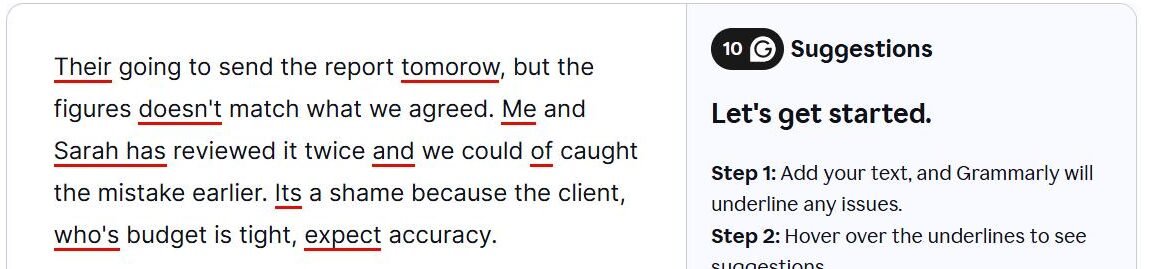
Limitations. Planted errors of this kind are exactly what grammar checkers are built to catch, so a full score is the expected result, not a surprise. The test says nothing about tone suggestions, long documents, the generative AI features or what the paid plan adds, and the web checker is not the same product as the browser extension. It does confirm one practical point: you can see what Grammarly flags on a short text before creating an account.
Related guides
- Best AI Writing Tools in 2026
- Best AI Chatbots in 2026
- Best AI Tools for Students in 2026
- Best AI Productivity Tools in 2026
Frequently asked questions
Is Grammarly free?
Yes. Grammarly publishes a free plan at no charge with grammar and spelling correction, tone detection and 100 AI prompts per month. It is a currently available plan rather than a trial.
What does Grammarly Pro add?
Full-sentence rewrites, tone adjustment, inclusive language, citation consistency, plagiarism detection, AI text detection, unlimited personalized suggestions, and 2,000 AI prompts per member per month, plus light team features.
Is there a free trial of Pro?
Grammarly’s plans page advertises a 7-day free trial with no payment at signup and an email reminder two days before it ends.
What happened to Grammarly Premium and Business?
Both were folded into Pro. Grammarly states that switching from Premium to Pro cancels the Premium subscription with a refund prorated to the remainder.
Will Grammarly’s AI detector flag writing I edited with Grammarly?
It can. Grammarly documents that rewrites produced by its Grammarly, Paraphraser and Humanizer agents come from its own LLM and will raise the score, while standard underline corrections typically will not.
Can I buy more AI prompts on Pro?
We have not verified a top-up option for Pro. Consult the account notice and monthly prompt-refill guidance for the relevant feature.
Conclusion
Grammarly in 2026 is best understood as two products sharing a name. The free plan is a capable, currently available correction and tone tool that a great many people will never need to pay for. Pro is an AI writing layer whose real value is the 2,000-prompt allowance and the originality checks, and whose real limitation is that its detection scores carry Grammarly’s own caveats and may differ from an institution’s detector.
The honest way to decide is to install the free plan first and watch how often you reach for something it will not do. If that happens weekly, Pro earns its price. If it does not, the free tier is one of the better currently available free plans in this category, and there is no need to upgrade at all.