
The AI writing market split in two while most comparison guides were still ranking tools on output quality. On one side are general-purpose assistants like ChatGPT that will write almost anything you ask for. On the other are specialised platforms built around brand consistency, campaign workflows and search visibility. They overlap, but they solve different problems and they charge in completely different ways.
How differently is the thing worth knowing before you compare features. The entry plans here run from $0 to $79 a month, and one platform’s second tier is $1,000 a month. Two of the five are no longer really writing tools at all.
This guide compares five of the most widely used options on the differences that actually affect the decision: how each one bills, what the free tier really allows, how brand voice and templates work, and what each is not built to do. Every figure is linked to the vendor page that publishes it, as of September 2026. Where a vendor does not publish something, this guide says so instead of picking a number.
One thing this guide will not do is declare a winner on writing quality. Judging that credibly requires a defined, repeatable methodology, and comparisons that assert it without one are guessing.
What actually separates AI writing tools in 2026
Three distinctions matter more than feature lists.
Where the tool lives. Grammarly works inside the applications you already write in, catching problems as you type. ChatGPT is a destination you go to. Jasper, Writesonic and Copy.ai are workspaces you produce content inside, then export. This determines whether a tool fits your day or interrupts it.
What the tool is optimised for. A general assistant is optimised for breadth. A marketing platform is optimised for repeatability: the same brand voice across fifty pieces, the same campaign structure every month. Breadth and repeatability are different goals, and paying for one when you needed the other is the most common mistake here.
Whether the vendor is still a writing company. Two of the five have repositioned, and their pricing pages now prove it. Copy.ai sells itself as a go-to-market platform built around workflows and agents. Writesonic’s plans are now measured in AI prompts tracked daily and site audits, not words. If you are shopping for a writing tool, you may be buying into a much larger product than you need.
Pricing models: subscriptions, credits and usage limits
The biggest change since these tools launched is that word counts have largely stopped being the unit of pricing. Four models are now in play, and they reward very different usage patterns.
Subscriptions and allowances. Compare the exact billing term and usage unit. OpenAI’s official pricing guide displays USD reference prices of $8/month for Go and $20/month for Plus as checked on 20 September 2026; confirm your local checkout. Grammarly’s plans page advertises Pro at $12, but confirm the billing commitment and renewal total before treating that as a month-to-month price.
Prompt allowances. Grammarly meters generative use specifically: “100 prompts / month” on Free, “2,000 prompts / member / month” on Pro, and “unlimited prompts / member / month” on Enterprise. Grammarly does not publish a top-up option, so exhausting the allowance means waiting for the reset or upgrading.
Seat-based access. Jasper Pro includes one seat. Team access and advanced workflow features require a comparison with Business, rather than assuming a single subscription can be shared or that all operations are unmetered.
Credits and tracked allowances. Copy.ai bills workflow runs against a credit meter, and Writesonic’s plans are built around AI articles, tracked prompts and site audits rather than word counts. Both make spend scale with process complexity rather than writing volume.
Compare total cost at the same seat count and output requirement. Subscription allowances, metered workflow steps and monitoring quotas are different units. Estimate them separately and record any unverified checkout price.
The five tools
ChatGPT: breadth, not specialisation
ChatGPT is the most flexible option here and the least opinionated about writing specifically. It drafts, rewrites, summarises, brainstorms, answers questions and works far outside writing tasks, which is why so many people use it alongside a dedicated tool rather than instead of one.
ChatGPT can be evaluated for drafting without buying a marketing suite. Start with a real brief and check whether the available plan handles your required length, source material and revision volume. A cheaper subscription is poor value if fact-checking and rewriting take longer than your existing process.
For team work, evaluate how each product stores approved facts, style instructions and examples, and who can change them. Do not assume that a saved prompt is equivalent to enforced review or approval controls.
Fits: individuals and small teams who want one assistant for many kinds of work, and who do not need enforced consistency across a content library.
Jasper: brand consistency as the product
Jasper is built around marketing teams producing on-brand content repeatedly. Its distinguishing features are brand voices, knowledge assets and audience profiles that carry across every piece, plus campaign tooling that generates a set of related assets from one brief.
Its pricing page lists two plans. Pro is “$59/month billed yearly or $69/month billed monthly”, includes 1 seat, and comes with “2 Brand Voices, 5 Knowledge assets and 3 Audiences” and a 7-day free trial. Business is custom-priced and adds “unlimited IQ customization: Brand Voices, Knowledge, Audiences”.
There is no entry-level Creator tier. Older roundups still list one; Jasper’s current page offers Pro and Business only, so $59 a month on annual billing is the floor.
Jasper’s current pricing FAQ directs customers who need more than one Pro user to its sales team for a Business plan. Confirm the seats, workflow access and usage conditions in that offer. The absence of a word counter on the main price card does not establish unlimited access to every agent or operation.
Fits: marketing teams and agencies managing multiple brands or clients, where consistency across many pieces is the actual problem.
Grammarly: correction where you already write
Grammarly is the only tool here that is primarily about improving text rather than producing it. It runs inside browsers, Microsoft Office, Google Docs, desktop clients and mobile keyboards, correcting grammar and spelling, reporting tone and, on paid plans, rewriting sentences and adjusting tone.
Its free plan covers correction, tone detection and 100 AI prompts a month, and has no time limit. Pro adds full-sentence rewrites, tone adjustment, plagiarism detection, AI text detection, citation consistency and 2,000 prompts per member per month, with a trial advertised as “Try for $0.00”.
One detail matters if you write for academic or editorial review: Grammarly documents that rewrites from its own AI agents will raise its AI detection score, because those rewrites come from its own model. Standard corrections typically will not. Our Grammarly review covers that in more depth.
Fits: anyone whose problem is quality and consistency of writing they already produce, rather than volume of new content.
Writesonic: no longer priced as a writing tool
Writesonic began as an AI writer and has repositioned around AI search visibility, tracking how a brand appears in AI-generated answers alongside content generation and site auditing.
Its pricing page now reads like a monitoring product, and the numbers confirm the repositioning. Starter is $79 a month billed annually, or $95 monthly, for “50 prompts, 50 answers tracked daily”, 15 AI articles a month, 10 site audits, 1 user and 1 project. Basic is $199 annually, or $249 monthly, for 100 prompts, 300 answers tracked daily and 25 AI articles. Growth is $399 annually, or $499 monthly, for 200 prompts, 600 answers and 50 AI articles across 3 users. Enterprise is custom and is the only tier tracking all ten AI platforms.
Note what the entry plan is actually metered on. Fifteen AI articles a month at $79 is not a volume content plan; the plan is sold on the tracking allowance, and the writing is an accompaniment. There is a free trial requiring no credit card, but the page does not offer a permanent free tier.
Fits: teams whose primary need is AI search visibility monitoring and who will also generate some content. If you want a writing tool, this is not priced as one.
Copy.ai: a go-to-market platform that used to be a writer
Copy.ai has moved furthest from where it started. It now positions as an AI-native go-to-market platform: multi-step workflows, agents and data tables that connect content generation to CRM and sales processes, with the writing templates as one component rather than the product.
Its pricing page shows that shift more clearly than any description could. Chat is $29 a month, or $24 billed annually at $288 a year, and includes 5 seats and unlimited words in chat. The next tier up is Growth at $1,000 a month, billed $12,000 a year, for 75 seats and 20,000 monthly workflow credits. Above that, Expansion is $2,000 a month with 45,000 credits, Scale is $3,000 with 75,000, and Enterprise is custom.
That gap — $29 to $1,000 with nothing between — is the single most useful fact about Copy.ai for anyone shopping for a writing tool. The Chat tier is the whole self-serve writing product; everything above it is priced for revenue teams. No free plan appears on the page.
Fits: B2B revenue teams automating repeatable content and outreach processes. If you only want copy, Chat is the only tier that makes sense, and nothing above it is a writing purchase.
Comparison
Vendor-published figures as of September 2026, linked in the sections above.
| Tool | Category | Entry paid price | Billing basis | Free option | Brand voice |
|---|---|---|---|---|---|
| ChatGPT | General assistant | Check local plan price | Per seat, tiered usage | Yes, $0 tier | Evaluate with your style brief |
| Grammarly | In-app assistant | $12 advertised; verify billing term | Per seat + prompt allowance | Yes, permanent, 100 prompts | Brand tones on paid tiers |
| Jasper | Marketing platform | Pro $59 yearly / $69 monthly | One Pro seat; verify workflow limits | 7-day trial | 2 Brand Voices on Pro |
| Writesonic | AI search visibility | Starter $79 yearly / $95 monthly | Tracked prompts + AI articles | Trial, no card | Available on paid tiers |
| Copy.ai | GTM platform | Chat $29 / $24 yearly | Workflow credits | None published | Core feature |
Brand voice, templates and workflow
This is where the specialised platforms earn their price, and where a general assistant genuinely falls short.
Brand voice features store style guidance for reuse, but they do not guarantee that every output follows it. Compare the tools with the same approved examples, prohibited phrases and factual brief. General assistants can also reuse instructions or project context; the practical difference is how your team manages, applies and reviews those settings. Grammarly provides editing and style controls within supported writing workflows.
Worth checking against your team size: Jasper Pro includes two brand voices and one seat. Unlimited brand voices sit on Business, which is custom-priced.
A caveat worth stating plainly: brand voice features reflect what you feed them. Training a voice on inconsistent or weak source material produces inconsistent or weak output. These features do not improve writing on their own; they replicate what you give them.
Templates are the second differentiator. The marketing platforms ship large template libraries for defined asset types. This matters less than it once did, since a general assistant handles most of these with a good prompt, but templates provide a starting structure that teams can standardise on.
Workflows are the newest divide. Copy.ai’s multi-step workflows and Jasper’s campaigns produce sets of related assets from one input. That is a genuinely different capability from a chat interface, and Copy.ai’s pricing shows exactly what it is valued at: workflow credits do not appear until the $1,000 tier.
AI content and SEO: what is worth knowing
This subject attracts more confident claims than the evidence supports, so it is worth being careful.
Google’s published guidance focuses on whether content is helpful, reliable and created for people, rather than on which tool produced it. Using AI to assist writing is not itself the issue. Publishing large volumes of low-value material that exists mainly to rank is the issue, and that has been true since long before these tools existed.
The practical distinction is between assistance and automation-at-volume. AI used to research, structure, draft and tighten work that a knowledgeable person then verifies and edits produces something a reader benefits from. AI used to generate dozens of near-identical articles nobody checks produces something a reader does not.
What that means in practice:
- Verify every factual claim. These tools generate plausible text, including plausible errors. Prices, dates, statistics and product capabilities need checking against primary sources.
- Add something the model cannot. First-hand knowledge, original analysis or genuine expertise is what separates useful content from restated consensus.
- Answer the actual question. Search intent is satisfied by resolving what someone came to find out, not by covering a topic at length.
- Edit properly. Unedited AI drafts share recognisable patterns and tend to be longer than they need to be.
- Be careful with AI detection. Detection scores are probabilistic and vendors document their own inaccuracy. Treat them as a signal, not a verdict, in either direction.
If SEO is your primary use case, our guide to the best AI SEO tools covers the optimisation side of this workflow.
Commercial use and output ownership
All five tools are sold for commercial content production, and none of them publishes a simple one-line answer on rights. The terms that matter sit in each vendor’s terms of service rather than on the pricing page, and they differ.
Before using output commercially, particularly for client work, three things are worth reading in the vendor’s own terms rather than in a summary: how the agreement treats ownership of generated output, whether the plan you are on permits use on behalf of third-party clients, and what the vendor says about indemnification if generated content causes a dispute. Enterprise agreements frequently differ from self-serve terms on all three.
Separately, and independently of any vendor’s terms, generated text can unintentionally reproduce existing material. If you publish commercially, an originality check before publication is a reasonable precaution regardless of which tool produced the draft.
How to choose based on workflow
You mainly need cleaner writing. Grammarly’s free plan solves this permanently and costs nothing. Start there before considering anything else.
You need one assistant for varied work. Try your writing brief in a general assistant before adding another subscription. Compare the editing effort with your current method.
You produce marketing content as a team. Jasper’s brand voices and campaign tooling exist for exactly this. Price it per person, because Pro is one seat.
You need AI search visibility, not just content. Writesonic is built for that now, starting at $79 a month billed annually.
You are automating go-to-market processes. Copy.ai’s workflows are the right shape for that, at $1,000 a month and up. If you only want copy, stop at the $29 Chat tier.
You may need a drafting assistant and an editor, but do not assume two paid subscriptions are necessary. List the features you already receive and add a specialist only for a recurring gap.
A writing brief that exposes factual drift
Use a short product announcement as a controlled comparison. The following facts are invented for this example: a workshop runs on 12 October from 14:00 to 16:00, has 12 places, costs $40 per person, and includes a printed workbook. Lunch and a certificate are not included.
Give each candidate the same task: write a 120-word announcement for first-time participants, one clear booking instruction, no invented benefits or urgency, and no facts outside the brief. Do not ask a product to imitate a named writer. Save the first output before editing it.
Check six items: date, time, capacity, price, included workbook and absence of invented extras. A fluent sentence such as “Book now for a certified workshop with lunch” fails because both benefits were invented. A usable factual sentence is “Join the two-hour workshop on 12 October, 14:00–16:00; a $40 place includes a printed workbook.” This is an editorial example, not output attributed to any vendor.
Then request a 60-word version. Verify that shortening preserves the price and conditions. Record minutes spent checking and correcting, not just generation speed. For a campaign, repeat with an email, landing-page paragraph and social post; inconsistent dates across assets are a practical failure even when each draft reads well.
If your task is mainly inbox correspondence, use our email tools guide. For correcting existing prose, use the Grammarly review. This comparison focuses on drafting and coordinating content.
We ran that brief on 25 September 2026
We pasted the workshop brief above, word for word, into three general assistants that many people use for this kind of writing: ChatGPT (Plus account, temporary chat), Gemini (free account, Flash) and Perplexity (free account). We saved the first answer from each and checked it against the six items in the brief. The prompt and all three answers are in our test record. The dedicated writing products reviewed in this guide were not part of this run.
| Tool | Length | Six facts correct | Things the brief did not contain |
|---|---|---|---|
| ChatGPT | 121 words, including two headings | 6 / 6 | None. Its booking line (“submit your booking with the $40 workshop fee”) says what to send but not where |
| Gemini | 100 words | 6 / 6 | A booking channel (“send an email with your full name”, with no address) and “Register early” |
| Perplexity | 118 words | 6 / 6 | Urgency (“early registration is recommended to avoid disappointment”), a benefit (the workbook will “support their learning during and after the session”) and a booking channel (“reply to this announcement”) |
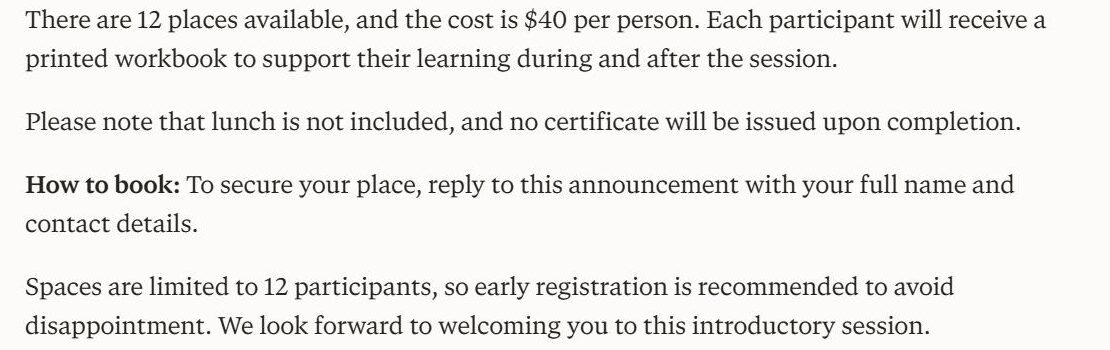
No tool got a date, time, price or capacity wrong, and none claimed lunch or a certificate. The drift was all at the edges. Two of the three added urgency that the brief prohibited in so many words.
The booking instruction exposed a flaw in our own brief. It asks for “one clear booking instruction” but never says how people book, so every tool had to choose between inventing a channel and staying vague. Gemini and Perplexity invented one; ChatGPT stayed vague. If you use this brief, give it the real booking route. A missing fact in the brief is an invitation to invent one.
Limits: one run per tool, first answer only. Gemini was used in a regular chat because its temporary-chat switch did not respond in our session, and we did not run the 60-word follow-up because ChatGPT’s temporary chat was lost when the page reloaded.
Related guides
- ChatGPT Review 2026
- Best AI Chatbots in 2026
- Best AI Productivity Tools in 2026
- Best AI Tools for Students in 2026
Frequently asked questions
Do I need a dedicated writing tool if I already pay for ChatGPT?
Only if you need something it does not do: shared brand guidance across a team, campaign workflows, in-app correction while you type, or search visibility tracking. For drafting alone, a general assistant covers most of the ground at a fraction of the price.
Which of these has a genuinely free plan?
Two. ChatGPT has a $0 tier and Grammarly has a permanent free plan with 100 AI prompts a month. Jasper and Writesonic offer trials, and Copy.ai’s pricing page publishes no free plan at all.
What is the cheapest way in?
Try the available free plans first. For paid tools, compare the local checkout total, billing period, seat count and usage allowance. A low monthly equivalent on an annual commitment is not a monthly cancellation option.
Are these tools still priced by word count?
No. Jasper is seat-based with unlimited generation, Grammarly meters AI prompts, Copy.ai meters workflow credits, and Writesonic counts tracked prompts, AI articles and site audits. Word counts are a legacy of earlier pricing.
Will using AI hurt my search rankings?
Google’s published guidance is oriented around whether content is helpful and reliable rather than how it was produced. The risk lies in publishing unverified, low-value material at volume, which is a content problem rather than a tool problem.
Can I use the output commercially?
These platforms are sold for commercial use, but the specifics, including output ownership, client work and indemnification, live in each vendor’s terms of service and vary between self-serve and enterprise agreements. Read the terms for the plan you are actually buying.
Conclusion
Choose against the writing job: draft generation, editing, consistent campaign production or measurement. These workflows require different controls. Keep a dedicated platform only if it reduces revision work or provides a capability you actually use.
Read that ladder before comparing features, because three of these five are no longer competing for the same buyer. Then use the free tiers, which two of them offer permanently, before committing to anything.