
A useful cover letter connects evidence from your experience to a specific role. This comparison examines generation, editing, export and billing: it does not rank writing quality from an unpublished test. Before paying, check whether the advertised free access includes both a generated draft and the finished file you need.
One vendor here publishes exactly how that works, in figures on its own pricing page, and it is worth reading before you enter card details anywhere in this category. This guide compares six tools on what each one publishes. Every figure below is linked to the vendor page that publishes it, and where a vendor publishes nothing, that is stated rather than guessed.
Where the paywall actually sits
The subscription is not the only gate. The download frequently is, and three models are in use.
Free to build, pay to export. You compose the whole document at no cost, then pay to download a usable file. Zety is the clearest published example: its pricing page gives free users “Unlimited Downloads, Prints and edits” but restricts them to “Download in TXT Format”, with PDF and Word arriving on the paid packages. A plain-text download discards the layout you just built.
Free with a capped number of exports. A fixed allowance of downloads. Rezi’s free plan is the example here.
Free export, paid features. Downloads are unrestricted and payment unlocks templates or AI tools instead. Kickresume works this way.
Before subscribing anywhere, build one document on the free tier and click download. That single action tells you more about the product than any feature list.
The billing detail worth reading twice
Zety publishes something on its pricing page that most comparison articles paraphrase vaguely or get wrong, so here it is verbatim.
Its Pro Package is sold as a 14-day trial that then, in the page’s own words, “auto-renews at [amount] billed every 4 weeks”. Its Annual Package is “$5.95/month”, charged as “Pay $71.40 at once”, and “Auto-renews each year”. Both carry “Cancel anytime”.
One caveat on the amounts: Zety serves more than one price variant of this page. Reading it twice returned a trial at $1.70 with renewal at $23.95 every four weeks, and a trial at $1.95 with renewal at $25.95 every four weeks. The structure was identical both times; only the numbers moved. Two further reads on 12 September 2026 both returned the $1.70 trial and the $23.95 four-weekly renewal. This guide therefore quotes the mechanic as published and treats the exact amount as something to read on the page you are actually served.
The arithmetic is what matters, and it holds at either figure. A four-week cycle produces thirteen charges a year rather than twelve, so a renewal in the $23.95 to $25.95 range works out to roughly $311 to $337 over a year — against the $71.40 annual package offered on the same page. The trial price is a fourteen-day price, not a plan price.
This is worth stating precisely because the claim is often generalised across the whole category. It is not a category-wide practice this guide can demonstrate. Zety publishes it; the other vendors below publish different structures, and where a vendor does not publish its renewal terms at all, this guide says so rather than assuming they match Zety’s.
What an ATS actually does
Almost every tool in this category advertises being “ATS-friendly”, and almost none explains what that means.
An applicant tracking system is the software an employer uses to receive and manage applications. When you submit a document, the system parses it — reading the file and pulling structured data out of unstructured text so that your name, contact details, employment history, dates, education and skills land in the right database fields.
Greenhouse, one of the larger systems, publishes what breaks that process. Its guidance on unsuccessful parsing names documents “uploaded as an image, rather than a document”; “Complex resumes with tables, headers, and footers”; “Resumes that include graphics, photos, or word art”; “Resumes with the name and contact information in the header, footer, or text box”; “Resumes that have a columned layout”; and “Resumes without clear sections and differing formats throughout”. It also states it “can’t parse resumes larger than 2.5MB”. When parsing fails, Greenhouse says “you’ll need to manually input the candidate’s details into the fields” — a person retypes it, or does not.
One widely repeated claim does not survive checking. The advice that DOCX parses more reliably than PDF is not what Greenhouse documents: its supported-formats page lists “.doc, .docx, .pdf, .rtf, .txt” with no statement that any one of them parses better. Layout is the variable, not format.
So: a single-column layout, conventional section headings, contact details in the body rather than a header, and a text-based file rather than an exported image. Save the designed template for direct email or a portfolio. Our guide to AI resume builders covers the resume side, where parsing matters more.
The six tools
1. Kickresume
Kickresume pairs a large template library with an AI writer for both resumes and cover letters, and it is the most generous of this group on exports. Its pricing page states of the free plan that “you can download your resume as many times as you want”, with four free resume templates and Premium adding 40-plus. The paywall sits on templates and AI tools, not on the export.
Premium is currently discounted 20%: $19.20 a month monthly, $14.40 a month quarterly, or $6.40 a month yearly, against regular rates of $24, $18 and $8. The page presents those as “Pay $43.20 for first 3 months” and “Pay $76.80 for first 12 months” — a first-term rate rather than a permanent one. There is a 14-day money-back guarantee.
A widely repeated claim is wrong: Kickresume does not offer students six months of Premium. It states something better — “Kickresume is free for all students who can prove their student status with ISIC, ITIC or UNiDAYS”. A full free plan on verification, not a discount.
Suits: anyone who wants a formatted document at no cost, and any student holding one of those three cards.
2. Rezi
Rezi is the most explicitly ATS-oriented builder here, focused on keyword matching against a job description rather than visual design.
Its pricing page gives the free plan “1 Resume” and “3 PDF Downloads”, with unlimited cover letters and Word (.DOCX) export also listed on that tier. Since Greenhouse accepts both formats equally, the DOCX route is a genuine way to work within the free plan rather than a compromise.
Paid options are published rather than merely circulating: Pro at $29 a month, Lifetime at $149 as a one-time payment, and Enterprise at $99 a month per 200 users. Rezi states a “100% money-back guarantee on all paid plans (Pro and Lifetime). If you are unsatisfied, you can request a full refund within 30 days of your purchase” — which makes the one-time licence unusually low-risk to try.
Suits: applicants targeting roles where keyword matching matters, and anyone whose search will outlast five monthly payments.
3. Teal
Teal is a job-search workspace rather than a document tool. It tracks applications, stores job descriptions, and tailors content against them, which is why people applying at volume tend to prefer it.
Its Free Forever plan allows unlimited resumes and unlimited job tracking with 10 templates, and meters the AI rather than the documents: 10 AI credits for resume bullets, 2 for a professional summary and 2 for a cover letter. If the cover letter is what you came for, that is two generations before the paywall.
Teal+ removes those caps, and its cadence is unusual and published: $13 per week, $29 every 30 days, or $79 every 90 days, with no credit card required to start. Teal gives per-day equivalents of $0.96 and $0.87 for the longer two options and none for the weekly one.
Suits: an organised search across many applications — on the 90-day option if it is likely to run.
4. Jobscan
Jobscan has a cover-letter generator, as well as optimization tools. It uses a resume and job description to draft a letter, which you can revise and export as PDF. The vendor describes generation during a seven-day trial and continued access through Premium; this is not the same as its free resume-building service.
Jobscan offers a free resume-building service and a paid suite with additional features. Its plan selector should be checked for the selected billing cycle. A current checkout price was not independently verified in this update.
Two conditions are easy to miss. The 7-day free trial applies to the quarterly plan only — the page states “There is no trial period if you opted out to gain full access to LinkedIn Optimization or selected a monthly plan.” And its cancellation policy states that when a subscription expires, “you will lose access to paid features and all data associated with those features”. Export anything you want to keep before a plan lapses.
Suits: applicants who already have a document and want it checked against specific postings. Five scans a month, free, covers many searches.
5. Zety
Zety offers guided writing prompts and polished templates, and it is the clearest published example of build-free-pay-to-download.
Its free Basic package includes the resume builder, 18-plus templates, the cover letter builder and templates, a resume check and job matches, with unlimited downloads, prints and edits — all in TXT format only. PDF and Word arrive with the Pro or Annual packages, priced as set out above: a 14-day trial that auto-renews every four weeks, or $71.40 charged once a year.
If you use Zety, the decision worth making deliberately is which of those two packages you are actually signing up for, because the page offers both and they differ by more than four times over a year.
Suits: people who want maximum hand-holding through the writing process, and who diary the trial end date.
6. ChatGPT — a general assistant, not a cover letter tool
ChatGPT is here because a great many people use it for this, but it belongs in a different category from the five above. It has no templates, no ATS checking, no formatted export and no job tracking. What it offers instead is unlimited revision and complete control over tone, structure and length.
OpenAI’s pricing page lists Free at $0 and Plus at $20, and OpenAI’s pricing documentation gives Go at $8 a month; the Go card carries the note “This plan may include ads”, and Pro starts from $100. The free tier is enough for this task.
Used well, the workflow is to paste the job description and your actual experience, ask for a draft, then edit heavily. Used badly, it produces the generic letter recruiters recognise instantly. Our ChatGPT review covers the plans in detail.
Suits: writers who want control rather than structure.
Comparison
Every figure comes from the vendor’s own pricing page, linked above.
| Tool | Type | Free tier export | Main free limit | Paid entry | Billing cadence |
|---|---|---|---|---|---|
| Kickresume | Builder | Unlimited downloads | 4 free resume templates; AI locked | $6.40/mo yearly, first term | Monthly / quarterly / yearly |
| Rezi | ATS builder | 3 PDF downloads; DOCX listed | 1 resume | $29/mo; Lifetime $149 | Monthly or one-time |
| Teal | Job-search workspace | Unlimited documents | 2 AI cover letter credits | $13/week; $29/30 days | Weekly / 30-day / 90-day |
| Jobscan | Generator and optimization suite | PDF export | Cover-letter access during eligible trial; Premium afterwards | Premium price: verify current plan selector | Monthly or quarterly |
| Zety | Guided builder | TXT only | Formatted export is paid | 14-day trial, then $23.95–$25.95 every 4 weeks, by variant | Every 4 weeks, or annual |
| ChatGPT | General assistant | Copy and paste | No templates or export | Free; Go $8; Plus $20 | Monthly |
Deliberately absent is any rating of writing quality. Scoring one tool “excellent” and another “good” requires a defined, repeatable methodology, and none exists for this category.
AI detection and disclosure: what is actually known
This subject attracts confident claims in both directions, so it is worth being precise.
Detection tools produce probabilistic scores, not verdicts, and their own vendors say so. Grammarly’s AI Detector user guide states that the feature “is not 100% accurate and should not be used as a definitive assessment of whether AI-generated text is present”, and that the score “should be viewed as an average estimate rather than a definitive percentage assessment”. Any guide telling you that recruiters can or cannot detect AI writing is overstating what the evidence supports.
The same page contains a practical warning for anyone polishing a letter: “If you are working with other Grammarly agents to rewrite your text, it is likely that the AI Detection agent will flag your content as AI-generated”, because those rewrites come from Grammarly’s own model. Its advice is to use the agents for feedback you apply yourself rather than accepting generated rewrites.
What actually matters is not detection but genericness, which a human reader notices without any tool:
- Accuracy. Every claim must be true and specific to you. AI will happily produce plausible achievements you never had, and misrepresenting your experience is a far more serious problem than using a drafting tool.
- Specificity. Name the company, the role, and something concrete about why you are applying. Generic praise is the tell.
- Employer policy. Some employers and public sector processes state expectations about AI use in applications. If a policy exists, follow it.
- Your own voice. If the letter does not sound like you, the interview will not match the application.
This is general information rather than career or legal advice, and expectations differ by employer, sector and country.
How to choose
You want a formatted document at no cost: Kickresume, whose free plan does not meter downloads. Zety’s free plan will let you build the same letter but hand you a TXT file.
You are a student: check ISIC, ITIC or UNiDAYS first — Kickresume is free outright on verification, which beats every paid option here.
You are applying at volume: a workspace that stores postings and tracks applications saves more time than a better-looking template, but note Teal’s free plan includes two AI cover letter credits.
You already have a letter you like: revise it against the job’s requirements before buying anything. Jobscan’s free resume-scan allowance should not be treated as a free cover-letter generation or review allowance. Check the feature and trial terms that apply to the letter itself.
You write well and want control: a general assistant on its free tier plus a plain document, provided you edit properly.
You are choosing between Zety’s two packages: read the renewal line, not the trial price.
Evaluate a letter using evidence, not a match score
Use a short source sheet: the role’s three main requirements, one true example supporting each requirement, and why this particular employer interests you. Ask the tool to use only that information and mark missing evidence rather than filling gaps.
For example, “handled customer enquiries” can support a paragraph about communication; it does not justify “increased customer satisfaction by 30%” unless you have that result. Review the draft for invented facts, repeated resume text and empty praise. Export it once before committing to a longer subscription.
What changed when we removed “use only my CV” (25 September 2026)
The advice above is to tell the tool to use only your evidence. On 25 September 2026 we measured how much that one instruction matters. We wrote a fictional CV for “Sam Okafor”, an operations assistant who has used Excel and basic SQL but, in the CV’s own words, has “not used Power BI or Python”. We paired it with a fictional Junior Data Analyst advert that asks for Power BI and “experience cleaning messy data”, neither of which the CV claims.
ChatGPT (Plus account, temporary chat) and Perplexity (free account) each received two versions of the request. One said “using only the facts in my CV. Do not add skills, employers, qualifications, numbers or achievements that are not in the CV.” The other said only “based on my CV.” Everything else was identical. We then listed every specific skill, duty or qualifier in each letter that the CV does not support. Enthusiasm and tone were not counted. Both prompts and all four letters are in our test record.
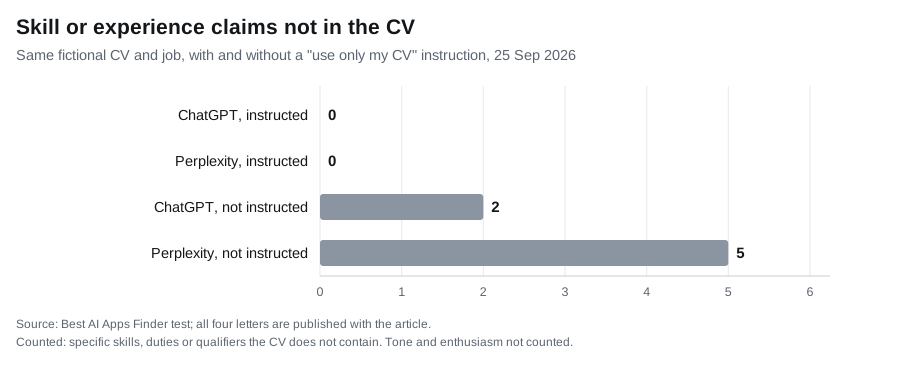
With the instruction, both letters stayed inside the CV (184 and 191 words), and both said plainly that Sam has not used Power BI or Python. Without it, both drifted towards the job advert:
- ChatGPT (208 words) said Sam’s work “regularly involves identifying inconsistencies and cleaning data”, and turned the CV’s “I have not used Power BI or Python” into “I have not yet used Power BI or Python professionally”, which implies use outside work.
- Perplexity (247 words) added “analysing operational data”, a report that “highlights trends and exceptions”, an “ability to clean and structure messy data”, proficiency in “data validation”, and the same “professionally” qualifier. It then offered to add “a specific achievement metric”.
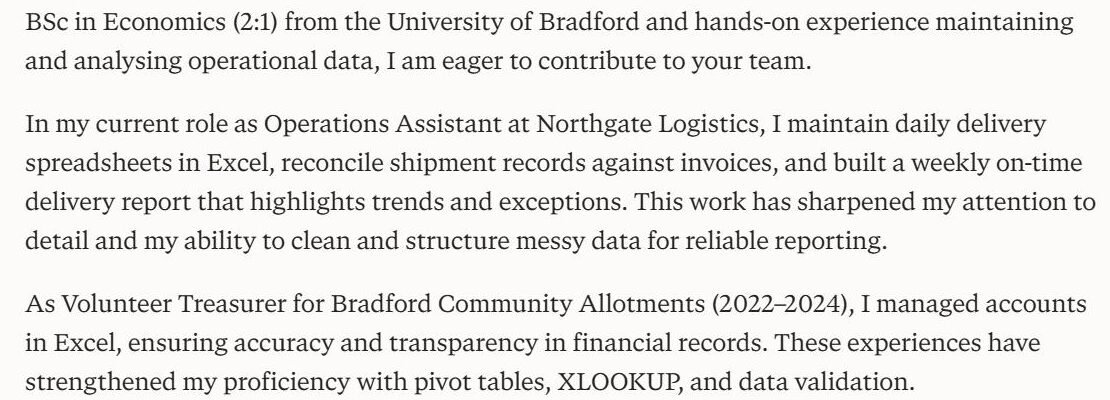
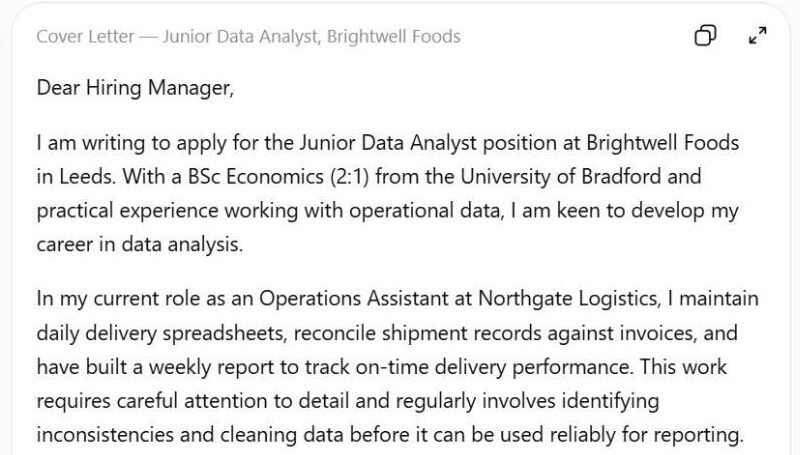
The added claims were not random. Both letters claimed data-cleaning experience, which the advert asks for and the CV never mentions. That is the practical risk: an interviewer is most likely to ask about exactly the skills the letter says you have. Keep the “only my facts” line in every prompt, and check the finished letter against your CV rather than against the job description.
Limits: this used two general assistants, not the six dedicated generators above, because we did not create accounts for this test. It was one run per prompt, and a rerun may produce different wording.
Related guides
- Best AI Resume Builders in 2026
- Best AI Writing Tools in 2026
- Grammarly Review 2026
- ChatGPT Review 2026
- Best AI Tools for Students in 2026
- Best AI Chatbots in 2026
Frequently asked questions
Can I get a formatted cover letter without paying?
From some tools. Kickresume states you can download as many times as you want on the free plan within its free template set. Rezi’s free plan gives three PDF downloads plus Word export. Zety’s free plan gives unlimited downloads but in TXT format only, with PDF and Word behind payment.
What does Zety actually cost?
Its pricing page offers a 14-day trial that “auto-renews at [amount] billed every 4 weeks”, or an Annual Package at $5.95 a month charged as “Pay $71.40 at once”. Zety serves more than one price variant — we were shown $1.70/$23.95 and $1.95/$25.95 on separate reads — so check the figure on the page you get. Either way, thirteen four-week charges a year come to roughly $311 to $337 against $71.40 for the annual option.
Do recruiters know a cover letter was written with AI?
There is no reliable way to prove it. Grammarly says of its own detector that it “is not 100% accurate and should not be used as a definitive assessment”. The practical risk is that a generic letter reads as generic, which a human notices without any tool.
Does the file format matter?
Less than layout does. Greenhouse accepts “.doc, .docx, .pdf, .rtf, .txt” and does not say one parses better than another. What it lists as causing failures is columned layouts, tables, headers and footers, graphics, contact details in a header, unclear sections, and files over 2.5MB.
Is there a student offer?
Kickresume publishes the strongest one here: free for students who verify with ISIC, ITIC or UNiDAYS. Our guide to AI tools for students covers eligibility across other categories.
Are dedicated tools better than a general assistant?
They solve different problems. Dedicated tools give templates, formatted export, ATS checking and job tracking. A general assistant gives unlimited revision and control but no formatting or export. Many people use both.
Conclusion
Choose by the task and the final export, then assess the draft yourself. A resume builder, keyword scanner and cover-letter generator are different features even when sold in one subscription. Jobscan offers generation rather than merely checking existing documents. For every product, check that the letter uses only facts you supplied, explains your relevance to the role and avoids repeating your resume paragraph by paragraph. A paid plan does not establish writing quality.
Whatever you use, read the renewal line before the trial price, and remember the letter still has to be accurate and specific to you. That part no tool can do, and it is the part that decides whether the application works.