ChatGPT is no longer one product with one paid upgrade. OpenAI now sells six plans, and the differences between them are not mainly about speed. They are about which models you can reach, how much context you get, and whether your conversations are used to train future models.
This review sets out what each plan includes, using OpenAI’s own pricing pages and documentation. Where OpenAI describes something vaguely, or does not publish a figure at all, that is stated rather than filled in with numbers from user reports.
What ChatGPT is in 2026
ChatGPT is a conversational assistant built on OpenAI’s large language models. It answers questions, drafts and edits text, analyses uploaded files, writes and reviews code, generates images, searches the web, and runs longer research tasks.
What has changed most is that it stopped being only a chat window. It now includes Projects for grouping related work, scheduled tasks, custom GPTs, a built-in browser, a record mode, Sites, Study Mode, and Codex for software work. Several of these are gated by plan, which is why the plan you choose matters more than it used to.
The six plans
OpenAI currently lists four individual plans and two organisational ones:
- Free — available to everyone
- Go — a lower-cost individual tier
- Plus — the mainstream paid tier
- Pro — sold with two usage levels, described by OpenAI as 5x or 20x more usage
- Business — a shared workspace, from 2 users
- Enterprise — custom pricing and governance
The published individual prices. On OpenAI’s pricing page, Free is $0 a month and Plus is $20; the price figures are rendered in the browser and localised, so for US reference prices we use OpenAI’s pricing documentation, which lists Go at $8 a month, Plus at $20 and Pro “From $100/month”. Earlier in 2026 we recorded Go at $5.50 on a localised view of the same page, which is a reminder that the checkout, not a review, is the final word on price. One condition is attached to Go and stated on the plan card itself: “This plan may include ads”. That note appears on Go alone, not on Free and not on Plus. Prices in this product change, so confirm on OpenAI’s page before subscribing. Free is, as OpenAI states, available to everyone at no cost, and Pro is sold “from” a starting price with a higher usage level above it.
Business is now sold as two seat types. OpenAI’s business pricing page lists a Standard seat at $20 a month — “$20/month if billed annually. $25/month if billed monthly.” — and a Premium seat at $100 a month, described as “5x more usage than standard, with no 5-hour limit”, at “$100/month if billed annually. $125/month if billed monthly.” The two can be combined: the page invites you to “mix and match seat types”, and states the plan is “For teams of 2–200 employees”. Enterprise is not listed with a price at all — those buyers are routed to OpenAI’s sales team.
OpenAI also offers “ChatGPT for Teachers, a free plan for verified U.S. K–12 educators through June 2027”, a separate Edu plan for universities, and states that “through OpenAI for Nonprofits, nonprofits can now access up to a 75% discount on ChatGPT Business or ChatGPT Enterprise”. Note the date on the teachers plan: it is a defined window, not a permanent tier.
What each plan includes
Free gives unlimited everyday text chats on GPT-5.6 Luna, with limited file uploads, limited and slower image generation, limited voice, limited deep research, limited memory and context, and limited Codex and ChatGPT Work access on desktop.
Go keeps everything in Free and raises the ceilings: more messages with tools, more uploads, more image creation, more voice and longer memory. It also adds scheduled tasks, voice with video, and the ability to create and share GPTs. One detail worth knowing before subscribing: OpenAI states on its pricing page that this plan may include ads.
Plus is where the product changes character rather than just scale. It adds advanced reasoning with GPT-5.6, expanded messages and uploads, expanded deep research, expanded memory and context, Projects with scheduled tasks and custom GPTs, expanded Codex, ChatGPT Work across desktop, web and mobile, and early access to new features. Plus is also the first tier with Sites, record mode, developer mode in beta, interactive tables and charts, image generation with Thinking, and apps that connect to internal tools.
Pro is about volume and the top model. OpenAI describes it as 5x or 20x more usage, with Pro reasoning via GPT-6 Astra, maximum Codex tasks, unlimited and faster image creation, maximum deep research, and maximum memory and context.
Business is a different product rather than a bigger one. It adds a secure shared workspace, SAML SSO and multi-factor authentication, centralised billing and administration, usage analytics with budgeting and spend controls, company knowledge, workspace agents, connections to tools including Microsoft 365, Google Drive, Slack, GitHub, Linear and Figma, and crucially no training on your business data by default.
Enterprise layers governance on top: SCIM, enterprise key management, role-based access controls, ISO 27001, 27017, 27018 and 27701 certification, data residency across ten regions, compliance API logs, IP allowlisting, a connector registry, a global admin console, 24/7 priority support and SLAs. Notably, Business does not include SCIM, EKM, role-based access controls, the ISO certifications, data residency or IP allowlisting, so organisations with those requirements need Enterprise.
Models and reasoning
Model access is the clearest line between tiers, but it is also the part of this review that ages fastest. When we rechecked OpenAI’s pricing page on 22 September 2026, the plan cards read as follows: Free offers unlimited text conversations with GPT-5.6 Luna; Plus adds advanced reasoning models with GPT-5.6; and Pro lists Pro reasoning with GPT-6 Astra alongside five times more usage. The comparison table shows GPT-6 Astra as limited on Plus and expanded on Pro, and gives Free and Go only limited access to GPT-5.6 Terra, inside ChatGPT Work and Codex on desktop.
The practical reading: Free and Go run the everyday model. Plus is the first plan with the GPT-5.6 reasoning models, and Pro is where the newest top model, GPT-6 Astra, becomes a working tool rather than a sample. OpenAI’s pricing documentation also states that “GPT-5.5 retires from ChatGPT, ChatGPT Work, and Codex on all plans on October 14, 2026”. Business and Enterprise are listed as flexible across the model range, since those plans can purchase additional credits for more access.
Model names in this product change frequently: GPT-6 Astra was not on the pricing page when this review was first written in July. Treat any specific version named in a review, including this one, as a snapshot.
Context windows and usage limits
This is where OpenAI is most concrete, and where most reviews say nothing at all. Published context windows:
| Plan | Instant context | Instant input max | Reasoning context | Reasoning input max |
|---|---|---|---|---|
| Free | 27K | ~12 pages | Varies | Varies |
| Go | 54K | ~40 pages | 256K | ~320 pages |
| Plus | 54K | ~40 pages | 256K | ~320 pages |
| Pro | 128K | ~250 pages | 400K | ~680 pages |
| Business | 54K | ~40 pages | 256K | ~320 pages |
| Enterprise | 128K | ~250 pages | 256K | ~320 pages |
Two caveats travel with those numbers, both from OpenAI. First, the context window is shared: it holds system instructions, tools, memories and internal processing as well as your input, so the space available for what you type is smaller than the total, and OpenAI describes that input figure as an approximation that may change dynamically depending on which features are in use. Second, Free’s reasoning context is listed simply as “Varies”.
Note also that Go and Plus share identical context windows. If your reason for upgrading to Plus is longer documents, that is not what you are buying. You are buying Sol, advanced reasoning and the feature set.
On message limits, OpenAI does not publish counts. The pricing page uses the words Limited, Expanded and Maximum, and the footnotes state that usage must be reasonable and comply with OpenAI’s policies, and that unlimited text chats are subject to abuse guardrails. Any specific number of messages per window that you see quoted elsewhere is a user observation, not a published figure, and this review will not repeat one as fact.
Research, web and file capabilities
Search is available on every plan, including Free, as is the built-in browser. Deep research, which runs longer multi-step investigations, is limited on Free and Go and available in full on Plus, Pro, Business and Enterprise.
File uploads are limited on Free and available on every paid tier. Data analysis follows the same pattern. Interactive tables and charts are Plus and above, as are the Excel, PowerPoint and Google Sheets extensions in full form, which are limited on Free and Go.
The practical consequence for anyone doing research work: the free tier will let you search and upload, but the combination of small context and limited deep research is what will stop you first, not the number of messages.
Images and multimodal features
Image generation is limited and slower on Free, available on Go and Plus, and unlimited and faster on Pro. Image generation with Thinking, which applies reasoning to the request, starts at Plus.
Vision, meaning analysis of images you supply, is limited on Free and available on paid tiers. Voice is available on all plans and expanded on Go and Plus, with voice-with-video available from Go upward. Record mode starts at Plus.
Coding and Codex
Codex is OpenAI’s software engineering surface, and it is metered separately from chat. Access is limited on Free and Go, available on Plus, and expanded on Pro, which OpenAI describes as offering maximum Codex tasks. Code edits on macOS are available on every plan.
Worth knowing: Free and Go get limited access to GPT-5.6 Terra specifically inside Work and Codex on desktop, even though they cannot reach it in standard chat. If your main use is coding, the free tier is less restricted than the chat comparison suggests.
For how this compares with editor-integrated alternatives, see our guide to the best AI coding tools for developers.
Memory, Projects, GPTs and apps
Memory is limited on Free, available on Go, and expanded on Plus and Pro. Memory with past chats follows the same ladder.
Projects and shared projects are available on all plans, which is more generous than most people assume. Scheduled tasks start at Go. Sites start at Plus.
Custom GPTs split three ways: everyone can discover and use them, creating and sharing them starts at Go, and sharing them with a workspace requires Pro or a business plan. Plugins, Skills in beta, Study Mode and interactive apps are available on every tier, while apps that connect to internal tools require Plus.
One inversion worth flagging: OpenAI lists memory sources as available on the consumer plans but not on Business or Enterprise, and memory with past chats as coming soon for those plans. On this specific feature, the business tiers currently trail the individual ones.
Privacy and data controls
This is the difference most likely to matter and least likely to be mentioned in a review.
On all four individual plans, including Pro, OpenAI’s pricing page states that content is used to train its models, with an opt-out available. Paying more does not change the default; you have to change the setting. OpenAI’s Data Controls FAQ explains that turning off “Improve the model for everyone” stops new conversations being used for training while keeping them in your history, and that Temporary Chats are not saved to history or used for training but may be retained for up to 30 days for safety purposes.
On Business and Enterprise, OpenAI states plainly that content is not used to train its models. That is a default, not a toggle, and it is the main reason organisations move staff off individual subscriptions.
On security, OpenAI documents that data is encrypted in transit using TLS 1.2 and at rest using AES-256, that access controls limit who can reach data, that its security team runs a 24/7/365 on-call rotation, and that it operates a bug bounty programme, with further detail in its Trust Portal. Enterprise adds custom data retention policies and data residency across ten regions.
None of that amounts to a guarantee that any given conversation is private. It describes documented controls, and the meaningful action for an individual user is to check the training setting rather than assume the plan handles it.
ChatGPT versus the OpenAI API
These are separate products with separate bills, and conflating them causes real confusion.
ChatGPT is the consumer and business application: a subscription per user, an interface, memory, Projects, GPTs and the feature set above.
The OpenAI API is for developers building models into their own software. It is billed by token consumption rather than by seat, has no ChatGPT interface, and does not include ChatGPT features. Paying for Plus does not include API credit, and API spending does not raise your ChatGPT limits.
If you are evaluating cost, work out which one you actually need first. Most individuals and teams want the subscription; only people writing software against the models need the API.
ChatGPT compared with other assistants
At the mainstream paid tier, ChatGPT, Claude, Gemini, Perplexity and Microsoft Copilot are close enough in capability that the sensible basis for choosing is fit rather than a ranking.
ChatGPT has the broadest feature surface and the largest ecosystem of integrations, and it sells both a lower-cost tier below the $20 mark and a very high individual tier above it (Google does too, with AI Plus below its $19.99 AI Pro plan).
Claude is commonly chosen for long-document work and sustained reasoning. Gemini is most valuable inside Google Workspace. Perplexity is built around cited web research; like the others, it publishes concrete usage numbers for its free and enterprise tiers but describes its paid consumer tiers in qualitative terms. Copilot earns its place inside Microsoft 365.
A fuller side-by-side is in our guide to the best AI chatbots in 2026.
Limitations
- It can state things that are wrong, confidently. Anything factual, numerical or legal needs checking against a source before you rely on it.
- Limits are not published. You cannot forecast how much you will get for your money on any individual plan, because OpenAI describes usage qualitatively.
- Consumer plans train on your content by default. Opting out is available but is not the starting state.
- The context window is smaller than it looks. System instructions, tools and memory share it with your input.
- Ads on lower tiers. OpenAI states Go may include ads, which is unusual in this category.
- It is not a system of record. Memory is a convenience feature, not storage you should depend on.
Who each plan suits
Free suits occasional users. Unlimited everyday text chats make it more usable than most free tiers; the 27K context and limited deep research are what will constrain you.
Go suits people who hit Free’s ceilings on uploads, images and voice but do not need advanced reasoning. Weigh the ads.
Plus suits daily professional use. It is the first tier with the GPT-5.6 reasoning models, full deep research, Sites, record mode and internal-tool apps.
Pro suits heavy research and coding workloads. It is the individual plan with Pro reasoning on GPT-6 Astra, and the only one with a materially larger context window.
Business suits any team handling non-public information, chiefly because training is off by default and SSO and administration are included.
Enterprise suits organisations with compliance requirements, since SCIM, EKM, role-based access, ISO certification and data residency are not available below it.
What we found in our 22 September 2026 test
We used ChatGPT on a Plus account on 22 September 2026 for four small, checkable tasks. The prompts and scoring are published so you can repeat them.
- Calculation. A 10% discount on $93.00 of stationery, then a flat $7.00 delivery charge: ChatGPT showed each step and gave the correct $90.70.
- Recent fact with a source. Asked when Salesforce completed its acquisition of Fin, it gave 10 September 2026 and linked Salesforce’s announcement, which matched the press release. The answer also mentioned our site by name, which it could only have taken from the account’s personalisation settings: a reminder that memory and custom instructions shape answers.
- Invented study. Asked to summarise a Stanford study we had made up, it said it could not verify the study and declined to describe its findings.
- Image with exact text. A temporary chat refused to generate an image (“image generation isn’t available in this temporary chat”). In a regular chat, our chalkboard prompt produced a sign reading “OPEN 7AM-4PM” and “FLAT WHITE £3.20” on the first attempt, with a plain hyphen where we had typed an en dash.

One result is a caution rather than a pass. In a translation test the same day, ChatGPT rendered the date “3/4/2027” in an American-style business email as 3 April 2027, and said that was its interpretation; DeepL and Google Translate both gave 4 March. Flagging the assumption was helpful, but given the email’s dollar prices and its US-style “February 12”, it was the less likely reading. The four-assistant comparison is in our same-prompts test.
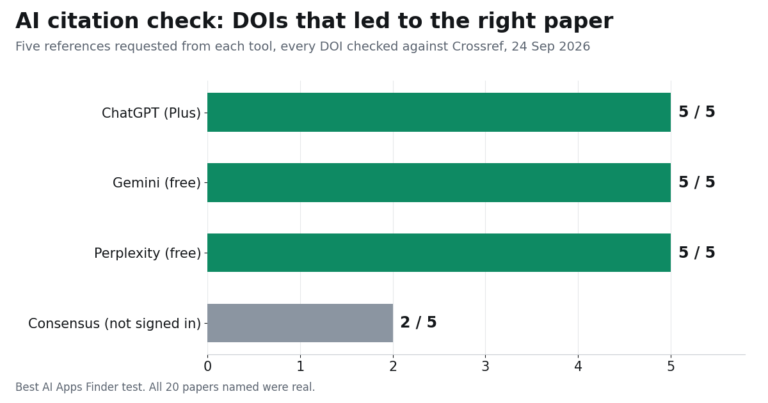
Follow-up, 24 September 2026. Two more tasks on the same Plus account, in temporary chats. Given our three-page test PDF and seven questions, including two about information the file does not contain, ChatGPT answered all seven correctly, cited the right page each time and showed its working for the one calculation. Asked for five peer-reviewed papers with DOIs, it searched the web and returned five real papers whose DOIs all opened the right article; an extra summary it gave of a systematic review matched the review’s own figures. The comparisons are in our PDF tools guide and our citation check.
Related guides
- Best AI Chatbots in 2026
- Best AI Coding Tools in 2026
- Best AI Writing Tools in 2026
- Best AI Productivity Tools in 2026
- Best AI Translation Tools in 2026
- Best AI Tools for Students in 2026
Frequently asked questions
Is ChatGPT free?
Yes. OpenAI states the free version is available to everyone, with unlimited everyday text chats on GPT-5.6 Luna, subject to abuse guardrails. Uploads, images, voice, deep research, memory and Codex are limited.
How many messages do I get on a paid plan?
OpenAI does not publish a number. Its pricing page uses Limited, Expanded and Maximum, and states usage must be reasonable and comply with its policies. Figures circulating elsewhere are user observations rather than published limits.
Does ChatGPT train on my conversations?
On Free, Go, Plus and Pro, OpenAI states content is used to train its models with an opt-out available. On Business and Enterprise, it states content is not used for training by default.
What is the difference between Go and Plus?
Go raises volume limits. Plus changes what you can reach: the GPT-5.6 reasoning models, full deep research, Sites, record mode, developer mode and internal-tool apps. Their context windows are identical, so upgrade for capability, not for longer documents.
Is ChatGPT Pro worth it?
It is the individual plan with Pro reasoning on GPT-6 Astra, maximum Codex tasks and a substantially larger context window at 128K instant and 400K reasoning. For heavy research or coding workloads that is meaningful; for general use it is unlikely to be.
Is ChatGPT Business the same as the old Team plan?
Business is the current name for the shared workspace plan. The FAQ on OpenAI’s pricing page states that paid plans “are priced per user per month”, that it offers “monthly plans for Go, Plus and Business and annual plans for Business and Enterprise”, and that “Business plans are available starting at 2 users”, with training off by default. On seat pricing, OpenAI’s business page puts a Standard seat at $20 a month billed annually or $25 billed monthly, and a Premium seat at $100 or $125 on the same basis, for teams of 2–200 employees.
Does a ChatGPT subscription include API access?
No. The API is billed separately by token consumption and is a distinct product from the ChatGPT subscription.
Conclusion
ChatGPT in 2026 is a capable and unusually broad assistant, and the honest way to evaluate it is by plan rather than as a single product. Free is genuinely usable and constrained mainly by context and research limits. Go buys volume. Plus buys capability, and is the point at which the product becomes what most reviews describe. Pro buys headroom. Business and Enterprise buy governance, and change the data handling default.
Two things deserve attention before subscribing. OpenAI does not publish message limits on any individual plan, so you cannot forecast what you are getting. And on every individual plan, including the most expensive one, your content is used for training unless you opt out. Both are documented by OpenAI, and both matter more than any capability comparison.