Translation tools are compared on accuracy, but the decision that costs money is billing. These platforms charge four different ways — per character, per translated word, per seat, or not at all — and one of the most popular website tools counts words as a lifetime cap rather than a monthly allowance.
This guide covers six tools across three jobs: translating text and documents, localising a website, and localising software. Every figure below is linked to the vendor pricing page it comes from. Where a vendor does not publish a rate on a page we could read, this guide says so rather than printing a number from elsewhere.
Three different jobs
Text and document translation. You have something written and want it in another language. DeepL, Google Translate and a general assistant all do this.
Website localisation. A live site needs to serve multiple languages, with search engines indexing each version. This is a hosting and delivery problem as much as a translation one, and Weglot is built for it.
Software localisation. Strings in a codebase need translating continuously as the product ships, with context, glossaries and developer integrations. Lokalise is built for this.
Amazon Translate sits outside all three as raw infrastructure: an API you build on rather than an application you use.
Four billing models
Free with limits. Google Translate is free for consumer use, and its Cloud API covers the first 500,000 characters a month through a $10 monthly credit that does not roll over.
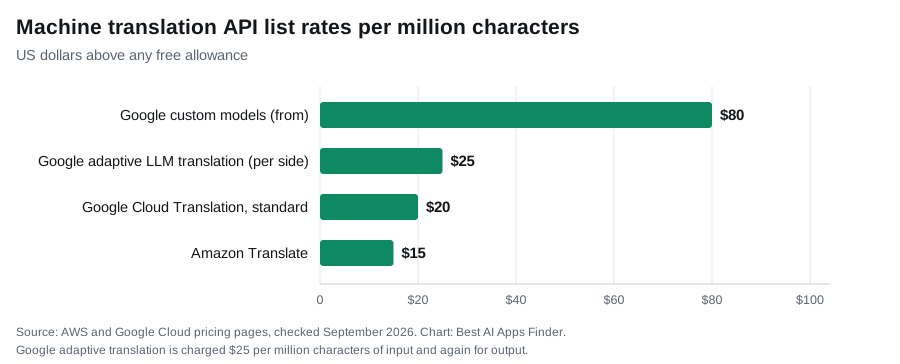
Per character. The API standard, and the rates that are actually published are close together: Amazon Translate at $15.00 per million characters and Google Cloud Translation at $20 per million above the free allowance. Google’s newer LLM-based adaptive translation is priced separately at $25 per million characters in and $25 out, and its custom-model tier starts at $80 per million. Azure Translator publishes a free tier of 2 million characters a month but shows its paid rate only through the regional pricing calculator, so there is no single figure to quote. DeepL does not publish a per-character rate we could read; see below.
Per translated word. Weglot’s model, and the one that surprises people. Details below.
Per seat and project. Localisation platforms charge for the workflow rather than the words.
Text and document translation
1. DeepL
DeepL remains the quality reference for European language pairs, preserving formatting in Word, PowerPoint and PDF files, with glossaries and formality control.
On quality, DeepL publishes its own blind evaluation: a March 2026 review it describes as 48,000 blind evaluations across 80 test groups and 16 language pairs, judged by professional native-speaking linguists, reporting a 94% win rate against GPT-5.2, Gemini 3.1 Pro and Claude Opus 4.6, and wins in 16 of 16 pairs against Google Translate. Read that as what it is: a well-documented study, run and paid for by DeepL, on pairs DeepL selected. It is more transparent than most vendor claims in this guide and it is still not independent.
On price, DeepL does not expose its plan table or its per-character API rate on a page we could read, so this guide does not print one — read it at the source. One correction worth making, because other guides repeat it: DeepL’s own developer documentation still instructs free-plan users to call api-free.deepl.com, so a free API tier does exist.
Suits: documents where formatting and quality matter, particularly across European languages.
2. Google Translate
Google Translate is free, covers more languages than anything else here, and handles text, voice, camera and conversation input with offline modes on mobile. For travel, everyday use and quick comprehension, nothing competes on value.
Its Cloud Translation API is a separate commercial product at $20 per million characters, with the first 500,000 characters each month covered by a $10 credit that does not roll over. Custom models are far more expensive, starting at $80 per million characters and falling with volume, and document translation is billed per page at $0.08.
Quality varies by language pair. DeepL’s own study places Google behind it on the 16 pairs DeepL tested; Google’s advantage is breadth rather than per-pair polish.
Suits: everyday translation, unusual languages, and anything where free matters more than polish.
3. ChatGPT and other general assistants
A general assistant translates differently from a dedicated engine: it can adapt tone, explain cultural context, adjust for an audience and rewrite rather than convert. That is genuinely useful for marketing copy, where a literal translation often reads badly.
The trade-offs are cost and consistency. LLM-based translation is billed on input and output tokens rather than a flat per-character rate, which makes a like-for-like comparison with a dedicated engine harder than it looks — Google prices its own adaptive LLM translation at $25 per million characters each way, against $20 per million for its standard model. Output also depends on how you prompt. For bulk, repeatable translation a dedicated engine is cheaper and more predictable.
Suits: nuanced content where tone and adaptation matter more than volume.
Website localisation
4. Weglot
Weglot detects site content automatically, translates it, and serves indexable multilingual versions, typically installed in minutes. It routes to several engines including DeepL, and it is one of the most-installed translation apps on Shopify and WordPress.
Three pricing mechanics deserve attention before you install it.
First, word limits are lifetime caps rather than monthly resets, and Weglot says so itself. Its pricing page defines the allowance as “Total unique words translated across all your languages. This is a fixed limit and does not renew.” Once you have 10,000 translated words stored on the $17 Starter plan, you either upgrade or make room — even if that translation happened a year ago. Weglot’s help article on reducing word count lists the ways to make room: deleting translations, removing inactive ones, excluding URLs or blocks from translation, and merging similar strings with variables. So the cap is a running total of what is stored, not a counter that can never go down, but a site with 15,000 words of content that it wants translated still outgrows Starter on day one.
The published ladder makes the jump concrete: Free covers 2,000 words in 1 language, Starter $17 a month covers 10,000 words in 1 language, Business $32 covers 50,000 in 3, Pro $87 covers 200,000 in 5, Advanced $329 covers a million in 10, and Extended $769 covers five million in 20. Annual billing is ten times the monthly figure across the range. Those dollar figures are conversions: Weglot bills in euros (Starter is €15 a month, Business €29) and states that “USD pricing is an estimate. The final price will be based on the EUR/USD rate on your subscription date”, with VAT excluded.
Third, and most consequential: your translations live on Weglot’s servers. Cancel the subscription and translated pages revert to the original language. That is genuine vendor lock-in, and it should factor into a long-term decision rather than being discovered at renewal.
Suits: non-technical site owners who want multilingual quickly and accept the ongoing cost and lock-in.
Software localisation
5. Lokalise
Lokalise manages translation as part of a development pipeline: strings sync from the codebase, translators work with context and screenshots, glossaries and translation memory keep terminology consistent, and updates ship continuously rather than in batches.
Pricing is by plan tier rather than per word, and Lokalise now publishes it. Its pricing page lists Explorer at $149 a month, Growth at $379 and Advanced at $1,049, billed monthly, with Enterprise on request and a 14-day free trial with no card. Two details change how that compares with per-word tools: “Hosted words are unlimited on all plans”, and “Translator and reviewer seats are unlimited on all paid plans”, with the paid manager and developer seats scaling by tier. You are paying for the workflow and the team around it, not for the volume of text.
Suits: product teams shipping continuously in several languages.
Translation infrastructure
6. Amazon Translate
Amazon Translate is infrastructure rather than an application: characters in, translated characters out, with no seats, subscriptions or minimums. There is no polished editor for translators.
Pricing is $15.00 per million characters for standard and batch document translation, with a free tier of 2 million characters a month for 12 months. Unused free-tier characters do not carry over, and after the twelve months there is no included free volume. It requires an AWS account.
Its case is integration rather than quality: if your stack already runs on AWS, this is the least friction. The arithmetic turns against it at catalogue scale, where per-character costs accumulate with nothing bundled to offset them.
Suits: developers already inside AWS who need translation as a service.
Comparison
Every figure below comes from the vendor’s own published pricing page, linked in the sections above. Where a vendor does not publish a rate on a page we could read, the table says so rather than estimating it.
| Tool | Job | Billing model | Free tier | Reported API rate | Key limit |
|---|---|---|---|---|---|
| DeepL | Text and documents | Subscription + API | Yes, incl. a free API tier | Not published on a readable page | Quality study is vendor-run |
| Google Translate | Text and documents | Free consumer; paid API | Yes, free to use | $20 per million chars | First 500k/mo via $10 credit |
| ChatGPT | Nuanced content | Subscription or API | Yes | Token-based, not per character | Output depends on prompting |
| Weglot | Website | Per translated word | Free, 2,000 words, 1 language | From $17/mo, 10,000 words | “Does not renew”; lock-in |
| Lokalise | Software | Plan tier, unlimited hosted words | 14-day trial | Not applicable | From $149/mo (Explorer) |
| Amazon Translate | Infrastructure | Per character | 2M chars/mo, first 12 months | $15.00 per million chars | No editor; AWS account required |
There is no accuracy column. The most detailed quality study in this category is DeepL’s own, run on pairs DeepL chose, and no vendor publishes a benchmark that predicts performance on your material.
Where machine translation still fails
No independent figure exists for how close machine translation now sits to a professional translator, and the numbers quoted around the web trace back to vendor marketing rather than to published research. What is well established is where the remaining gap concentrates, and it is predictable.
Idiom and marketing copy translate literally and land badly, which is where an LLM’s adaptation ability beats a dedicated engine. Legal, medical and regulatory text needs human review regardless of engine, because the cost of an error is not proportional to the cost of the translation. Honorifics and formality systems in languages such as Japanese and Korean remain difficult, and models differ sharply on them. And terminology consistency across a large project requires glossaries and translation memory rather than raw model quality.
The practical approach for anything published: machine-translate first, then have a fluent speaker review. That is now the standard workflow rather than a compromise.
How to choose
Occasional text and documents: Google Translate free, or DeepL where quality on European pairs matters.
Marketing copy needing adaptation: a general assistant, accepting higher per-character cost and prompt dependence.
A website: understand the word-count model before installing. Check whether caps are lifetime or monthly, whether served traffic counts, and what happens to translations if you cancel.
A software product: a localisation platform, priced by plan and workflow rather than words; Lokalise starts at $149 a month.
Building translation into an application: compare per-character API rates directly, and be aware that not every vendor publishes one. Amazon and Google do, at $15.00 and $20 per million characters; Azure and DeepL make you go and look.
For translating subtitles specifically, our guide to AI subtitle generators covers tools with translation built in.
What we found in our 22 September 2026 test
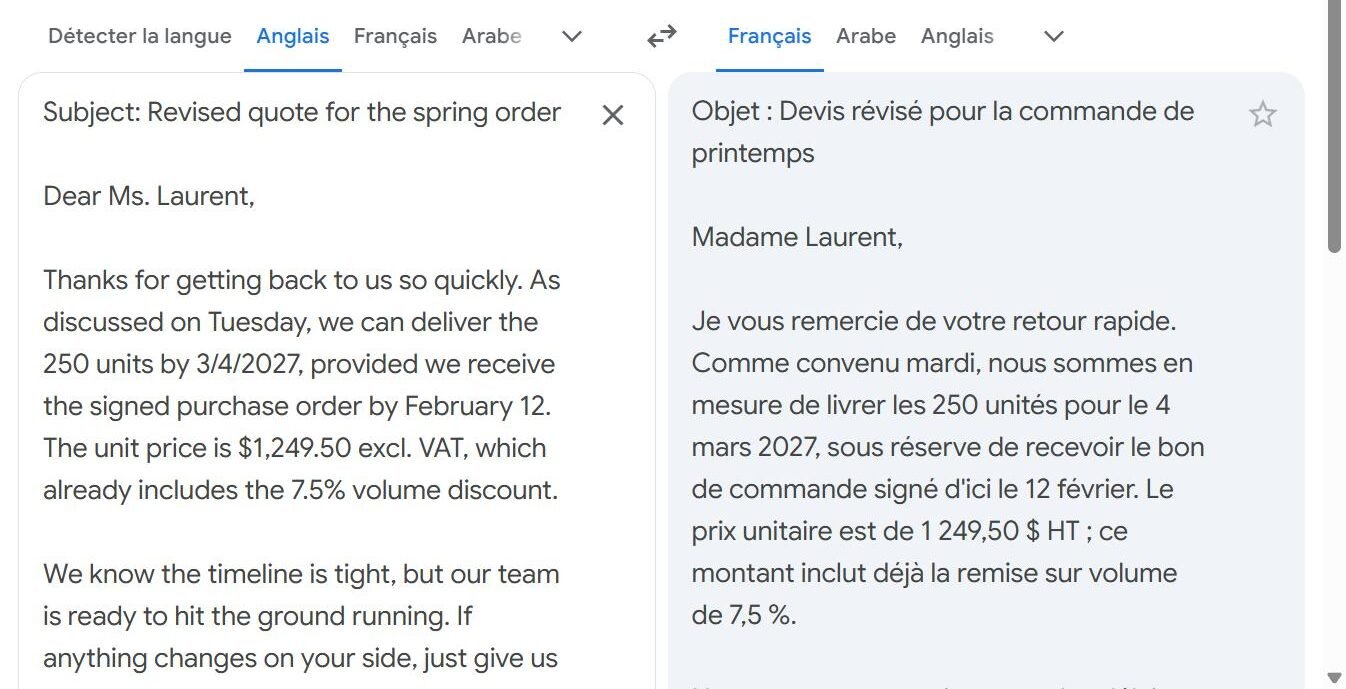
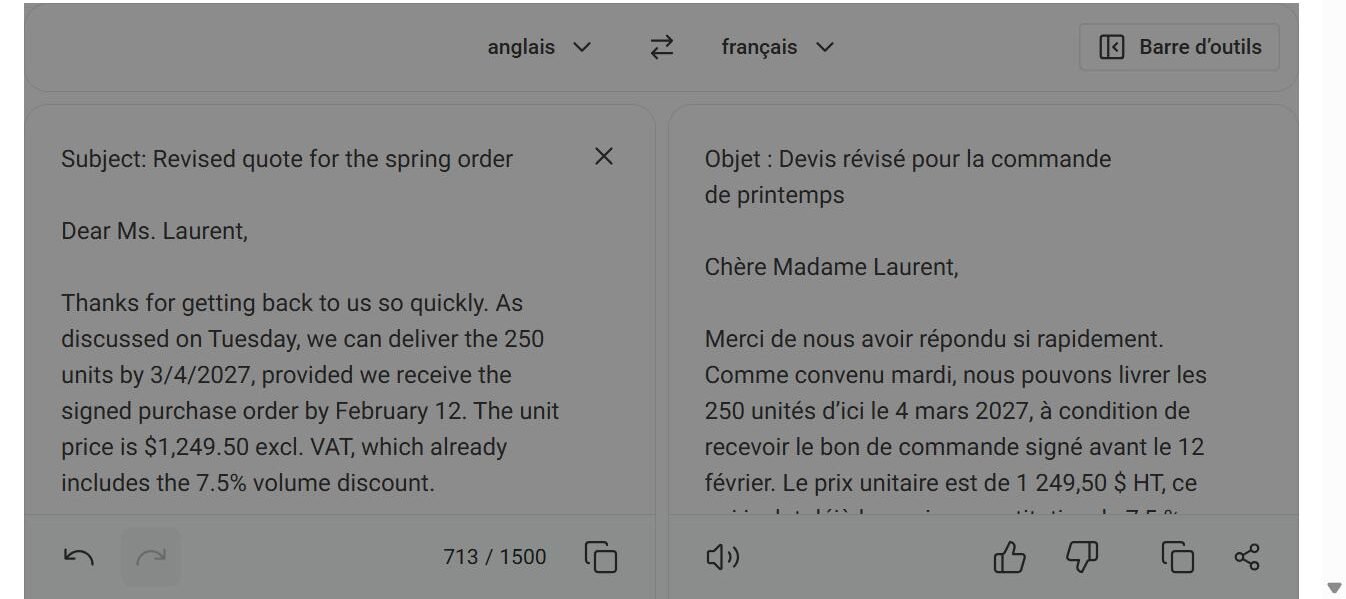
What we tested. One fictional English business email (549 characters), translated into French by three tools on 22 September 2026. We wrote the email to contain the things that usually go wrong: an ambiguous numeric date (“3/4/2027”), a US-format price (“$1,249.50 excl. VAT”), a percentage (“7.5%”), a job title, and three idioms (“hit the ground running”, “give us a heads-up”, “we’ll take it from there”). The email’s other date is written “February 12”, the American order, which makes 4 March the likely meaning of 3/4.
Tools and plans. DeepL’s free web translator (not signed in), Google Translate on the web, and ChatGPT (Plus account, temporary chat with personalisation off) with the instruction “Translate this business email into French:”.
| Item | DeepL | Google Translate | ChatGPT |
|---|---|---|---|
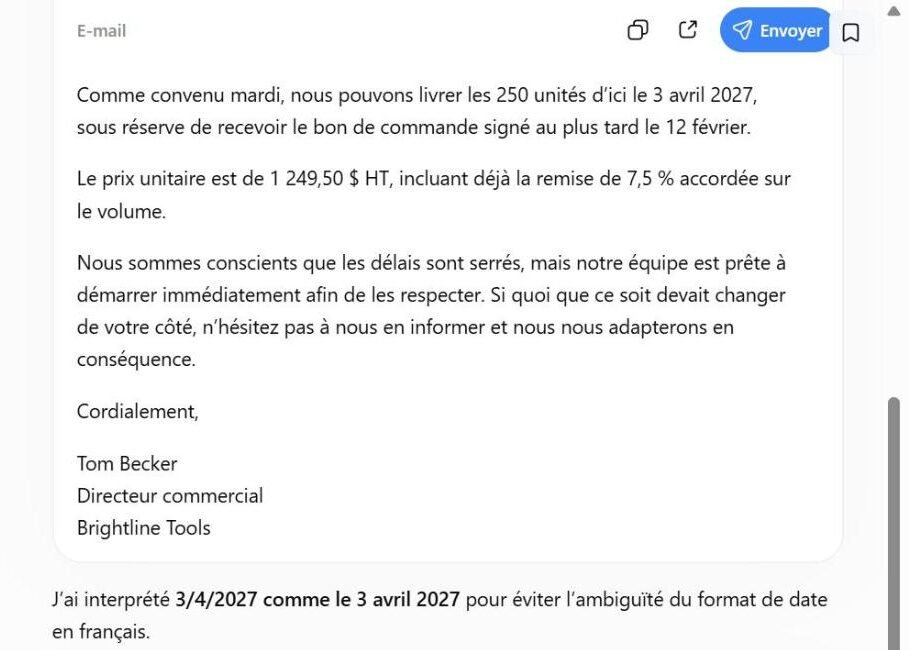
| 3/4/2027 | 4 mars 2027 | 4 mars 2027 | 3 avril 2027, with a note saying it had chosen that reading |
| $1,249.50 excl. VAT | 1 249,50 $ HT | 1 249,50 $ HT | 1 249,50 $ HT |
| 7.5% | 7,5 % | 7,5 % | 7,5 % |
| “hit the ground running” | se mettre immédiatement au travail | démarrer sans attendre | démarrer immédiatement afin de les respecter |
| “heads-up … take it from there” | nous en informer et nous nous adapterons en conséquence | nous en informer et nous aviserons en conséquence | nous en informer et nous nous adapterons en conséquence |
| Sales Manager | Responsable commercial | Responsable commercial | Directeur commercial |
| Omissions | None | None | None |
Result. All three kept every figure, used French number formatting, chose the formal “vous” register and translated the idioms by meaning rather than word for word. The differences were in judgement calls. ChatGPT read the ambiguous date the other way and turned a sales manager into a sales director, a small seniority change that matters in a signature. In fairness, it was the only tool that told us it had made an assumption.
Limitations. One short email, one language pair, one run per tool. It shows the kind of error to look for rather than which engine is better overall. The practical rule it supports: write dates unambiguously in the source text (“4 March 2027”), and check dates, amounts and job titles in any translation that leaves your hands.
Related guides
- Best AI Subtitle Generators in 2026
- Best AI PDF Tools in 2026
- Best AI Voice Generators in 2026
- Best AI Writing Tools in 2026
- Best AI Chatbots in 2026
- Best AI Website Builders in 2026
Frequently asked questions
Which AI translator is free?
Google Translate is free for consumer use across text, voice and camera input. DeepL has a capped free tier, and general assistants translate within their free plans. Paid APIs are separate commercial products.
What happens to my website translations if I cancel?
With hosted website translation, translated pages typically revert to the original language, because the translations live on the vendor’s servers rather than in your site. Check this before committing, as it is the main form of lock-in in this category.
Are Weglot word limits monthly?
No. Weglot’s own pricing page defines the allowance as “Total unique words translated across all your languages. This is a fixed limit and does not renew.” A content-heavy site can exceed an entry plan immediately; Weglot documents ways to reduce the stored count, such as excluding pages or deleting translations you no longer need, but otherwise the answer is an upgrade.
What does a translation API cost?
The published rates are $15.00 per million characters for Amazon Translate and $20 for Google Cloud Translation above its free allowance, rising to $80 for Google custom models. Azure publishes a 2-million-character monthly free tier but shows paid rates only in its regional calculator, and DeepL does not publish a per-character rate on a readable page. Free allowances differ, and Amazon’s applies only for the first 12 months.
Is AI translation accurate enough to publish?
For general business content, machine-first with human review is now the standard workflow rather than a compromise. Be sceptical of any percentage claiming to quantify the remaining gap — the figures in circulation come from vendors, not from independent research. Legal, medical and regulatory material should always be reviewed by a qualified human.
Conclusion
Match the tool to the job before comparing quality. Documents and everyday text are well served by a free consumer translator or a subscription engine. Marketing copy benefits from an assistant that can adapt rather than convert. Websites and software need platforms built for continuous delivery, and those charge in entirely different ways.
Two checks matter more than any accuracy claim. If you are building on an API, compare per-character rates directly, and note which vendors will not show you one without a calculator or a signup. And if you are translating a website, establish whether word caps reset, whether served traffic counts against them, and what happens to your translated pages if you stop paying.