Most guides for students list ten AI tools and tell you they all have free plans. That is not the useful information. What matters is which tools publish a genuine student discount, which ones publish none at all, and what your institution actually permits you to submit.
This guide covers seven tools organised by the study task they solve, sets out the current state of education pricing with its verification conditions, and explains the two ways AI most commonly gets students into trouble. Every figure below is linked to the vendor page that publishes it. Where a vendor publishes nothing, that is stated rather than filled in from a third-party roundup.
Match the tool to the task
Students rarely need more than two or three of these. The tasks worth matching a tool to are:
- Understanding and drafting — explaining concepts, brainstorming, working through problems
- Research with sources — finding material you can actually cite
- Writing quality — grammar, clarity and tone in work you wrote
- Lecture capture — transcribing classes you attended
- Presentations — turning a topic into slides
- Revision — flashcards and practice testing
Buying a tool for a task that is not your bottleneck is the most common way students end up with subscriptions they stop opening in week three.
Student pricing: what is published and what is not
This is the section most guides get wrong, because they repeat discount figures that the vendors themselves do not publish. Below is only what appears on the companies’ own pages.
ChatGPT: no individual student discount. OpenAI’s pricing page lists Free at $0 and Plus at $20, and its pricing documentation gives US reference prices of Go at $8 a month, Plus at $20 and Pro from $100. Asked directly whether it offers an education plan, its own FAQ names only two, and both are institutional: ChatGPT for Teachers, “a free plan for verified U.S. K–12 educators through June 2027”, and ChatGPT Edu, described as a plan that lets universities deploy AI across campus. Nothing on that page offers an individual student rate, so plan for the list price.
One detail worth reading before choosing a tier: the Go plan carries the note “This plan may include ads”. At $8 it is the cheapest paid ChatGPT tier, and the trade-off is stated openly on the page.
Claude: no individual student discount either. Anthropic’s pricing page lists Free at $0, Pro at $17 a month on an annual subscription or $20 billed monthly, and Max from $100. The Education plan on that page covers students, faculty and staff at a whole university — an institutional arrangement negotiated with the university, not something you claim at checkout. A specific warning: no verified-student rate for Claude appears anywhere on Anthropic’s pricing page. If you see one advertised, it is not coming from Anthropic.
Perplexity publishes the clearest offer in this guide. Its own help centre plan comparison lists “Education Pro ($10/mo with verification from SheerID)”, and shows Education Pro as the one individual tier where education discounts are “Yes (auto-applied)”. For comparison, Perplexity’s own pricing page currently lists Free at $0 a month, Pro at $20 and Max at $200. Education Pro is therefore half the standard Pro price.
Two honest caveats. Perplexity does not label Education Pro with a discount percentage on its own pages, so the comparison above is simply its two published figures set side by side. And it does not publish, on the pages we could read, which institution types qualify or what happens to your rate when you stop being enrolled. Ask before you rely on either.
Grammarly publishes no individual student discount. This has circulated for years as a 50%-off SheerID offer. Grammarly’s own students page states no discounted rate and does not mention SheerID; what it offers students is the free plan, available to everyone. Its education page is an institutional sales page — “Contact Education Sales” — rather than a consumer discount.
Otter does publish one, and it is easy to miss. Its pricing page offers students and teachers 20% off Pro: “$6.67 USD per month (billed $79.99 annually)” or “$13.59 USD per month”, against list prices of $8.33 annually and $16.99 monthly. Eligibility is verified by signing up “using an email address ending with .edu”, and the offer is for individual students and teachers.
Quizlet and Gamma publish no student rate. Quizlet Plus is “Only $19.99 per year”. Gamma runs Free, Plus at $9 per user per month, Pro at $18 and Ultra at $90, with no education tier on the page.
Three general points about verification. Programmes here use either a verification service such as SheerID or an institutional email domain, and the check is usually quick. Eligibility is tied to one verified person and is not transferable, so sharing an account breaches terms. And if your institution does not use a recognised academic domain, verification may fail even when you are genuinely enrolled — confirm your domain is accepted before paying for anything.
Understanding and drafting
1. ChatGPT
ChatGPT is the broadest general assistant and the one most students reach for first. It explains concepts at whatever level you ask for, works through problems step by step, helps structure an argument, and handles coding coursework.
The free tier is genuinely capable, covering unlimited everyday text chats with limited uploads, image generation, voice and deep research. Paid tiers add reasoning models, higher limits and extended memory. Our ChatGPT review covers the plans and what each includes.
Best for: explanation, brainstorming and coding help.
2. Claude
Claude is the one students tend to prefer for long documents: reading a dense paper, summarising a chapter, or working through a lengthy reading list.
Anthropic does not publish exact message limits for the free plan; usage is a rolling budget rather than a fixed count. If your university participates in Anthropic’s Education plan, you may already have institutional access worth checking before you subscribe personally.
Best for: long readings, research papers and sustained reasoning.
Research with sources
3. Perplexity
Perplexity searches the live web and returns answers with citations attached, which is the behaviour students actually need. A general assistant answers from model memory; Perplexity points you at material you can open, read and cite properly.
Its help centre describes Education Pro as including everything in Pro — “access to Perplexity Computer, access to Learn Mode, unlimited Pro Searches, file and image uploads, access to premium models, and more” — plus education-specific tips and nudges. Verification runs through SheerID from inside the app: upgrade, toggle to the Education plan, and “Verify as student”. Perplexity notes that the discount is tied to your verified student email address and cannot be moved to another address without re-verifying.
Best for: finding sources, fact-checking and literature searching.
Writing quality
4. Grammarly
Grammarly works inside whatever you are already writing in, correcting grammar and spelling and reporting tone. Its free plan is permanent and available to everyone, students included; paid tiers add rewriting, plagiarism detection and AI detection.
One point every student should know before using its rewriting features on coursework is covered in the academic integrity section below. Our Grammarly review sets out the free and paid boundary in detail.
Best for: polishing work you wrote yourself.
Lecture capture
5. Otter
Otter records and transcribes lectures into searchable notes with summaries. Its Basic plan is free forever and allows “300 monthly transcription minutes” with a maximum transcription time per conversation of 30 minutes, which means a standard hour-long lecture is cut off halfway. That limit decides whether the free tier works for you, and the 20% student rate above is the cheapest way past it.
Before recording anything, check your institution’s policy. Many universities require a lecturer’s permission to record teaching, and some restrict it to students with documented accessibility needs. Our guide to AI meeting assistants compares the alternatives, several of which have more generous free recording.
Best for: transcribing lectures you attended, with permission.
Presentations
6. Gamma
Gamma turns a topic description into a formatted deck, which removes the slide-design work from a group project or a seminar presentation.
Its free plan is more useful than most write-ups suggest: 400 credits on signup, up to 10 slides per prompt, PDF and PPTX import, and export to PDF, PPTX, PNG and Google Slides. Export is not the paywall here. What paid tiers buy is monthly credits and scale — Plus at $9 gives 1,000 credits a month and up to 100 slides per prompt and removes Gamma’s logo; Pro at $18 gives 4,000 credits and brand customisation.
The output is a starting point rather than a finished presentation. Treat the generated structure as a draft and rewrite the content in your own words, both because it reads better and because of the integrity point below.
Best for: first-draft slide decks.
Revision
7. Quizlet
Quizlet is the only tool here built specifically for education rather than adapted to it. It generates flashcards and practice quizzes and adapts sessions to what you keep getting wrong.
Its value rests on something well established in learning research: retrieving information from memory is more effective for retention than rereading it. A tool that forces recall is doing something a chat assistant does not. The free tier covers flashcards and basic study modes, with Quizlet Plus at $19.99 a year, renewing automatically and cancellable at any time.
Best for: memorisation and exam preparation.
Comparison
Every figure comes from the vendor’s own page, linked in the sections above. Where a vendor publishes nothing, the table says so rather than repeating a third-party number.
| Tool | Study task | Free tier | Paid entry | Published student rate |
|---|---|---|---|---|
| ChatGPT | Explanation and drafting | Yes | Go $8 (may include ads); Plus $20 | None; institutional only |
| Claude | Long documents | Yes | Pro $17 annual / $20 monthly | None; institutional only |
| Perplexity | Research with citations | Yes | Pro $20 | $10/mo Education Pro, SheerID |
| Grammarly | Writing quality | Yes, permanent | Paid tiers above free | None published |
| Otter | Lecture transcription | 300 min/mo, 30 min per conversation | Pro $8.33 annual / $16.99 monthly | 20% off, .edu email |
| Gamma | Presentations | 400 credits, export included | Plus $9/user/mo | None published |
| Quizlet | Revision | Yes | Plus $19.99/year | None published |
Academic integrity: policy is not the same as capability
This section is general information, not academic or legal advice. Rules differ by institution, by department and frequently by individual module.
The distinction that matters is between what a tool can do and what your course permits. These tools will happily write an entire essay. Whether submitting it is acceptable is a question your institution answers, not the vendor. Using AI to explain a concept, generate practice questions, find sources or check your own grammar is widely accepted. Submitting generated work as your own is treated as academic misconduct at most institutions.
Read the policy for each module, not just the university. Policies vary between courses at the same institution, and some require you to declare AI use rather than prohibiting it. Where a declaration is required, make it.
One technical detail with direct consequences, documented by Grammarly itself. Its AI Detector user guide states: “If you are working with other Grammarly agents to rewrite your text, it is likely that the AI Detection agent will flag your content as AI-generated”, because “rewrites from the Grammarly, Paraphraser, and Humanizer agents come from our LLM”. Its own advice is to “refrain from using our agents to rewrite your content; instead, focus on using agents to guide feedback that you manually incorporate”. If your institution runs detection software, using a rewriting tool on your own genuine work can produce a result you did not expect.
The same guide is candid about the limits of the score: “Like all AI detectors, the AI detection feature is not 100% accurate and should not be used as a definitive assessment of whether AI-generated text is present”, and the number “should be viewed as an average estimate rather than a definitive percentage assessment”. That cuts both ways: a clean score is not proof of anything, and a flagged score is not proof either. The reliable protection is doing the work and being able to discuss it.
Where AI gets things wrong
Two failure modes matter more for students than for anyone else.
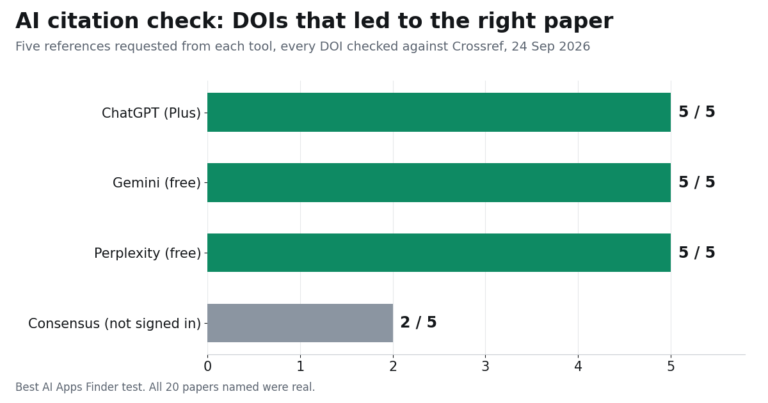
Fabricated citations. General assistants can produce references that look entirely plausible, with real-sounding authors, journals and dates, for papers that do not exist. Submitting a bibliography containing invented sources is a serious problem, and it is easily avoided: open every source and confirm it exists and says what you claimed. This is the strongest practical argument for using a citation-based research tool rather than asking a chat assistant for references.
Confident errors in subject matter. These tools state incorrect things with the same fluency as correct ones, and the risk is highest in exactly the areas where you cannot yet judge the answer. Verify anything factual, numerical or technical against your course materials before relying on it.
A useful habit: use AI to check your understanding rather than to supply it. Ask it to explain a concept, then explain the concept back in your own words. If you cannot, you have learned something more useful than the answer.
Building a study stack for nothing
Most students can cover the essential tasks without paying at all.
A general assistant on its free tier covers explanation and drafting. Perplexity free covers research with citations. Grammarly free covers correction permanently and is the same plan everyone else gets. Quizlet free covers flashcards. Gamma free covers slide decks including export. Otter free covers 300 minutes of lecture transcription, in 30-minute pieces.
The sensible upgrade path is to run those free tiers for a term and notice which one you hit the wall on first. That is the single subscription worth paying for, and for most students it is either research volume or transcription minutes — which happen to be the two categories here with a published student rate.
Before paying anything, check three things: whether your university already provides institutional access, whether a published student rate exists and your email domain qualifies, and whether the annual billing discount beats the student discount, which it sometimes does.
Related guides
- Best AI Chatbots in 2026
- ChatGPT Review 2026
- Grammarly Review 2026
- Best AI Note Taking Apps in 2026
- Best AI Writing Tools in 2026
- Best AI Presentation Makers in 2026
Frequently asked questions
Is there a ChatGPT student discount?
Not an individual one. OpenAI’s pricing FAQ answers the education question with two institutional plans only: ChatGPT for Teachers, free for verified U.S. K–12 educators through June 2027, and ChatGPT Edu for universities. Individuals pay the list price, which OpenAI’s documentation gives as $8 for Go and $20 for Plus.
Which student discount is actually worth claiming?
Two are published. Perplexity Education Pro at $10 a month, verified through SheerID, is the clearest. Otter gives students and teachers 20% off Pro at $6.67 a month billed $79.99 annually, verified by a .edu email address. Those are the only individual student rates on the vendors’ own pages in this guide.
Does Grammarly give students a discount?
Not one it publishes. Its students page offers the free plan, which is available to everyone, and its education page is an institutional sales contact rather than a consumer rate. The 50%-off student offer quoted in many roundups does not appear on Grammarly’s own pages.
Can I use AI for my assignments?
It depends on your institution and often on the individual module. Using AI to explain concepts, generate practice questions or check grammar is widely accepted; submitting generated work as your own is treated as misconduct at most institutions. Read the policy for each course, and declare AI use where a declaration is required.
Will my university detect AI writing?
Detection tools produce probabilistic scores rather than proof, and Grammarly says plainly that its own detector “is not 100% accurate”. Worth knowing: Grammarly also states that rewrites from its own agents are likely to be flagged as AI-generated, so using a rewriting tool on genuine work can produce an unexpected result.
Can AI invent sources?
Yes, and this is the most serious practical risk for students. General assistants can generate plausible-looking references to papers that do not exist. Open and verify every citation, or use a research tool that links to real sources.
Do I need to pay for any of these?
Usually not at first. Free tiers cover explanation, research, grammar correction, flashcards and slide decks with export. Run them for a term, then pay for whichever one you exhaust first.
Conclusion
Pick by task rather than by list position. A general assistant for understanding, a citation-based tool for research, a permanent free grammar checker for polish, and a flashcard tool for revision will cover most of a degree without a subscription.
Two things deserve more attention than any feature comparison. Student pricing in this category is thinner than most guides suggest: of the seven tools here, exactly two publish an individual student rate, and the two largest assistants publish none at all. And the tools that fail you will do so confidently, whether by inventing a citation or by flagging your own writing. Verify sources, read your module policy, and use these tools to check your understanding rather than to replace it.