

The most useful thing to know about AI coding tools in 2026 is that three of them changed how they bill you inside six months, and one changed its name.
GitHub moved every Copilot plan off premium-request counting on 1 June 2026. Cursor split its team tiers the same day. Windsurf became Devin Desktop two days later. If you are working from a comparison written before June, you are reading about products that no longer price as described, or in one case no longer exist under the name given.
This guide covers three shapes of tool and how each one actually charges you.
The three shapes of tool
Chat assistants — ChatGPT, Claude, Gemini. You paste code in, you paste code out. No editor integration, no repository context. Billed as a flat consumer subscription. For a great deal of everyday work this is enough, and the free tiers cover more than most people expect.
In-editor assistants — GitHub Copilot, Cursor. They see your open files and your repository, complete as you type, and run agent tasks against your codebase. Billed as a seat plus metered model consumption.
Agent environments — Devin Desktop. You describe an outcome, an agent plans and executes it, and you review what comes back. You supervise rather than type.
The billing units are not comparable across these three, and that is the point. A chat subscription buys a person’s access. A seat buys a person’s editor. Agent billing buys a machine’s working time. Decide which you are buying before you compare prices.
What each product is in 2026
GitHub Copilot is an extension. It installs into VS Code, Visual Studio, JetBrains IDEs, Neovim, Xcode and Eclipse, and adds completions, chat, agent mode and code review inside the editor you already have. It is the least disruptive of the three because it changes nothing about your setup.
Cursor is a code editor built as a fork of VS Code. You install it in place of your existing editor, and the AI is woven through the whole application rather than added at the side. Because it is a VS Code fork, your existing extensions, keybindings and settings largely carry across.
Devin Desktop is Cognition’s desktop application for working with Devin, its autonomous software engineer. Cognition describes it as the next generation of Windsurf, built around Devin Cloud and an Agent Command Center for running and supervising multiple agents, and states it remains backwards-compatible with Windsurf. The download now sits under devin.ai.
The architectural difference that decides the choice
Strip away the feature lists and there are three distinct models of how a developer works with AI.
Assistance inside your editor. Copilot suggests as you type and answers questions in context. You remain the author. Nothing about your environment changes.
An AI-first environment. Cursor assumes AI is part of every action, so multi-file edits and codebase-wide context are built into the editor rather than bolted on. You author, but the editor participates continuously.
Delegation to agents. Devin Desktop is oriented around handing a task to an agent that plans and executes it, then reviewing what comes back. That is a different working pattern, not a faster version of the same one.
These are not mutually exclusive. Many developers run more than one. But each product is designed around a different default, and the default is what you experience daily.
Chat assistants for coding
The cheapest useful advice in this guide: try a chat assistant first. If your work is bounded — a function, a regex, a stack trace, a migration you can paste — the free tiers of ChatGPT, Claude and Gemini will do it, and you will have spent nothing.
They are excellent for explaining unfamiliar code, designing an approach, debugging a specific error or writing a self-contained function. They do not see your repository unless you paste or upload it, and they do not edit files.
One billing detail is worth knowing before you scale up. Anthropic’s command-line coding tool draws on the same subscription allowance as Claude chat. Heavy terminal use therefore reduces your chat headroom on the same plan. If you intend to use both, size the plan for the combined load rather than for either one. Anthropic does not publish exact usage figures for any tier; usage is a rolling budget with session and weekly caps.
Google does not publish specific consumer rate limits for Gemini. Plan around that opacity rather than around a number.
Current consumer plan prices for all three sit on their own pricing pages and moved repeatedly through 2026. This guide does not restate them, because a stale figure here is worse than no figure. For fuller treatment see our ChatGPT review and best AI chatbots guides.
GitHub Copilot
Copilot’s advantage is reach. It supports a wide range of editors and integrates with GitHub itself, including pull request workflows and code review, which no other tool here matches on the GitHub side.
What changed on 1 June 2026
GitHub replaced premium-request counting with usage-based billing built on GitHub AI Credits. Consumption is calculated from tokens at each model’s listed API rates. One AI Credit equals $0.01.
Headline prices did not move, but GitHub’s current plan comparison no longer sets every plan’s credit allowance equal to its price. On the individual plans the allowance is now larger than the fee, because a flexible allocation sits on top of the base credits: Pro at $10 a month carries $15 in total monthly AI Credits ($10 base plus $5 flexible), Pro+ at $39 carries $70 ($39 plus $31), and Max at $100 carries $200 ($100 plus $100). On the business plans the one-to-one rule still holds, because no flexible allocation is included: Business at $19 per user carries $19, and Enterprise at $39 per user carries $39. GitHub notes on the same page that flexible allocations “can change over time”. A free tier offers limited chat and agent usage.
Read that structure carefully, because it is unusual. On Business and Enterprise your subscription price is your model budget: you are not paying a seat fee and then a separate usage bill until you exceed the plan price. On the individual plans the budget is currently larger than the fee, but the extra portion is the flexible allocation GitHub says can change, so the figure to plan against over time is the base credit amount — and that still matches the price.
What does not consume credits
GitHub’s documentation is explicit that code completions and Next Edit suggestions remain unlimited on paid plans and do not draw on AI Credits. For a developer whose use is mostly inline completion rather than agent work, the metered portion of the bill may be close to zero. Chat, agent mode, CLI, cloud agents and code review are what draw down the pool.
The two costs that are easy to miss
Copilot code review consumes GitHub Actions minutes as well as AI Credits. Turn on automated review across a busy repository and you are running two meters at once, with the Actions minutes landing on a separate line of your bill. GitHub states this itself; almost no comparison mentions it.
Annual subscribers were treated differently, and worse. Monthly Pro and Pro+ subscribers moved to the new billing automatically on 1 June. Annual subscribers stayed on legacy premium-request billing until their term expires — and GitHub increased the model multipliers for those users on the same date. If you bought an annual plan before June, you are getting fewer requests per premium call than you were, and you move to Copilot Free at expiry unless you take a paid monthly plan. Check your renewal date.
Pooled credits, and two licensing caveats
Business and Enterprise credit allowances are pooled at the billing entity rather than locked per seat, so a team’s lighter users offset its heavier ones. For uneven teams this is the most consequential difference between Copilot and its per-seat competitors.
Two caveats. Copilot Enterprise requires a GitHub Enterprise Cloud licence in addition to the Copilot seat, so the real per-user cost is higher than the Copilot line alone. And if you subscribed through GitHub Mobile on iOS or Android, GitHub documents that purchasing additional AI credits is not available.
Suits: teams already on GitHub, and developers whose usage is mostly completions rather than agents.
Not for you if: your repositories live on GitLab or Bitbucket — check integration coverage before committing.
Cursor
Cursor’s pitch is that AI belongs in the editor rather than beside it. Because it forks VS Code, the switching cost is unusually low for a whole-editor change: extensions, themes and settings carry across.
Cursor’s pricing documentation lists Pro at $20 a month, Pro Plus at $60 and Ultra at $200, alongside a free Hobby plan with limited agent requests. Teams split into two seat types on 1 June 2026: Standard at $40 per user per month and Premium at $120 per user. Enterprise is quoted. The FAQ on the pricing page states that “every plan includes a set amount of model usage”; the exact included amount per tier is shown in the interactive plan picker rather than in the page text, so check it for the tier you are considering. Rechecked 22 September 2026.
The part that produces surprising bills
Cursor runs two separate usage pools. One covers Cursor’s own models (the documentation currently lists Composer and several Grok models), with what it calls “significantly more included usage”. The other covers third-party models, charged “at the model’s API price”, and that is the pool heavy agent users empty first. On Teams and Enterprise, third-party requests also carry a Cursor Token Rate of $0.25 per million tokens on top of the model’s API price; Cursor’s own models are exempt.
What happens when the included usage runs out is your choice. The documentation says you can either add on-demand usage, billed pay-as-you-go in arrears, or upgrade the plan. On-demand usage is something you switch on, not something that happens silently, and Cursor documents team-wide monthly spending limits configurable by admins, with per-member limits on Enterprise. If you enable on-demand usage, set the limit on the same day.
The practical consequence: two developers on identical plans can have very different bills, because the variable is which models they select and how hard they run agent tasks. Neither Cursor nor anyone else publishes a way to forecast that.
On privacy: Cursor documents a privacy mode, enabled in settings or enforced by a team admin, under which it states code data is not used for training by Cursor or its model providers. Check it before pointing the tool at proprietary code.
Suits: developers doing agent-heavy work who will actually use the included third-party budget.
Not for you if: you want a predictable monthly number.
Devin Desktop, formerly Windsurf
The rename
On 2 June 2026, Cognition renamed Windsurf to Devin Desktop, delivered as an over-the-air update. Plans, extensions, keybindings, LSPs and settings carried over unchanged, and Cognition states the product remains backwards-compatible with Windsurf. The windsurf.com domain now resolves to devin.ai/desktop.
This followed Cognition’s July 2025 acquisition of Windsurf, which covered the IP, product, trademark, brand and team.
The migration that came with it
The rename was not only a name. Cascade, Windsurf’s local agent, was replaced by Devin Local, rewritten in Rust with subagent support. Cognition kept legacy Cascade available during a migration window that closed on 1 July 2026 — there is no route back to it. Several Cascade capabilities were absent from Devin Local at launch, including persisted Memories, Workflows, Codemaps, App Deploys and Conversation Sharing. If your workflow depended on any of those, the migration had a cost.
The Agent Command Center, not the editor canvas, is now the default surface.
What Devin costs
Cognition reworked Devin’s pricing more than once during 2026, and the lineup has now settled into five plans on Devin’s pricing page: Free at $0, Pro at $20 a month, Max at $200 a month, Teams at $80 a month plus $40 per full developer seat, and Enterprise on request. The page no longer mentions Agent Compute Units for these plans.
The metering is the distinctive part. Cognition states that “each paid plan comes with a usage allowance that refreshes automatically on a daily and weekly basis”, and that beyond it “you can purchase extra usage which is consumed at API pricing”. A daily refresh behaves differently from a monthly pool: a heavy Monday cannot borrow from a quiet Friday. Budget per outcome rather than per session, and measure what a representative ticket on your own codebase actually consumes before buying extra usage.
Suits: teams with a steady stream of bounded, repetitive tickets — dependency bumps, test coverage, small migrations.
Not for you if: your work is judgment-heavy and exploratory. A flat-rate in-editor tool is more predictable.
Windsurf Plugins, and what happened to Codeium
This is the most confusing naming situation in developer tooling, and it is worth setting out plainly because a lot of published advice is now wrong.
Codeium launched in 2022 as a free AI completion assistant with extensions for VS Code, JetBrains, Vim and Neovim. In November 2024 the company released the Windsurf Editor, a VS Code fork built around an agentic system called Cascade. In April 2025 the company renamed itself Windsurf and rebranded the Codeium extensions as Windsurf Plugins. Cognition acquired the company in July 2025. On 2 June 2026 the editor was renamed Devin Desktop.
So if you are searching for Codeium in 2026: the standalone editor is now Devin Desktop. The separate plugin line carried the Windsurf Plugins name through 2025. Cognition’s Devin Desktop page now settles the JetBrains part of that question: “Windsurf for JetBrains (IntelliJ IDEA, PyCharm, WebStorm, and more) continues to be available for download.” The page does not say the same for every other editor plugin, so check devin.ai for the editor you use.
How each one charges you
| Tool | Meter | Included | Overage behaviour |
|---|---|---|---|
| Chat assistants | Flat consumer subscription | Plan allowance | Hard limits, not bills |
| GitHub Copilot | AI Credits (1 credit = $0.01), token-based | Pro $15, Pro+ $70, Max $200 in monthly credits; Business and Enterprise match the seat price; completions unmetered | Metered above the included amount; pooled on Business and Enterprise |
| Cursor | Two pools — first-party (undisclosed) and third-party at list API rates | A set amount of model usage per plan, shown in the plan picker | Optional on-demand usage, billed in arrears. Set a spend cap if you enable it. |
| Devin | Agent usage allowance, not per-seat usage | Allowance refreshed daily and weekly; Teams $80 base plus $40 per developer seat | Extra usage purchased at API pricing |
Copilot figures checked 12 September 2026; Cursor and Devin figures rechecked 22 September 2026 against each vendor’s published plans.
What this costs at ten developers
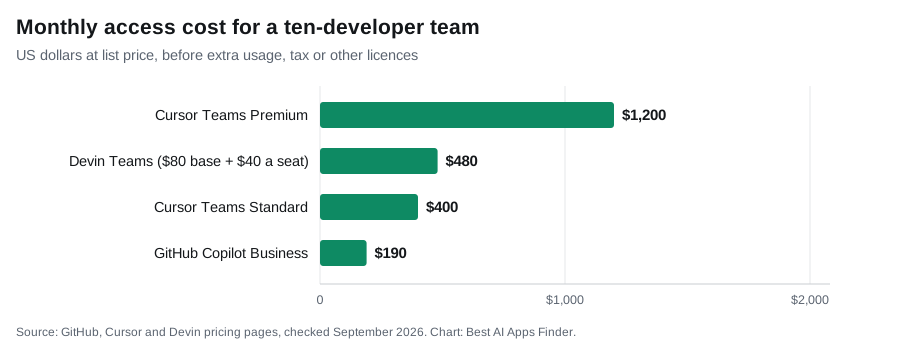
All three now publish team prices, so the access cost can be modelled; the usage on top of it cannot.
- Copilot Business: 10 × $19 = $190 a month, including $190 in pooled AI Credits. Completions sit outside the meter entirely.
- Cursor Teams Standard: 10 × $40 = $400 a month at list, plus any on-demand usage you enable, and the $0.25 per million token rate on third-party models.
- Cursor Teams Premium: 10 × $120 = $1,200 a month, with a larger included allowance per seat.
- Devin Teams: $80 + 10 × $40 = $480 a month, plus any extra usage bought beyond the daily and weekly allowances.
The seat cost is your floor, not your bill. On Copilot Business and Enterprise the ceiling is visible, because the included credit allowance matches the seat price. On Cursor and Devin the ceiling is whatever you allow on-demand or extra usage to reach, which is why the spending control matters more at ten developers than any feature comparison.
Editor and platform support
This is often the deciding constraint and it is rarely discussed properly.
Copilot supports the widest range of editors, including VS Code, Visual Studio, the JetBrains IDEs, Neovim, Xcode and Eclipse. If your team works across several editors, or someone depends on a JetBrains IDE, Copilot is the only one of the three that fits without changing anyone’s tooling.
Cursor is primarily its own editor, so adopting it usually means adopting its application; the VS Code lineage makes that easy for VS Code users. JetBrains users now have a second route: Cursor documents a JetBrains integration over the Agent Client Protocol, which requires a paid Cursor plan and a JetBrains IDE with the AI Assistant plugin (2025.1 or later). It gives you Cursor’s agent — file editing and terminal commands — inside the JetBrains IDE, not the whole Cursor editor. There is no Xcode equivalent.
Devin Desktop is a desktop application from Cognition. It also reaches developers through other surfaces, but the desktop product is the environment being compared here.
Model access and routing
All three route across multiple models, and all three change their catalogues frequently enough that any list published today may be stale within weeks. What is documented is the structure rather than the roster.
Copilot bills model usage at each model’s listed API rates, so choosing a more expensive model drains credits faster at the same request count. Cursor separates first-party models from third-party API models into different usage pools, charging third-party requests at public list API prices plus a token rate. Cognition operates a multi-model approach for Devin under its own harness.
The practical implication is the same across all three: model choice, not request count, is the main driver of cost. If you are trying to control spend, that is the lever.
Terminal and tool use is the newer dividing line. Agent modes that can run commands, execute tests and iterate on failures are now available across the in-editor tools, and Anthropic ships a command-line tool that works on a local repository. If you want a tool that can actually run your test suite rather than suggest a fix, that capability is what to check for, and it is usually gated to paid tiers.
Codebase context
Cursor’s design centres on understanding a whole repository rather than the open file, which is the capability most often cited as its differentiator. Copilot has extended well past single-file completion into agent mode, chat and repository-aware review, particularly where work is already organised around GitHub. Devin Desktop approaches context differently again: an agent explores the codebase itself as part of executing a task, and Cognition’s DeepWiki generates repository documentation.
Comparing these fairly is difficult because the vendors do not publish equivalent, verifiable measures of context handling. Claims that one is definitively better at understanding large codebases are generally not supported by any published methodology.
Git platform integration
This is where Copilot is hard to match, and it is frequently the deciding factor for teams. Copilot integrates with GitHub’s own pull request and code review workflow, so AI review sits in the place your team already works rather than in a separate application.
If your organisation runs on GitLab or Bitbucket instead, check integration support carefully before committing, because coverage across the tools here is uneven and less documented than editor support.
Code privacy and training
Worth settling before a tool touches a client repository. Cursor documents a privacy mode, which can be enabled per user or enforced by a team administrator, under which it states code data is not used for training by Cursor or its model providers. Business and enterprise tiers across these vendors generally exclude customer code from training by default, while consumer tiers may not.
The practical advice is to check the terms for the specific plan you hold rather than the vendor’s general marketing, because consumer and business terms differ, and to confirm whether privacy settings are enforced organisation-wide or left to each developer.
Switching considerations
- Copilot has the lowest switching cost. It is an extension. Install it, and if it does not suit you, remove it.
- Cursor replaces your editor but inherits its ancestry. As a VS Code fork it carries over extensions and settings. JetBrains users can use its agent through the ACP integration without switching; Xcode users face a real migration.
- Devin Desktop changes the workflow, not just the tool. Delegating tasks and reviewing agent output is a different working pattern, and the adjustment is habitual rather than technical.
- Watch the billing model, not the price. All three moved to usage-based billing during 2026. A cheap seat with heavy agent use can cost more than an expensive seat used lightly.
- Set spend limits before you need them. Cursor documents team-wide limits and GitHub provides budget visibility.
Which suits which developer
You want help without changing anything: Copilot. It is an extension, it works in almost every editor, and at $10 with completions outside the credit meter it is the cheapest serious entry point.
You want AI throughout the editing experience: Cursor, particularly if you already use VS Code, since the fork makes switching mild. The two-pool structure suits teams that lean on first-party models for routine work and reserve frontier models for hard problems.
You mostly need explanation and design help: a chat assistant is enough, and the free tiers will cover a surprising amount before you pay anything.
Your team is spread across editors: Copilot is the only option here that does not require anyone to change tools.
You want to delegate scoped work and supervise results: Devin Desktop, if your work decomposes cleanly into assignable units.
What we found when four chat assistants fixed the same bug (24–25 September 2026)
The advice above is to try a chat assistant first for bounded work. We checked it with one bounded task: a nine-line Python function, parse_duration(), that fails 6 of 15 checks. It rejects uppercase units and “1h30m”, accepts a repeated unit and a negative number, and crashes with the wrong error on an unknown unit.
Each tool received the same prompt: the specification plus the broken function, with the instruction “Return only the corrected function.” We saved each answer unedited and ran it against 15 tests the tools never saw: nine valid inputs (including “1H 5M”, “1h30m” and “30m 1h”) and six that must raise ValueError (including an empty string, “5d”, “1h 1h” and “-5m”). The prompt, the test file and every answer are in our published test record.
| Tool (how accessed) | Hidden tests passed | What went wrong |
|---|---|---|
| ChatGPT (Plus account, temporary chat) | 15 / 15 | Nothing |
| Perplexity (free account) | 15 / 15 | Nothing |
| Gemini (free account, Flash, temporary chat) | 14 / 15 | “-5m” returned 300 instead of raising an error |
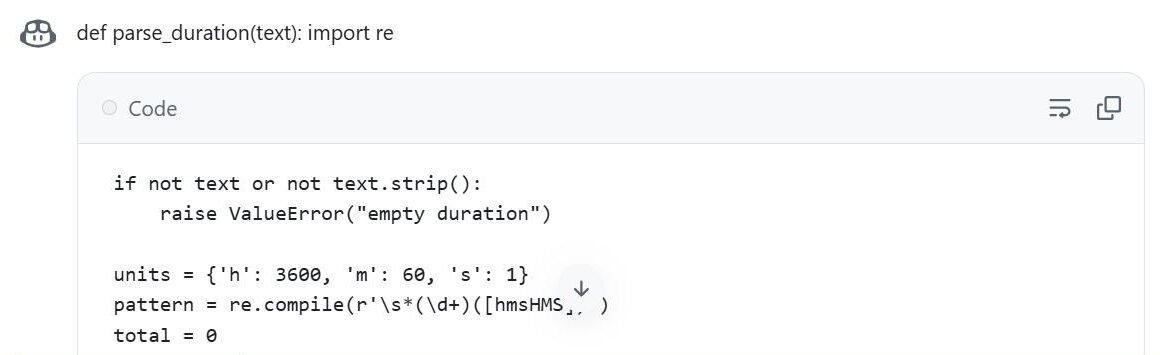
| GitHub Copilot (Copilot Free, github.com/copilot, model set to Auto) | 14 / 15 after re-indenting | Code did not run as copied; padded input “ 2h ” raised an error |
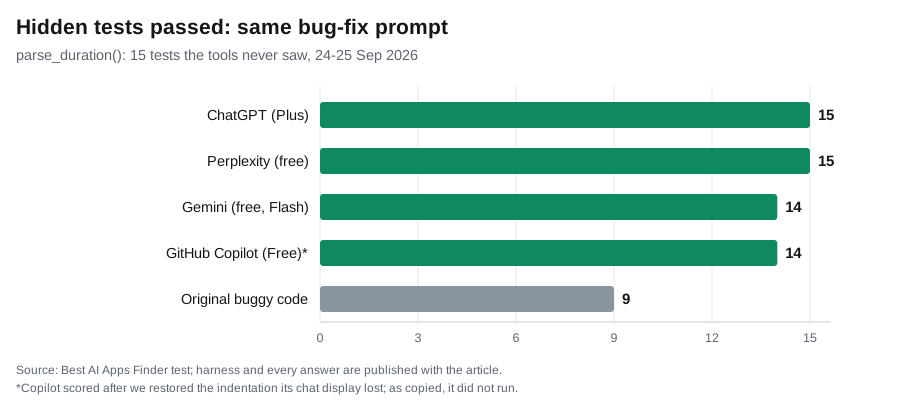
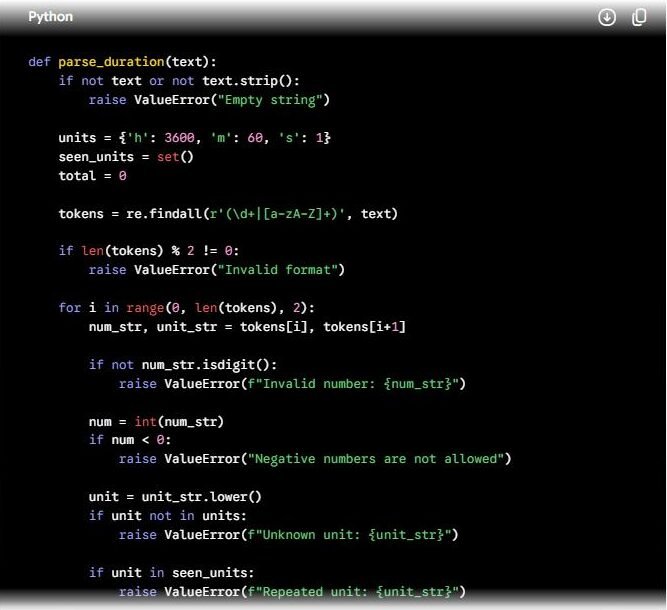
Gemini’s failure is the kind that matters most, because nothing looks wrong. Its fix splits the text with a regular expression that only captures digits and letters, so the minus sign in “-5m” is thrown away before the code reaches its own “negative numbers are not allowed” check. The function returns 300 seconds instead of raising an error.
Copilot’s logic was sound, but its chat window displayed the first line, def parse_duration(text): import re, as ordinary text above the code block, and the code inside the block started at the left margin. Copying the block alone gives Python a return outside any function. After we restored the indentation, without changing anything else, it passed 14 tests. The one it missed, leading and trailing spaces, is not mentioned in our specification, so treat that as a strict reading rather than a bug.
What this does and does not show. For a self-contained function, all four assistants fixed the obvious bugs, which supports the advice to start with a chat assistant. It also shows why you run your own tests before pasting: the one silent error would have passed a quick read. It says nothing about Cursor, Devin Desktop or Copilot inside an editor, which work on whole repositories and were not part of this test. It is a single prompt with one answer per tool; free tiers can route to different models from day to day, so a rerun may differ.
Our comparison methodology
These tools are compared on documented architecture, billing model, editor and platform support, repository context and switching cost. They are not ranked on output quality. No vendor publishes a reproducible benchmark for code generation, results vary heavily by language, codebase and which model you select, and any ranking offered here would be an opinion dressed as a measurement.
Figures come from vendor pricing pages and official documentation, each linked at the point of use. Where a vendor does not publish a figure, or where published accounts contradict each other, this guide says so rather than estimating. Apart from the dated chat-assistant test above, nothing here is based on hands-on testing: Cursor, Devin Desktop and Copilot’s editor features were not tested, and no claim of measured performance is made about them.
Related guides
- Best AI Chatbots in 2026
- ChatGPT Review 2026
- Best AI Productivity Tools in 2026
- Best AI Writing Tools in 2026
Frequently asked questions
Is Windsurf still available?
Cognition announced Devin Desktop on 2 June 2026 as the next generation of Windsurf, delivered as an over-the-air update and backwards-compatible with Windsurf. The windsurf.com domain now resolves to devin.ai/desktop. Treat Windsurf as the former name of what is now Devin Desktop.
What happened to Codeium?
The company renamed itself Windsurf in April 2025 and rebranded the Codeium extensions as Windsurf Plugins. Cognition acquired the company in July 2025, and on 2 June 2026 the standalone editor became Devin Desktop. The current status of the separate plugin line is not something we can confirm from published material.
Does GitHub Copilot still count premium requests?
Not on current monthly plans. GitHub moved to usage-based billing with AI Credits on 1 June 2026, calculated on token consumption. Subscribers on existing annual plans remained on legacy request-based billing until their term expires, and GitHub increased model multipliers for those users on the same date.
What does Devin cost?
Devin’s pricing page lists Free at $0, Pro at $20 a month, Max at $200 a month and Teams at $80 a month plus $40 per full developer seat, with Enterprise on request. Paid plans include a usage allowance that refreshes daily and weekly, and extra usage is purchased at API pricing.
Do I have to leave VS Code to use Cursor?
You install Cursor in place of VS Code, but because it is a fork, extensions and settings largely carry over. JetBrains users can instead run Cursor’s agent inside their IDE through the Agent Client Protocol integration, on a paid plan; there is no Xcode equivalent.
Can I use a chat assistant instead of an editor tool?
For explanation, design and debugging specific problems, yes, and the free tiers go a long way. What you lose is completion as you type, repository-wide awareness and the ability to edit files directly.
Is my code used to train these models?
It depends on the plan. Business and enterprise tiers generally exclude customer code by default, and Cursor documents a privacy mode that can be enforced by an administrator. Consumer tiers vary, so check the terms for the plan you actually hold.
Which tool writes the best code?
This guide does not answer that. No vendor publishes a reproducible benchmark, output depends heavily on which model you select, and the available models change frequently.
Conclusion
These products answer different questions. A chat assistant asks whether you need advice. Copilot asks how much help you want while you write. Cursor asks whether you want an editor built around AI. Devin Desktop asks whether you want to write at all, or to define work and review it.
Two things are worth carrying away. First, all of them changed billing structure during 2026, so any comparison predating the summer describes pricing that no longer exists — and Devin’s structure only settled into its current five plans after several revisions. Second, the deciding factor is rarely the seat price: it is which model you use and how often agents run. Start on the free tiers, watch your own consumption for a month, and let that decide the plan.