Search for a voice changer and you will be shown three different kinds of product as though they were interchangeable. They are not. Some transform your live microphone as you speak. Some convert a recording into a different voice afterwards. Some do not change a voice at all, they generate one from text. Buying the wrong category is the most common mistake in this market.
This guide separates the three, then compares six tools on what is actually documented: platform support, integrations, whether they work in real time, how cloning is handled, and what each vendor publishes about pricing and commercial rights. Pricing in this category is unusually opaque — several vendors here show prices only inside the application — and where a vendor does not publish a figure, this guide says so rather than repeating one from elsewhere.
Voice changers, voice cloning and voice generators
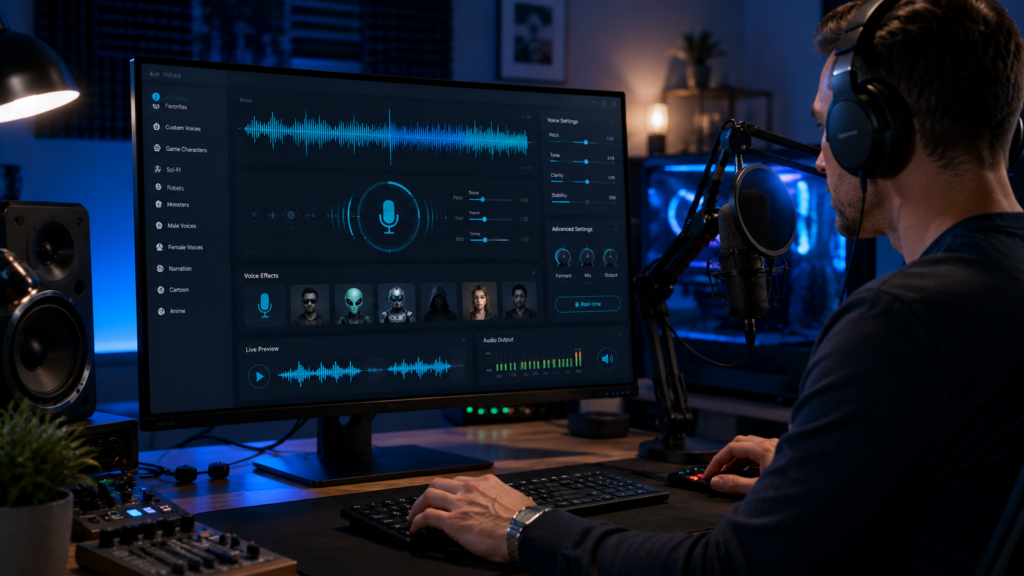
Real-time voice transformation installs a virtual microphone on your computer. You select it as the input device in Discord, Zoom, OBS or a game, and everyone hears the modified voice as you speak. This is what most people mean by a voice changer.
Studio or post-processing conversion works on audio you have already recorded. You upload a file, and the tool re-voices it while preserving the timing and delivery of the original performance. It is slower, generally higher fidelity, and useless for a live call.
Text-to-speech generates speech from typed text. There is no source voice at all. These are frequently listed as voice changers, which is simply wrong, though they are the right tool for narration.
Cutting across all three is voice cloning: building a model of a specific person’s voice. Cloning is a capability, not a category, and it carries obligations the other features do not. That is covered in its own section below.
Real-time voice changers
Voicemod
Voicemod is one of the best-known real-time changers and a useful reference point for the category. It installs a virtual audio device, which you then select as your microphone inside any application that takes mic input.
Voicemod’s own site describes it as a real-time voice changer and soundboard that works “not only in voice apps like Discord, but also in-game voice chats”, advertises “200+ Voicemod voices”, and states it is “available on Mobile and Desktop”. Its documentation covers Windows and Mac, hardware and software integrations with Elgato Stream Deck, Loupedeck and OBS, and VoiceLab, a builder for layering effects such as reverb, pitch shift and vocoder into a custom voice.
We could not find a public Voicemod pricing page. Its site offers a free download rather than a plan comparison, and when we checked, the /pricing/ address resolved to the homepage. There is a free tier with a rotating subset of voices and a paid PRO tier, but the rate is shown at the point of purchase inside the application. No Voicemod price is quoted here, and any figure you see quoted elsewhere is not coming from Voicemod’s own page.
MagicMic (iMyFone)
MagicMic’s main claim is breadth of platform support. iMyFone documents Windows, Mac, Android and iOS, which is wider than most competitors, and lists compatibility with Discord, Fortnite, Valorant, Zoom and Twitch. Its published library is 500+ AI voices and a very large soundboard, and there is an online version that changes an uploaded audio file, with a documented upload cap of 5MB.
A free version exists, which the MagicMic pricing page describes as five free voices daily plus basic sound effects. That page, checked on 22 September 2026, lists a monthly subscription at $9.99, a yearly subscription at $45.99 and a lifetime licence at $59.99 one-off, each shown beside a higher struck-through price. The lifetime option is the one to weigh: on those figures it costs less than a year and four months of the yearly plan.
HitPaw VoicePea
HitPaw’s voice changer, now branded VoicePea, is positioned as a free real-time changer for PC and Mac. Its product page advertises 300+ voice effects with real-time operation for gaming, streaming and chat. It is the most consumer-oriented of the three, leaning on preset character effects plus noise reduction.
No HitPaw price is quoted here either — the product page presents features rather than a plan table. Confirm on HitPaw’s store before buying.
Studio and post-processing conversion
ElevenLabs Voice Changer
ElevenLabs is the best-documented product in this guide, and its voice changer is a genuinely different thing from the real-time tools above. Its documentation describes Voice Changer, previously called Speech-to-Speech, as converting a source voice into another voice while preserving the tone and delivery of the original. It captures performance detail such as whispers, laughs and accents, and is used to fix pronunciation in existing recordings or hold a character voice consistent across sessions. Audio is uploaded or recorded rather than processed live, and the same capability is available through the API.
The free tier gives 10,000 credits a month with no card required. ElevenLabs denominates its plans in credits rather than characters, so the allowance has to be read against the credit cost of the feature you intend to use rather than converted into a character count. Commercial usage rights come with paid plans, and cloning features sit on paid tiers. ElevenLabs publishes its current plan prices on its own pricing page.
Its cloning rules are worth knowing before you plan a project, because they are stricter than most people assume. ElevenLabs’ Instant Voice Cloning documentation recommends one to two minutes of clean audio and says that more than about three minutes brings little improvement (checked 25 September 2026); the feature requires you to confirm you have consent. Professional Voice Cloning trains a dedicated model on at least 30 minutes of clean audio, requires a Creator plan or above, and uses a voice-captcha verification step in which you read a prompt aloud so the platform can match it against the uploaded samples. ElevenLabs states plainly that you can only create a Professional Voice Clone of your own voice, and that even with someone’s consent you cannot clone theirs. If a colleague wants you to use their voice, they must create and verify the clone on their own account and share it with you.
Altered
Altered targets dubbing, audiobook and production work rather than gaming. It is also the one vendor here that spans both categories: alongside Altered Studio, its content-creation platform, it sells RealTime Pro, described on its own site as a “voice changer for voice & video calls”.
It is also the only vendor in this guide that publishes a full price and licence table, and that transparency is the reason to look at it closely. Its pricing page lists, for Altered Studio:
- Free at $0 — 3 minutes a month of Voice Morphing, 10,000 AI tokens, local voice cloning.
- Creator at $30 excluding tax, per month billed annually — 60 minutes a month, 325,000 AI tokens, accent and speaking-style morphing.
- Professional at $90 excluding tax, per month billed annually — 180 minutes a month, 1,000,000 tokens, unlimited local morphing, 48kHz output.
- Enterprise at contact-sales, with unlimited morphing, custom voice models, API and multi-seat.
Billing is offered monthly, quarterly at a stated 10% saving, or annually at 25%.
Text-to-speech platforms with a voice changer
Murf
Murf appears on almost every voice changer list, and the reason is more specific than the lists suggest. Murf is primarily a text-to-speech platform: you type a script and it produces narration in a synthetic voice. But it also sells a voice changer for recorded audio, and its API pricing page lists Voice Changer at $0.10 per minute of input audio, described as transforming “voice recordings into high-quality, lifelike AI voices”.
So Murf belongs in the studio-conversion group for recorded audio, not in the real-time group: nothing on its pricing page describes a virtual microphone for live calls. If your actual need is narration from a script, our guide to AI voice generators covers that side properly.
What 42 seconds of voice changing cost on ElevenLabs’ free plan (25 September 2026)
ElevenLabs bills its Voice Changer in credits, and the free allowance only means something once you know the rate. We measured it. On 25 September 2026 we uploaded a 42.5-second clip to Voice Changer on a free ElevenLabs account and generated it once with the default settings: the preset voice “Josh – Teacher for Kids”, the Eleven English v2 model, stability 50%, similarity 75% and MP3 output at 128 kbps. The clip is a synthetic voice we generated ourselves with open-source text-to-speech, so no real person’s voice was used.
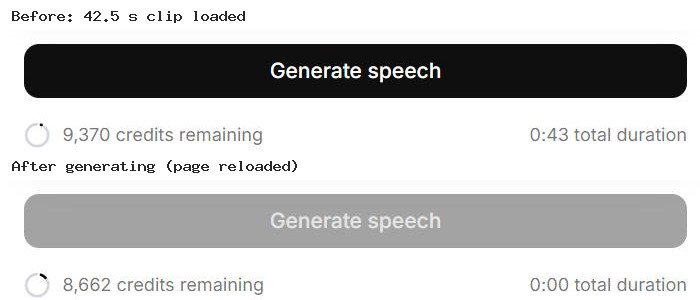
The balance fell from 9,370 to 8,662 credits: 708 credits for 42.5 seconds, or about 16.7 credits per second. That works out at roughly 1,000 credits per minute of source audio. At that rate the free plan’s 10,000 monthly credits cover about ten minutes of voice changing, before anything else on the account uses credits.
The clip is a reading of the same 630-character script we used in our voice generator test, where ElevenLabs’ text-to-speech turned it into a 46-second clip for 630 credits on 24 September. So the same words cost 630 credits as text-to-speech and 708 as a voice conversion. Text-to-speech charged one credit per character in that test; this result fits Voice Changer being charged by the length of the audio instead. If so, a slow speaker or a recording with long pauses will cost more to convert than the same words spoken briskly, so trim silences before you upload.
What we did not test: how natural the converted voice sounds. We did not download the output, so this section covers cost and settings only. In our browser the progress indicator did not finish; after a page reload the credits had already been deducted. If that happens to you, check the History tab before running the conversion again, or you may pay twice.
Comparison
Based on vendor documentation as of September 2026. A dash means the vendor does not present the figure on a page this guide could read, and no number is substituted from elsewhere.
| Tool | Type | Platforms | Live mic | Published price | Free option |
|---|---|---|---|---|---|
| Voicemod | Real-time | Desktop and mobile | Yes, virtual mic | — in-app only | Yes, rotating voices |
| MagicMic | Real-time | Windows, Mac, Android, iOS | Yes, virtual mic | $9.99/mo, $45.99/yr, $59.99 lifetime | Yes, 5 voices daily |
| HitPaw VoicePea | Real-time | Windows, Mac | Yes, virtual mic | — | Yes |
| ElevenLabs | Studio conversion | Web and API | No, upload or record | On its pricing page | 10,000 credits/month |
| Altered | Studio + RealTime Pro | Web | Yes, via RealTime Pro | $0 / $30 / $90 annual | Yes, 3 min/month |
| Murf | Text-to-speech + recorded voice changer | Web and API | No, recorded audio | API voice changer $0.10/min | API trial credit |
One column deliberately absent is latency. Real-time tools advertise low latency, but none of these vendors publishes a measured figure under defined conditions, and actual delay depends on your hardware, audio drivers and buffer settings. Any specific millisecond number you see quoted for these products is not something the vendors document.
The pattern in that table
Look down the price column and a split appears that has nothing to do with audio quality. Two of the three consumer real-time tools do not publish prices on a page we could read, and the third, MagicMic, publishes discount-style prices beside struck-through ones; the production tools publish full plan tables.
That is not an accident of web design. Consumer voice changers are sold on an in-app upgrade prompt after you have installed the free version and started using it. Production tools are sold to people who need to know the cost and the licence before committing to a project, so the figures are on the page.
The practical consequence: if you need to budget or justify a purchase in advance, the tools that publish are the tools you can plan around. If you are changing your voice on Discord, install the free version and you will see the price when it matters.
Platforms and integrations
The real-time tools all work the same way: they install a virtual microphone, and you select it as the input device in whatever application you are using. That means compatibility is usually a question of your operating system rather than of the specific app.
- Windows is supported by all three real-time tools and has the widest feature coverage.
- Mac is supported by all three, though features have historically lagged the Windows builds.
- Mobile is the clearest difference. MagicMic documents Android and iOS apps; Voicemod states availability on mobile and desktop, with its mobile app centred on the soundboard.
- Streaming hardware matters if you go live. Voicemod documents Elgato Stream Deck, Loupedeck and OBS integrations for switching voices mid-stream.
- API access is only relevant for the studio tools. ElevenLabs documents a voice changer API, and Altered includes API access on its Enterprise tier.
Consent, disclosure and responsible use
This section is general information, not legal advice. Rules differ by country and, in the United States, by state, and if any of this affects your work you should take proper advice.
There is a meaningful difference between transforming your own voice and reproducing someone else’s. Sounding like a robot on Discord raises no real issues. Creating a model of a specific real person’s voice is a different act, and it is where the risk sits.
What the vendors themselves require. ElevenLabs is the clearest example. Instant Voice Cloning requires you to confirm you have consent. Professional Voice Cloning goes further: it uses voice-captcha verification, where you read a prompt aloud so the platform can confirm the samples are yours, and ElevenLabs states you cannot create a Professional Voice Clone of another person at all, even with their permission. It also documents that misuse of cloning, particularly unauthorised or commercial use without consent, can result in permanent bans, and it operates an AI speech classifier and supports content provenance standards so generated audio can be traced and detected.
Why consent matters beyond the terms of service. A person’s voice can be protected as part of their identity. Several US states have enacted laws addressing AI voice replication specifically, and transparency obligations for synthetic media have been introduced under regulation including the EU AI Act. Finding a recording online is not consent, and a verbal agreement is weaker than a written one, particularly for client work, advertising or anything published.
Disclosure. Major platforms including YouTube now expect creators to disclose realistic synthetic or altered audio in published content. Disclosure is also simply good practice: audiences respond badly to discovering a voice was synthetic after the fact.
Practical habits worth adopting:
- Only clone a voice that is yours, or one where the owner has created and verified the clone themselves.
- Get consent in writing, and state what the voice may be used for and for how long.
- Disclose synthetic or altered audio in published work, and follow each platform’s labelling rules.
- Do not use these tools to impersonate a real person, fabricate statements, or misrepresent who you are in any transaction. That is prohibited by every vendor here and may be unlawful.
- Read the prohibited use policy of whichever tool you choose before a commercial project, not after.
Commercial use: the licence is the product
Commercial rights are not uniform across this category, and the free tiers are usually where the restriction sits. Altered is worth studying here because it makes the structure explicit rather than burying it in terms of service. Its published licences tie directly to plan:
- Its free tier carries an “Attribution License”, which allows publishing outputs on third-party platforms only if you “do not use them for commercial purposes” and credit Altered by mentioning the site.
- Its Creator licence permits commercial use but is scoped to “individuals or companies with up to 5 employees… as long as the overall revenue or funding from relevant activities is below $100k over the last 12 months”.
- Its Professional licence grants “a perpetual, exclusive, non-sublicensable, royalty-free, worldwide license to use such Content for commercial or business purposes”.
Read those three again if you are freelancing. A revenue-scoped licence means a plan that is compliant this year may not be next year, and that is a condition you will not find on a feature comparison.
Elsewhere, ElevenLabs ties commercial usage rights to paid plans, and its shared Voice Library operates under a separate addendum to its terms. Real-time tools raise a different question: many ship licensed or community-created voice packs, and a voice pack based on a recognisable character may carry usage limits the base subscription does not cover.
Before publishing monetised content, check three things in the vendor’s own terms: whether your plan grants commercial rights at all, whether any revenue or headcount threshold applies, and whether individual voices or packs carry separate restrictions.
How to choose
Start with when you need the voice changed. Live on a call or stream means a real-time tool. Editing a recording afterwards means a studio tool. Typing a script means text-to-speech. That decision eliminates most of the market.
For gaming and Discord, any of the three real-time tools will do the job; the differences are library size, mobile support and a price you will see in-app. MagicMic has the widest platform coverage; Voicemod has the deepest streaming-hardware integration.
For production work, ElevenLabs is the best documented on consent and rights, and Altered is the most transparent on price and licence scope.
If you need to budget before you buy, the studio tools and MagicMic are the ones here with published prices you can plan around.
For narration, stop looking at voice changers entirely.
Every tool here has a free tier or trial. Test on your own hardware before paying, because perceived latency in real-time use depends far more on your audio setup than on the marketing.
If cloning specifically is what you need, our guide to AI voice cloning tools goes deeper on that.
Related guides
- Best AI Voice Cloning Tools in 2026
- Best AI Voice Generators in 2026
- Best AI Music Generators in 2026
- Best AI Subtitle Generators in 2026
- Best AI Video Generators in 2026
Frequently asked questions
Can a voice changer work live on Discord or Zoom?
Yes, if it is a real-time tool. Voicemod, MagicMic and HitPaw VoicePea install a virtual microphone that you select as your input device, and Altered sells a separate RealTime Pro product for calls. Studio conversion works on recorded audio and cannot do this.
Why can I not find prices for these tools?
Because most consumer real-time changers do not publish them. We found no public Voicemod pricing page, and it shows its rate inside the application; HitPaw presents features rather than a plan table on the pages checked for this guide. MagicMic does publish monthly, yearly and lifetime prices, and Altered, ElevenLabs and Murf’s API publish theirs.
What does a free plan actually let me publish?
Read the licence, not the feature list. Altered’s free tier carries an attribution licence that excludes commercial use and requires crediting Altered, and ElevenLabs ties commercial rights to paid plans. A free tier that produces usable audio is not the same as one that lets you sell the result.
Can I clone a friend’s voice if they agree?
It depends on the platform. ElevenLabs states you cannot create a Professional Voice Clone of someone else even with consent; they must create and verify it on their own account and share it with you. Always check the specific vendor’s rules.
Do these tools work on a phone?
MagicMic documents Android and iOS apps, and Voicemod states availability on mobile and desktop. Most real-time voice changing still assumes a desktop, because it relies on a virtual audio device.
How much latency should I expect?
None of these vendors publishes a measured latency figure under defined conditions, and real delay depends on your hardware, drivers and buffer settings. Treat any specific number quoted elsewhere with caution and test on your own machine.
Conclusion
The useful question is not which voice changer is best, but which of the three product types you actually need. Real-time tools transform a live microphone and are the right answer for gaming, streaming and calls. Studio tools re-voice recordings with much higher fidelity and no live capability. Text-to-speech generates narration and changes nothing.
Two things deserve your attention before you pay. Several tools in this category do not publish a price at all, so the tools you can budget for in advance are a shorter list than the tools available. And if your plans involve reproducing a real person’s voice or selling what you produce, read the licence before the feature list — the strictest platforms will simply not let you clone someone else, and the most transparent one scopes your commercial rights to your own company’s size.