The number that decides what AI video actually costs you is not the monthly subscription. It is credit burn per second of output.
Runway is the one vendor here that publishes the conversion outright. Its pricing page states that “625 credits monthly = 52s of Gen-4.5, 104s of Gen-4 Turbo, or 78 Gen-4 Images”. So the $12-a-month plan buys under a minute of flagship video — and that is before a single retry. Most of the other tools in this guide sell you credits without ever telling you what a second costs.
This guide compares seven tools across three product types, leading with credit burn, licensing and plan structure rather than quality impressions. Every figure is linked to the vendor’s own pricing page or documentation and reflects the published US price as of September 2026. Where a vendor does not publish a figure, that is stated rather than estimated.
Three different products
These tools are routinely listed together and do three unrelated jobs.
Generative clip models create footage from a text prompt or still image. Runway, Kling, Google Veo and Pika belong here. They produce short clips, they meter by credit or by second, and none of them makes a finished video on its own.
Avatar and presenter tools put a synthetic person on screen reading a script. Synthesia and HeyGen belong here. They are not cinematic generators and should not be shortlisted against Runway or Veo for b-roll.
Template-based editors assemble a complete video from a prompt, combining stock or generated footage with voiceover and captions. InVideo belongs here. The output is a finished video rather than a generated shot.
Choosing across categories is the most common mistake. If you need a presenter explaining a product, a clip model is the wrong purchase however good its output looks.
How credits actually work
Every generative tool here meters by credit, but only some publish the exchange rate.
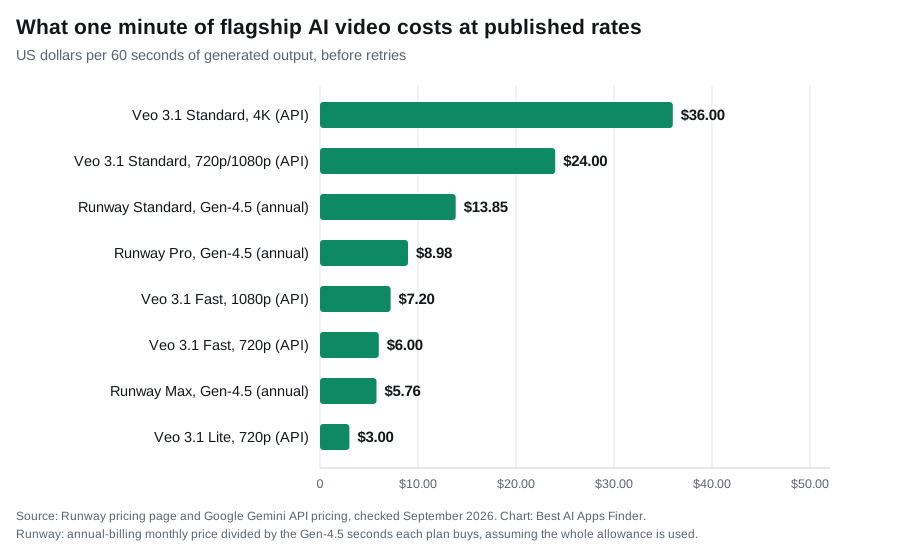
Runway publishes a full model table. Gen-4.5 costs 60 credits per 5 seconds — 12 credits a second. Aleph 2.0 costs 140 credits per 5 seconds, Seedance 2.0 Pro 160 per 4 seconds, and Seedance 2.0 Fast 116 per 4 seconds. Against those rates its plans work out at 52 seconds of Gen-4.5 a month on Standard, 187 seconds on Pro and 791 seconds on Max.
Kling publishes credits per output, not per second. Its own credit guide states that 660 credits buys “660 images / 33 720p videos” and 3,000 credits buys “3000 images / 150 720p videos”. Where it does give a per-second figure is 4K: the Kling VIDEO 3.0 series generates “cinema-grade native 4K video output” at 30 credits per second.
Veo is sold per second and not by credit at all. Google’s Gemini API pricing lists Veo 3.1 Standard with audio at $0.40 a second for 720p and 1080p and $0.60 for 4K; Fast at $0.10 for 720p, $0.12 for 1080p and $0.30 for 4K; and Lite at $0.05 for 720p and $0.08 for 1080p, with 4K not supported. All three show “Not available” under free tier.
Pika prices by feature rather than by duration. Its pricing page lists 10 credits for a Turbo-model generation using Pikascenes, Pikadditions or Pikaswaps, 20 credits for the same on the Pro model, and 60 or 80 credits respectively for Pikatwists.
Two practical rules follow. First, iteration is the real cost, because you will rarely accept the first generation and every retry burns the same credits. Second, cheaper models sit inside expensive platforms: on Runway’s own figures, drafting on Gen-4 Turbo and reserving Gen-4.5 for the final render doubles the seconds a plan buys.
Clip length and the assembly problem
None of these vendors publishes a maximum clip length on its pricing page, so this guide does not quote one. What they do publish is the generation unit, and it is short across the board: Runway meters Gen-4.5 in 5-second blocks and Seedance in 4-second blocks, and Kling counts whole 720p videos rather than minutes.
The practical consequence is the same whichever tool you pick. Anything of real length is assembled from multiple generations, which makes character and scene consistency across shots the binding constraint rather than duration. That is why Kling markets multi-shot and reference-driven workflows, and why its own guidance is to “prepare a small test set before generating every final asset” — consistency failures are what burn credits, not length.
Generative clip models
1. Runway
Runway is the production suite rather than just a model, offering directorial controls that the pure text-to-video tools do not match. It also resells third-party models inside its own dashboard — its plan pages list Kling 3.0, Seedance 2.5 and Nano Banana Pro alongside its own Gen-4.5 — which suggests the interface is becoming the product.
The free tier needs care: “125 one-time credits” that never renew, with 5GB of storage. At the published Gen-4.5 rate that is about ten seconds of flagship video, once.
Paid plans are Standard at $15 a month, or $12 billed annually, with 625 credits a month; Pro at $35, or $28 annually, with 2,250; and Max at $95, or $76 annually, with 9,500 and credits that roll over for one month. Annual billing is a flat 20% off. Standard and above remove watermarks and add 4K upscaling.
Suits: filmmakers and agencies who need to direct a shot rather than accept what a prompt returns, and who will budget for iteration.
2. Kling
Kling is the value option, and its plan ladder runs further than anything else here. Its credit guide lists Basic at $0, Standard at $6.99 a month with 660 credits, Pro at $25.99 with 3,000, Premier at $64.99 with 8,000 and Ultra at $127.99 with 26,000.
Two catches sit in that table and both cost money. The first is that those prices are “first-subscription discount only” — Kling publishes the renewal rates alongside them, and Standard renews at $8.80, Pro at $32.56, Premier at $80.96 and Ultra at $159.99. The second is licensing, covered below.
The free Basic plan is genuinely free forever, but it carries “No monthly Credits” — it grants 30 element creations rather than a video allowance. Kling also states plainly that “credits, prices, plan benefits, and access rules can change as Kling AI products are updated”.
Suits: high-volume social production, provided you price the renewal rate rather than the first-month rate.
3. Google Veo
Veo 3.1 generates synchronised native audio alongside the video rather than adding it afterwards, and Google prices every Veo 3.1 variant as video with audio by default. Check whether the model you choose on any other platform generates sound or leaves you to add it. It ships in three variants — Standard, Fast and Lite — at the per-second rates listed above.
Access runs through Google AI plans and the API rather than a standalone creator subscription, and Google’s API pricing table shows no free tier for any Veo 3.1 variant. Pricing scales with both speed tier and resolution, so a 4K Standard second costs twelve times a 720p Lite second.
Suits: brand and cinematic work where audio and resolution matter more than granular directorial control.
4. Pika
Pika is built for fast, playful short-form work, with named effects for transformations, object insertion and swaps rather than cinematic control. Its four plans are Basic at $0, Standard at $8 a month billed yearly with 700 credits, Pro at $28 with 2,300, and Fancy at $76 with 6,000. Yearly billing is 20% off.
Its free tier is more generous than its reputation. Basic includes 80 monthly video credits and, on Pika’s own pricing page, “download videos with no watermark”, “commercial use”, and the ability to “purchase more roll over video credits”. The real free-tier limit is resolution and input: Basic is “Pika 2.5 (480p only)” and “image-to-video only”. Paying moves you to all resolutions and faster generation, not to a licence you did not already have.
Suits: social creators making effect-driven clips, and anyone who wants commercially usable output without paying first.
Avatar and presenter tools
5. Synthesia
Synthesia generates a presenter reading your script in many languages, without filming anything. Its pricing page lists Basic at $0 with no credit card and 1,200 credits a month, “usable for up to 10 mins of video or 10 mins of AI-Dubbing or 25 AI-generated video assets”; Starter at $29 a month, or $18 billed yearly; Creator at $89, or $64 yearly; and Enterprise at custom pricing.
The free plan’s ten minutes is the figure that decides whether Synthesia fits, not the price — and note that downloading your videos and removing the Synthesia logo both start at Starter. One add-on is worth flagging because of its scale: a Studio Express-1 avatar is “a paid add-on ($1000/year) for annual plan users only”.
Suits: corporate training and localised business video at scale.
6. HeyGen
HeyGen occupies the same category with a stronger emphasis on voice translation and lip-sync, which makes it the common choice for taking one recording into several languages.
Its pricing page lists Free at $0, Creator at $29 a month or $24 annually, Pro from $49, and Business at $149 a month plus $20 per additional seat. The Pro tier is the unusual one: HeyGen states that “all Pro tiers include the same features: only the monthly credit allocation changes”, with tiers “from 1,000 credits/mo at $49 to 100,000 credits/mo at $4,300”. Credits are “HeyGen’s single currency for video and asset creation”.
If multilingual presenter video is the job, our guide to AI voice generators covers the audio side in more depth.
Suits: multilingual marketing and localisation.
Template-based editors
7. InVideo
InVideo produces a complete video from a prompt: script, footage, voiceover, captions and transitions assembled automatically. It is the tool here designed to output a finished, publishable video rather than individual shots, though you should still review the script and footage before publishing.
Its pricing page is now headed “annual plans only” and meters everything in a single credit pool spent across third-party models. Starter is $20 per seat a month billed annually with 400 credits, which the page converts to “160 Nano Banana Pro generations” or “~15 Seedance 2 fast videos”. Plus is $50 per seat billed annually, down from $60, with 2,000 credits or “~56 Seedance 2 videos”. Max is $100 per seat billed annually, down from $150, with 5,000 credits and 10,000 or 15,000 options above that.
The conversion is the number to plan against: at roughly 15 videos for 400 credits, the entry plan is about fifteen finished AI videos a month, and the same credits are also what your image generations come out of.
Suits: marketers and educators who need a finished video quickly rather than a generated shot.
Comparison
Vendor-published figures as of September 2026, linked in the sections above. A dash means the vendor does not publish the figure and this guide will not estimate it.
| Tool | Type | Free tier | Published burn rate | Entry paid | Commercial use on free |
|---|---|---|---|---|---|
| Runway | Clip model | 125 one-time credits | 60 credits / 5s on Gen-4.5 | $12/mo annual, 625 credits | — |
| Kling | Clip model | Free forever, no monthly credits | 660 credits = 33 720p videos; 30 credits/sec at 4K | $6.99/mo, renews $8.80 | Not for commercial use |
| Google Veo | Clip model | None on the API | $0.05–$0.60 per second | Per-second API billing | Not applicable |
| Pika | Clip model | 80 credits/mo, 480p, image-to-video | 10–80 credits per generation | $8/mo billed yearly | Yes, and no watermark |
| Synthesia | Avatar | 1,200 credits = ~10 min video | Metered in credits | $18/mo billed yearly | No download until Starter |
| HeyGen | Avatar | Free tier | Credits, single currency | $24/mo annual | — |
| InVideo | Template editor | —, annual plans only | 400 credits = ~15 videos | $20/seat/mo annual | Not applicable |
There is no quality column. No vendor publishes a reproducible benchmark, model versions change every few months, and results depend heavily on the kind of footage you ask for.
Commercial use and licensing
This is where buyers most often get caught, and the two clearest cases point in opposite directions from the usual assumption.
Kling’s free plan is the restrictive one. Its own credit guide states that on Basic, “generated content is not for commercial use”, and lists “generated content is for commercial use” as a benefit that begins at the $6.99 Standard tier. A free Kling clip is not usable in client work.
Pika’s free plan is the permissive one. Its pricing page lists “commercial use” and “download videos with no watermark” on the $0 Basic tier, alongside the 480p and image-to-video restrictions.
The general lesson holds regardless: a watermark-free export is not the same as a commercial licence, and the absence of an obvious restriction is not a grant. Before using AI video in paid work, read the terms for the specific plan you hold rather than for the platform generally, and check whether ownership or a revocable licence is what you are being granted.
What changed in the market
One correction for anyone working from older advice. OpenAI has published a help-centre article titled “What to know about the Sora discontinuation”, and its API deprecations page records that “on March 24th, 2026, we notified developers using the Videos API and Sora 2 video generation model aliases and snapshots of their deprecation and removal from the API on September 24, 2026”.
Note the two dates: March 2026 was the notice, and 24 September 2026 is the removal date for sora-2 and sora-2-pro. Any integration still pointing at those models needs a replacement, and any guide that still recommends Sora through the API is describing a product with a published end date. Dated changes like this one are collected in our log of AI tool pricing and product changes.
The field has otherwise consolidated around Veo 3.1, Kling 3.0 and Runway Gen-4.5, with several platforms reselling one another’s models. Treat any specific model version named in a guide, including this one, as a snapshot.
How to choose
The right tool depends less on which is objectively best and more on what you are making. Before choosing a platform, weigh:
- Whether you need generated footage, a presenter, or a finished video
- Your realistic monthly output in seconds, not in videos
- Whether you need synchronised audio generated with the video
- Export resolution on the tier you can actually afford
- Commercial licensing for the specific plan, not the platform
- Whether the advertised price is a first-subscription rate or the renewal rate
- How much iteration you expect before accepting a shot
Trying a free version first is the quickest way to find out whether a tool fits, but check what the free tier actually permits: Pika’s allows commercial use, Kling’s does not, and Veo has none. For visuals to accompany video, see our guide to AI image generators, and for captions, AI subtitle generators.
Related guides
- Best AI Image Generators in 2026
- Best AI Subtitle Generators in 2026
- Best AI Voice Generators in 2026
- Best AI Music Generators in 2026
- Best AI Presentation Makers in 2026
Frequently asked questions
Which AI video generator is actually free?
Pika has the most usable free plan: 80 monthly credits, and its pricing page lists both commercial use and watermark-free downloads on that tier, with 480p and image-to-video as the real limits. Kling’s free plan is free forever but carries no monthly credits and its output is “not for commercial use”. Runway grants 125 credits once, which never renew. Veo has no free tier on the API.
Why do my credits disappear so quickly?
Because flagship models burn credits per second of output and every retry costs the same as the first attempt. Runway prices Gen-4.5 at 60 credits per 5 seconds, so its 625-credit Standard plan covers 52 seconds of finished video a month — Runway’s own figure.
Can I use AI video commercially?
It depends on the exact plan, and the answer is not consistent across vendors. Kling states that free-tier content is “not for commercial use” and that commercial rights begin at its $6.99 tier. Pika lists commercial use on its free tier. Read the terms for the plan you actually hold.
Do these tools generate audio?
Most produce silent footage. Veo 3.1 generates synchronised native audio alongside the video — Google’s API prices every Veo 3.1 variant as “video with audio” by default. Avatar tools generate speech by design, and template editors add voiceover from a script.
What happened to Sora?
OpenAI has published guidance on the Sora discontinuation, and its deprecations page records that developers were notified on 24 March 2026 of removal of the Videos API and Sora 2 models from the API on 24 September 2026. Guides ranking Sora as a current recommendation are describing a product with a published end date. Dated changes like this one are collected in our log of AI tool pricing and product changes.
Is the advertised price the price I keep paying?
Not always. Kling publishes first-subscription discount prices alongside separate renewal rates — $6.99 renewing at $8.80, and $25.99 renewing at $32.56, for example. Check the renewal figure before comparing platforms on entry price.
Conclusion
Decide which of the three products you need before comparing anything. Generative clip models produce shots, avatar tools produce presenters, and template editors produce finished videos, and no amount of quality comparison bridges those categories.
Within the clip models, the deciding numbers are the published burn rate, what the free tier permits commercially, and whether the headline price is what you will still be paying in month two. Runway offers the most control and is the only one that tells you outright how many seconds a plan buys. Kling is the cheapest to enter and the most restrictive to use for free. Veo generates native audio by default, and has no free tier on the API. Pika is the cheapest place to produce commercially usable output at low resolution. Work out your monthly output in seconds rather than in videos, and the choice usually makes itself.