Most comparisons of AI image generators rank them on image quality, which is the one thing they cannot credibly measure. Aesthetic preference is subjective, models change every few months, and no published methodology backs the usual claims. What can be compared is far more useful anyway: what each tool is built to do, what it costs to run, and crucially what you are permitted to do with the output.
That last point is where this category gets serious. Commercial licensing differs sharply between these platforms, and one of them has a revenue threshold written into its terms that quietly makes a cheap plan non-compliant for a growing business. This guide covers six tools on specialism, generation limits, credit systems and licensing, using vendor documentation and pricing pages. Where a vendor does not publish something, or tells you not to rely on static figures, that is stated rather than filled in.
What actually separates them
These six are not competing to be the same product. Each is built around a different job.
- Midjourney is oriented toward stylised, art-directed imagery and sells compute time rather than images.
- FLUX, from Black Forest Labs, targets photorealism and is unusual in publishing open model weights alongside a commercial API.
- Ideogram is built around rendering readable text inside images, which is the hardest thing in this category.
- Adobe Firefly is built around commercial safety and integration into Photoshop, Illustrator and Express.
- Recraft targets brand and vector work, including true SVG export.
- Canva puts generation inside a design editor most non-designers already use.
Pick on the job first. Almost every disappointing outcome in this category comes from using a tool built for a different one.
The six tools
Midjourney
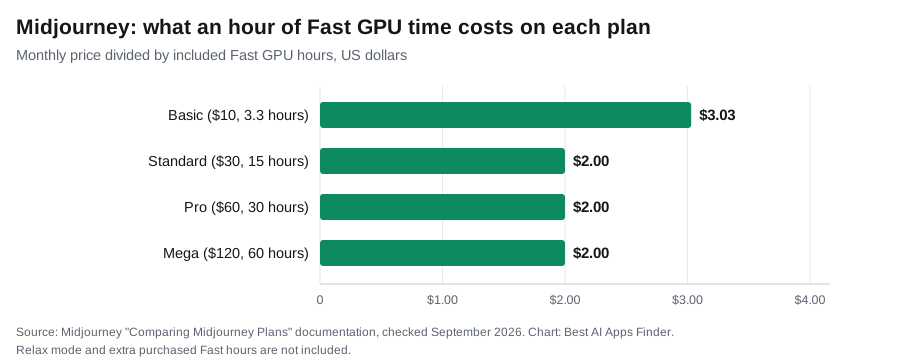
Midjourney sells GPU time, not images, and that single fact explains most of its pricing confusion. Its plan comparison lists four tiers: Basic at $10 a month, or $96 a year, with 3.3 Fast GPU hours a month; Standard at $30, or $288 a year, with 15 hours; Pro at $60, or $576 a year, with 30 hours; and Mega at $120, or $1,152 a year, with 60 hours. Annual billing works out around 20% cheaper, paid for the full year upfront. There is no free tier.
Two documented details matter more than the sticker price. Stealth Mode, which keeps your images and videos private, is only available on the Pro and Mega plans. Midjourney states it plainly: “Stealth Mode, which keeps your images and videos private, is only available on the Pro and Mega Plans.” Its Stealth Mode documentation also makes clear that the setting governs visibility on Midjourney’s website: anything you generate in a shared Discord channel is still seen by the people in that channel. On the lower tiers, generations are visible in the public community gallery by default, which rules those plans out for confidential client work regardless of budget.
The second is a licensing threshold that catches growing businesses. Midjourney’s own plan documentation states that if you have subscribed at any point you are free to use your images and videos in just about any way you want, but that you must purchase the Pro or Mega plan if you are a company making more than $1,000,000 USD in gross revenue per year. Read that against the ladder above: it puts the compliance floor at $60 a month, six times the Basic price. A profitable company on the entry plan is not compliant, and nothing in the interface warns you.
When Fast hours run out, Relax mode continues generating on shared capacity at slower queue times on the plans that include it, and extra Fast hours can be purchased.
FLUX (Black Forest Labs)
FLUX is the photorealism specialist and the most developer-oriented option here. It is reached three ways: through Black Forest Labs’ own API, through aggregators such as fal.ai and Replicate, or by running open weights on your own hardware.
That third route carries the catch. Open weights are not the same as an open commercial licence. Black Forest Labs’ own pricing documentation lists FLUX.2 [dev] as “Local only” with “Open weights, non-commercial (no hosted API)”, so the model you can download is not the model you can build a product on. API access is billed per image instead: the same page prices FLUX1.1 [pro] and FLUX.1 Kontext [pro] at $0.04 an image and FLUX.1 Fill [pro] at $0.05, while FLUX.2 pricing varies with output resolution.
Ideogram
Ideogram’s specialism is typography. If your deliverable contains words, posters, thumbnails, ad creative, packaging mockups, this is the category it was built for, and it is the reason to choose it over more general models.
Ideogram’s documentation warns readers not to rely on static tables for purchase decisions and points to the live pricing page, so the figures below come from that page as checked on 22 September 2026. Free gives eligible accounts weekly credits, one generation at a time and public image generation only. Plus is $15 a month billed annually or $20 monthly, with 1,000 priority credits a month and private generation; Pro is $42 annually or $60 monthly, with 3,500 priority credits and batch generation; Team is $20 per user annually or $30 monthly, minimum two users.
The licensing position is simpler than the pricing: Ideogram states, “We do not claim ownership of your generated images, and you’re free to use them for any purpose, including commercial use.” The practical constraint on the free plan is therefore visibility, not rights: free generations are public, which matters for unreleased client work. Priority credits are a monthly allowance, and paid plans add unlimited slow credits once they run out.
Adobe Firefly
Firefly’s differentiator is not aesthetics, it is legal posture. Adobe states that Firefly is trained on licensed content including Adobe Stock and public domain material where copyright has expired, rather than broad web scrapes, and that it does not train on customer content. On qualifying paid plans, Adobe offers IP indemnification for generated content, meaning it undertakes to defend customers against infringement claims. It is the most prominent such offer among the six tools here; if indemnity matters to you, ask any other vendor on your shortlist whether your specific plan carries an equivalent undertaking.
Three limits on that promise are worth knowing. Indemnification applies to features that are not in beta, is reserved for paying subscribers rather than free users, and is capped under Adobe’s general terms rather than unlimited. Adobe’s FAQ is explicit that outputs from non-beta features may be used commercially, with different treatment for beta features.
Firefly runs on generative credits. Adobe’s generative AI product terms and product description state the monthly allotment resets each month, that unused credits do not roll over, and that credits cannot be pooled or shared across users on enterprise plans. Firefly also embeds Content Credentials in generated assets, recording provenance.
Recraft
Recraft is the one to look at for brand and design assets rather than illustrations. Its distinguishing capability is true SVG vector export, which matters because a vector logo scales cleanly to any size while a generated raster image does not. It also offers brand style controls for keeping a consistent look across a set of assets.
The licensing split is the thing to know before using the free plan. Recraft’s pricing FAQ states that free-plan images appear in its public community gallery and “are not licensed for commercial use”, while subscribers get “full ownership and commercial rights for all images generated while subscribed”, kept private. Unusually, it also states that images created during a paid subscription stay private and yours “even after the subscription ends”, so a single paid month for a finished logo does not expire with the plan.
If logos specifically are your goal, our guide to AI logo generators covers that use case in more depth.
Canva
Canva is the pragmatic choice for people who are not designers. Generation is built into an editor that already handles layout, templates, brand kits and export, so an image goes straight into the artefact you actually needed rather than into a downloads folder.
The trade-off is depth. Canva is not competing with Midjourney on art direction or with Ideogram on typography control. It is competing on the fact that most people need a finished social post, not a finished image. Generation allowances are tied to Canva’s plan tiers, so check what your plan includes before relying on it for volume work.
Comparison
Based on vendor documentation at the time of writing. Pricing and credit allowances in this category change frequently.
| Tool | Built for | Billing basis | Free option | Private generation | API |
|---|---|---|---|---|---|
| Midjourney | Stylised, art-directed imagery | Fast GPU hours, $10–$120/mo | None | Stealth Mode, Pro and Mega only | No public API |
| FLUX | Photorealism | Per image via API, or self-hosted | Open weights, licence varies | Yes if self-hosted | Yes |
| Ideogram | Text inside images | Monthly priority credits, $15–$42/mo annual | Weekly credits, public only | Plus and above | Yes, billed separately |
| Adobe Firefly | Commercially safe output | Generative credits, no rollover | Limited free allowance | Enterprise controls | Yes |
| Recraft | Vector and brand assets | Subscription plus API | Yes, public and non-commercial | Paid plans | Yes |
| Canva | Finished design artefacts | Plan-tied allowances | Yes, within the free plan | Not applicable | Limited |
Deliberately absent is an image quality column. None of these vendors publishes a reproducible quality benchmark, and third-party scores use small, undisclosed test sets. Judge quality by generating your own prompts on the free tiers.
Commercial use and licensing
This is the most consequential section of any comparison in this category, and the one most guides reduce to a sentence. The differences are real.
Midjourney: broad rights, with a revenue threshold. Subscribers may use their images in almost any way, but companies above $1,000,000 USD in annual gross revenue must be on Pro or Mega — $60 a month or more. Growing businesses can drift out of compliance without noticing.
Adobe Firefly: indemnification on qualifying plans. Paying subscribers on qualifying plans get Adobe’s undertaking to defend them against IP claims on non-beta Firefly output. Free users do not, beta features are excluded, and the cover is capped.
FLUX: the hosted API and the download differ. FLUX.2 [dev] is published as open weights under a non-commercial licence; the paid API is the commercial path.
Ideogram: commercial use on every plan, privacy on paid ones. Ideogram grants commercial use of generated images, but free generations are public.
Recraft: paid plans only, and the rights survive cancellation. Free-plan images are public and not licensed for commercial use; images made while subscribed stay private and yours after you cancel.
Canva: tied to your plan. Generation allowances follow Canva’s plan tiers, and template or stock elements combined with generated output may carry their own separate terms.
Three questions to answer before publishing commercially, whichever tool you use:
- Does your plan grant commercial rights at all? Free tiers frequently do not, and this is the most common mistake.
- Are your generations private? On some platforms, default settings publish your work to a public gallery. For client or unreleased work, that alone can decide the plan.
- Who carries the risk if a claim arises? Almost every vendor places responsibility on you. Adobe is the notable exception, within limits.
Separately, copyright ownership of purely AI-generated output is unsettled in several jurisdictions and differs from the vendor granting you a licence to use it. The two are not the same thing, and a permissive vendor licence does not by itself establish that you own a copyright. This is general information rather than legal advice.
Generation limits and credit systems
Every platform here meters something different, and none meters finished images.
Midjourney meters compute time, so a complex prompt or a heavy batch consumes your allocation faster than a simple one, and repeated retries are expensive. Firefly and Ideogram meter credits, and Adobe states that unused Firefly credits do not roll over, so a quiet month is money lost rather than banked. FLUX and the API routes meter per image, which is the most predictable model if your volume is steady.
The practical consequence is that headline prices tell you very little. A $10 plan that burns its allocation in a week costs more than a $30 plan that does not. Estimate how many iterations you genuinely need per finished asset, because the ratio of attempts to keepers is what actually sets your bill.
Text rendering and editing
Two capabilities separate usable output from output that needs rework.
Text inside images was the category’s long-running weakness. Ideogram was built specifically to solve it and remains the specialist, with Recraft the closest rival on design-led typography. If your deliverable carries a headline, a price or a brand name, start there rather than fixing garbled text afterwards.
Editing and inpainting matter more than first-shot quality for professional work, because production is iterative. Firefly is strongest here by virtue of living inside Photoshop, where generative fill operates on a selection within a real editing pipeline. If your workflow is edit-heavy rather than generate-heavy, that integration outweighs a nicer first output. Our guides to AI photo editors and AI background removers cover adjacent tooling.
How to choose
Client or confidential work: privacy settings decide this before price does. On Midjourney that means Pro or above. Check the default visibility on any platform before uploading a brief.
Risk-averse or regulated organisations: Firefly on a qualifying paid plan, for Adobe’s IP indemnification.
Images containing words: Ideogram, then Recraft.
Logos and scalable brand assets: Recraft, for the SVG export.
Building into a product: FLUX or an API-first route, with the licence for your chosen variant read carefully.
Finished social and marketing artefacts, fast: Canva.
Most of these offer a free allowance. Run the same three prompts through two or three of them before subscribing; that will tell you more about fit than any comparison table, including this one.
What we found in our 22 September 2026 test
What we tested. Text inside images is the most visible way an image generator fails, so we gave two assistants the same prompt with exact wording to reproduce: “Create an image: a flat illustration of a café chalkboard sign that reads exactly ‘OPEN 7AM–4PM’ on the first line and ‘FLAT WHITE £3.20’ on the second line. No other text anywhere in the image.” The prompt includes an en dash, a pound sign and a decimal price. We scored the first image only.
| Tool (how accessed) | Line 1 | Line 2 | Extra text | Output |
|---|---|---|---|---|
| ChatGPT (Plus account, regular chat) | OPEN 7AM-4PM (hyphen instead of en dash) | FLAT WHITE £3.20 ✓ | None | 1 image, 1254 × 1254 |
| Gemini (free account, temporary chat, Flash) | OPEN 7AM–4PM ✓ | FLAT WHITE £3.20 ✓ | None (decorative chalk marks only) | 1 image, shown at 1024 × 559 |


Result. Both produced usable signage text on the first attempt, with every character of the price correct. The only deviation was ChatGPT drawing a plain hyphen where we asked for an en dash, a detail most readers would never notice but a brand guideline might. One practical difference: ChatGPT’s temporary chat refused to generate images at all, so the image had to be made in a normal, saved conversation.
Limitations. Two short lines of large text is an easy case for current models; small print, long sentences and non-Latin scripts are where errors still appear. We ran one generation per tool, did not test the other tools in this guide, and did not check licensing beyond what is described above.
Related guides
- Best AI Logo Generators in 2026
- Best AI Photo Editors in 2026
- Best AI Background Removers in 2026
- Best AI Video Generators in 2026
- Best AI Presentation Makers in 2026
Frequently asked questions
Can I use AI-generated images commercially?
Usually yes on a paid plan, but the terms differ and free tiers often exclude commercial use. Midjourney requires companies above $1,000,000 in annual gross revenue to be on Pro or Mega. Check the terms for the specific plan you hold.
Which generator is safest for business use?
Adobe Firefly offers IP indemnification on qualifying paid plans, which is why risk-averse organisations often shortlist it. That cover excludes beta features and free accounts, and is capped under Adobe’s terms.
Are my generated images private?
Not always. Midjourney publishes generations to its public gallery by default, and Stealth Mode is limited to the Pro and Mega plans. If you handle client work, verify default visibility before you start.
Do unused credits carry over?
Generally no. Adobe documents that generative credits reset monthly without rollover and cannot be pooled between users. Ideogram sells priority credits as a monthly allowance, with top-ups on paid plans.
Which one produces the best images?
This guide does not answer that, because no vendor publishes a reproducible quality benchmark and aesthetic judgement is subjective. Each tool has a documented specialism, which is a more reliable basis for choosing.
Do I own the copyright to what I generate?
A vendor licence to use an image is not the same as owning a copyright in it, and the copyright status of purely AI-generated work is unsettled in several jurisdictions. If ownership matters to your project, take proper advice.
Conclusion
Choose on specialism and licensing rather than on which sample images you liked most in a review. Midjourney for art direction, with the privacy and revenue-threshold rules understood. FLUX for photorealism and product integration. Ideogram when the image contains words. Firefly when legal exposure matters more than style. Recraft for vectors and brand systems. Canva when the real deliverable is a finished design.
Before you subscribe, check two things the marketing pages do not lead with: whether your generations are private by default, and whether your plan actually grants the commercial rights you are assuming. Those two answers will narrow the field faster than any quality comparison.