Every CRM now markets itself as AI-powered. Almost none of them is an AI CRM. They are established customer relationship platforms with an AI layer added on top, and the question that decides your bill is not which AI is better but how that layer is billed on top of the seat price.
The gap is large. Pipedrive puts AI on every plan including its $14 seat, with no add-on fee. Salesforce charges $195 a seat for its Core edition, then sells the Agentforce add-on at $125 per user per month, then meters actions on top of that. Same category, entirely different economics.
This guide compares six platforms grouped by how they charge for AI. Every figure below is linked to the vendor pricing page it comes from. Where a vendor does not publish something — and in this category several do not — that is stated rather than estimated.
The agent tax
Four billing models are in use, and they are not comparable on a headline price.
Bundled into the seat. The AI is included at a given tier with no separate meter. Zoho and Pipedrive work this way. Predictable, and the reason both appear cheap at scale.
Metered by credit or outcome. The assistant may be free, but agents that complete work bill against a credit allowance. HubSpot and Salesforce both work this way, with different units.
Charged per session. A fixed price per block of AI interactions, bought separately from the seat. Freshsales works this way.
Bundled into a broader suite. The AI arrives with a wider licence you may already hold, or as a further add-on to it. Microsoft works this way, and it is the most layered of the four.
One finding worth carrying into any negotiation, from reading all six pricing pages for this guide: only three of the six publish an overflow rule — anything stating what happens when the AI allowance runs out. HubSpot documents pay-as-you-go billing beyond the monthly limit plus spending caps that pause features, Microsoft documents pay-as-you-go Copilot Credits, and Freshworks sells further AI Agent sessions at a published $49 per 100. Zoho, Pipedrive, Salesforce and Freshsales publish nothing on the point that we could find. That is the single largest forecasting risk in the category, and it is worth asking about in writing before signing.
AI bundled into the seat
1. Zoho CRM
Zoho bundles rather than meters, and the reason is structural rather than technical: AI is included in the tier rather than sold separately. Its pricing page runs Free (forever, three users), Standard, Professional and Enterprise, placing AI agents that “execute tasks on your behalf” at Professional and Zia’s insights, predictions and recommendations at Enterprise. Zoho prices in local currency rather than a single global rate, so read the figure for your region at the source rather than trusting a converted number.
Zia covers predictive lead scoring, sales forecasting, anomaly detection and best-time-to-contact predictions. Anomaly detection is the genuinely uncommon one: it watches for unusual patterns in conversion rates, deal values or pipeline velocity and surfaces them as early warnings, which is useful to a manager overseeing a large team who cannot review every metric manually.
Zoho also allows connecting an external model rather than only its own, which is unusual in this group. The trade-off reported consistently is interface density and a steeper learning curve than simpler pipeline tools.
Suits: growing businesses that want the full feature stack, including AI, without add-on billing.
2. Pipedrive
Pipedrive is the flat-bill option. Its AI sales assistant ranks deals by close probability, suggests next actions and drafts emails, and it is distributed across the seat tiers rather than sold as a separate agent product. There is no agent tax.
Its published ladder is Lite at $14 a seat a month, Growth at $39, Premium at $59 and Ultimate at $79, and every one of the four now carries a “Now with AI” label — the AI is not reserved for the upper tiers. Add-ons exist for campaigns, web visitor tracking and lead capture, which is where the real total drifts upward.
What Pipedrive does not do is marketing automation or service ticketing. It assumes you sell through a pipeline and builds everything around that assumption.
Suits: sales teams that want a forecastable monthly bill and do not need marketing or support modules.
AI metered by credits or outcomes
3. HubSpot
A naming change first. HubSpot’s AI layer is now presented as Agent Hub, described on its own site as the central home for building and managing AI agents. Guides still describing Breeze as the current product name are out of date, though the underlying lineage is the same.
The billing structure is the most buyer-friendly of the metered group, and it is the most clearly documented. HubSpot publishes the unit price: “HubSpot Credits cost $0.010 USD per credit”, sold in packs of 1,000 for $10, with an included monthly allowance that varies by plan. Named agents bill per completed action rather than per seat — the customer agent consumes 50 credits, or 50 cents, when it resolves a conversation on its own.
It is also one of only three platforms here that states what happens at the ceiling: beyond your monthly allowance you are charged per credit on pay-as-you-go, and you can set a spending cap that automatically pauses the features when it is reached. That combination — a published unit price, per-outcome billing and a hard cap you control — is the most forecastable arrangement in this comparison.
Per-outcome billing also means an idle agent costs nothing, which is a real difference from a per-seat AI licence you pay for whether or not anyone uses it. The recurring structural complaint about HubSpot is not the AI but the Hub packaging: Sales, Marketing and Service are sold separately, and teams frequently pay for overlapping features across Hubs.
Suits: teams that want AI billed only when it does work, and can navigate the Hub packaging.
4. Salesforce
Salesforce is the deepest platform here and the most expensive by a wide margin, with the layering worth setting out explicitly.
Start with the seat, because the edition names have changed and most comparison guides have not caught up. Salesforce’s current Sales Cloud pricing page lists Free Suite at $0, Starter Suite at $25, Pro Suite at $100, Core at $195, Advanced at $395 and Max at $550 per user per month. The Enterprise and Unlimited editions that older comparisons quote at $165 or $175 and $330 or $350 are no longer what the page shows. Each edition also carries an annual org-level Flex Credit allocation: 500,000 for Core, 1 million for Advanced, 2.75 million for Max.
On top of the seat sits the agent layer, and Salesforce publishes the rates. The Agentforce add-on for Sales, Service and Field Service is $125 per user per month with unmetered employee agent usage; an Agentforce User Licence is $5 per user per month but requires buying Flex Credits; Agentforce 1 editions start at $550 per user per month including 2.5 million annual credits.
The consumption maths is worth doing once, because Salesforce quotes it in credits rather than dollars. Flex Credits are $500 per 100,000, which makes one credit half a cent. A standard action costs 20 credits and a voice action 30 — so 10 cents and 15 cents respectively. Customer-facing conversations are billed separately at $2 each.
What the money buys is genuine: the deepest agent framework, the largest ecosystem, and enterprise governance nothing else here matches. What it demands is scale to justify it.
Suits: enterprises with complex processes, dedicated administrators and budget for consumption pricing.
AI charged per session
5. Freshsales
Freshsales positions itself as the affordable AI-forward option, and its free tier is real rather than a trial: Freshworks’ free CRM page describes it as “Free for up to three users”. Note that the main pricing page now leads with the paid plans and a 21-day trial, so look for the free plan specifically when you sign up. Its paid ladder is Growth at $9 per user per month billed annually, Pro at $39 and Enterprise at $59 — the cheapest paid entry in this comparison by a wide margin.
The important detail is that Freddy AI is not one product. Contact scoring and deal insights come with the Pro plan and above, not with Growth. The Freddy AI Agent is a separate add-on, priced on the same page at $49 per 100 sessions. Freshworks does not publish a Copilot rate on its CRM pricing page, and the figures circulating elsewhere disagree with each other, so this guide does not print one — establish which component you are buying before you sign.
The practical warning: “AI-powered” on the marketing page does not mean every AI feature ships with your tier. Read the plan comparison carefully.
Suits: smaller teams wanting a genuine free tier and session-based AI they can switch on selectively.
AI bundled into a broader suite
6. Microsoft Dynamics 365
Dynamics is the most layered pricing in this guide, and the layers compound.
Microsoft’s Dynamics 365 Sales pricing page lists Sales Professional at $65, Sales Enterprise at $105 and Sales Premium at $150 per user per month paid yearly, with Microsoft Relationship Sales priced variably. It states that 1,000 Copilot Credits are included with Sales Premium per user per month, that additional credits are available on pay-as-you-go with no upfront commitment, that pre-purchased Commit Units save up to 20%, and that an Azure subscription is required to use agents.
Above that sits Microsoft 365 Copilot, priced at $30 per user per month paid yearly, or $31.50 monthly on an annual commitment, and requiring a qualifying Microsoft 365 subscription of its own. Microsoft does not publish a standalone Copilot for Sales rate on that page, so this guide does not quote one.
The honest summary is that the total depends on which combination you hold, and it is difficult to state a single per-seat figure. If your organisation already runs Microsoft 365 the marginal cost is far lower than the list prices suggest; if it does not, this is the most expensive route on the page.
Suits: organisations already committed to Microsoft, where CRM, ERP and productivity share one licence estate.
Comparison
Every figure below comes from the vendor’s own published pricing page, linked in the sections above. Where a vendor does not publish a rule, the table says so rather than estimating it.
| Platform | Seat pricing | AI billing model | Bundled or add-on | Published limits | Overflow rule |
|---|---|---|---|---|---|
| Zoho CRM | Local currency; Free for 3 users | Included in tier | Bundled | Agents at Professional, Zia at Enterprise | Not published |
| Pipedrive | $14 / $39 / $59 / $79 per seat | Included in tier | Bundled on all four plans | Tier-based | Not published |
| HubSpot | Free CRM tier available | Per completed action; $0.010/credit | Agents metered by credit | Included allowance varies by plan | Pay-as-you-go + spending cap |
| Salesforce | $195 Core, $395 Advanced, $550 Max | Per action and per conversation | Add-on $125/user | $500 per 100k credits; 20/action | Not published |
| Freshsales | Free to 3 users; $9 / $39 / $59 | Per session | Add-on, $49 per 100 sessions | Session blocks | Buy further sessions at $49 per 100 |
| Dynamics 365 | $65 / $105 / $150 per user, yearly | Copilot Credits | 1,000 credits with Premium | 1,000 credits per Premium licence | Pay-as-you-go or Commit Units |
There is no AI quality column. No vendor publishes a reproducible measure of AI accuracy in a CRM context, and in a category where platforms increasingly build on general-purpose frontier models, the differentiator is rarely the model — it is the data the model can read and what it costs to run.
What it costs at 10 and 50 seats
Seat costs can be calculated. AI consumption largely cannot, and it is worth being clear about which is which.
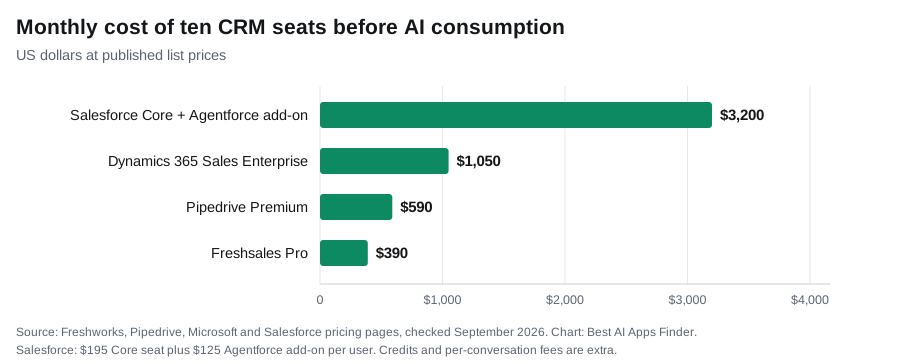
At 10 seats, using the published list prices above: Pipedrive Premium at $59 lands at $590 a month with AI included. Freshsales Pro at $39 lands at $390, again with AI in the tier. Salesforce Core at $195 lands at $1,950 before the Agentforce add-on, which adds $1,250 at $125 per user, before a single credit is consumed. Dynamics Sales Enterprise at $105 lands at $1,050; Microsoft lists some Copilot capabilities, such as summaries and email and meeting assistance, as already included in Enterprise, with the 1,000 Copilot Credits arriving only at Premium.
At 50 seats, the same figures scale to $2,950 for Pipedrive, $1,950 for Freshsales, $9,750 for Salesforce seats plus $6,250 for Agentforce licences, and $5,250 for Dynamics before Copilot. The spread between the cheapest and most expensive AI-included seat in this comparison is roughly eightfold before consumption enters the picture at all.
What cannot be calculated: the consumption layer. Salesforce Flex Credits at 10 cents an action, HubSpot credits at $0.010 each, and Dynamics Copilot Credits beyond the included 1,000 all depend entirely on how many actions your team triggers per month, and no vendor publishes a typical figure. Any guide presenting a total AI bill without stating an assumed workload has invented it. The only reliable approach is to run a pilot, measure actual consumption, then extrapolate.
Note also that HubSpot and Freshsales both offer free CRM tiers, so a small team’s floor in this category can genuinely be zero.
What CRM AI actually does
Marketing claims outpace practical value here, so it is worth separating them.
Activity capture is the feature that changes a day. Anything that updates the CRM without manual entry — logging emails, calls and meetings automatically — addresses the actual reason sales teams under-use CRMs, which is that data entry is tedious. Every other AI feature here assumes the record is already populated; this one is what populates it.
Lead scoring depends on your data, not the model. Predictive scoring works when it sits on years of pipeline history showing which deals closed and which did not. On a new CRM with thin history, it is guessing. That is why the same feature performs differently for two companies on identical software.
Drafting and summarising is genuinely useful and genuinely commoditised. Every platform here offers email drafting and record summaries in some form. It is not a differentiator.
Agentic workflows are the new claim. The pitch has moved from suggesting an email to qualifying a lead, writing outreach and updating the pipeline autonomously. Treat published capability as capability, not as a result, and pilot before committing to consumption pricing.
How to choose
Start with the billing model, not the feature list. Bundled AI gives a predictable bill; metered AI gives lower entry cost and variable spend.
Small team, tight budget: HubSpot or Freshsales free tiers cost nothing to start and both are real plans rather than trials.
Growing business wanting AI without add-ons: Zoho bundles it into the tier, with agents from Professional and Zia’s predictive layer at Enterprise.
Pipeline-focused sales team: Pipedrive, for the flat bill and the absence of an agent tax.
Already inside Microsoft 365: Dynamics, where the marginal cost is far lower than list pricing implies.
Enterprise with dedicated admins: Salesforce, budgeting for the seat, the Agentforce licence and consumption as three separate lines.
Whatever you shortlist, ask two questions in writing before signing: what is included at my tier, and what happens when AI credits run out. Most vendors do not publish the second.
Related guides
- Best AI Lead Generation Tools in 2026
- Best AI Marketing Automation Tools in 2026
- Best AI Customer Support Tools in 2026
- Best AI Meeting Assistants in 2026
- Best AI Workflow Automation Tools in 2026
- Best AI Email Assistants in 2026
Frequently asked questions
Is AI included in the CRM price?
It depends on the platform. Zoho and Pipedrive bundle AI into seat tiers, and Pipedrive now carries it on all four plans including the $14 one. HubSpot meters named agents by completed action at $0.010 a credit. Salesforce sells the Agentforce add-on at $125 per user per month before any consumption. Freshsales sells AI Agent sessions separately at $49 per 100.
Which AI CRM is cheapest for a small team?
HubSpot, Freshsales and Zoho all offer genuine free tiers — Freshsales for up to three users, Zoho for three, HubSpot with unlimited users on basic CRM — so the floor can be zero. Among paid options with AI included, Pipedrive at $14 a seat, with AI on every plan, is the most predictable; on Freshsales, contact scoring and deal insights start at Pro, $39 a seat.
What happens if I run out of AI credits?
Frequently unstated. Of the six platforms in this guide, only three publish the answer: HubSpot documents pay-as-you-go billing beyond your monthly allowance plus a spending cap that pauses the features, Microsoft documents pay-as-you-go Copilot Credits, and Freshsales sells additional AI Agent sessions at $49 per 100. Zoho, Pipedrive and Salesforce publish nothing we could find. Ask in writing before signing.
What was HubSpot Breeze?
Breeze was HubSpot’s earlier name for the AI layer now presented as Agent Hub, its central home for building and managing AI agents. The agents bill per completed action against HubSpot Credits, priced at $0.010 each.
Which AI feature is actually worth having?
Automatic activity capture — anything that updates the CRM without manual entry. It is the one feature that removes work rather than adding a suggestion. Predictive lead scoring, by contrast, depends heavily on how much pipeline history the system already holds, which is why the same feature performs differently for two companies on identical software.
Conclusion
These are general CRM platforms with AI layered on, and the layer is where the cost differences live. Zoho and Pipedrive bundle it into the seat, which makes the bill predictable. HubSpot meters by completed action at a published $0.010 a credit, so idle AI costs nothing and a spending cap can stop it entirely. Salesforce charges for the seat at $195 and up, the agent licence at $125, and the consumption separately at 10 cents an action and $2 a conversation. Freshsales sells sessions at $49 per hundred. Microsoft bundles into a licence estate you may already hold.
Calculate the seat cost, then pilot before committing to anything consumption-based, because no vendor publishes a typical usage figure and half of these six publish no overflow rule at all. On features, the one that reliably changes a working day is automatic activity capture; the rest is worth testing against your own pipeline before it is worth paying for.